

GHG scopes
EnerG organizes emissions by the greenhouse gas scopes your portfolio tracks.
Scope 1 combines stationary combustion with fleet emissions and fugitive emissions.
EnerG focuses on building and portfolio utilities. It does not cover every possible Scope 3 category, such as purchased goods, business travel, or investments. Your reporting boundaries and disclosure choices remain your responsibility.
Location-based and market-based Scope 2
EnerG reports Scope 2 emissions two ways. These totals are never mixed into one number.
Report either or both when your program requires it. Market-based totals fall as you allocate renewable instruments. Location-based totals track the grid.
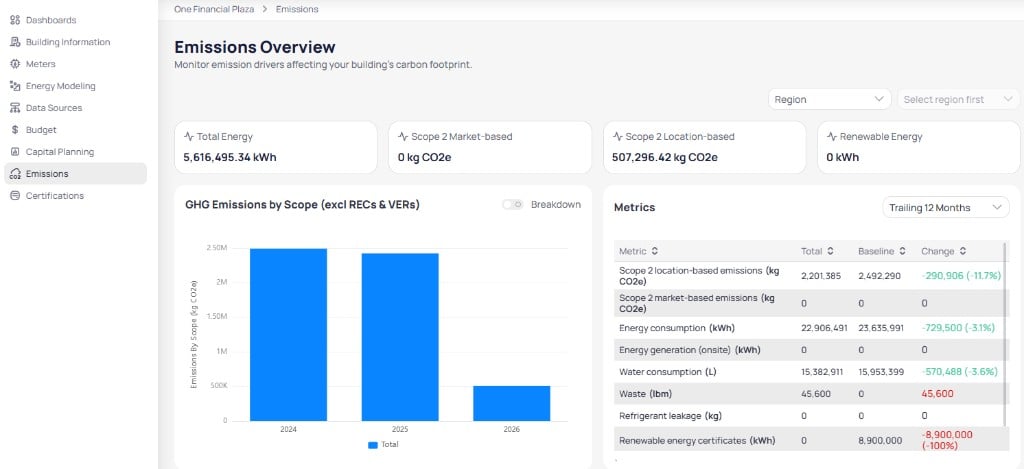
Building emissions overview with Scope 2 market-based and location-based cards
RECs and covered load
A represents renewable generation you can allocate to buildings and retire against emissions. For market-based electricity, EnerG splits use into:- Covered — matched to your renewable contract or certificates (often zero emissions per kWh)
- Uncovered — the remainder, which still uses a grid or residual-mix factor
You record instruments as volume contracts, then allocate and retire volume by reporting year.
- Residual emissions are emissions before offsets.
- REC avoided reductions come from retired certificates.
- Onsite avoided reductions come from on-site generation such as solar.
Emission factors
An emission factor converts activity into carbon: Emissions = Usage × Emission factor. Each factor carries a methodology, GHG scope, service type, and geography or grid. Only active factors apply to reports. Manage them in the emission factors library.Where default factors come from
EnerG starts with published datasets from recognized authorities. Your organization can keep these defaults or set custom factors.
Factors are versioned by year so historical reports stay aligned with the standards for that period.
Which factor applies
When EnerG calculates emissions for a reading, it picks a factor in this order:- Building-specific factor — assigned for that building and utility type
- Portfolio default — your organization standard for all sites
- System default — the official library for that region and year
Compliance-oriented exports
EnerG produces structured exports through Report Builder for consumption, cost, GHG, and completeness. Use those outputs as the system of record for disclosure prep. EnerG does not complete third-party sustainability filings end to end. You export metrics from EnerG, then finish entry and submission in your disclosure tools.Next steps
Portfolio emissions overview
Review scope totals, offsets, and the metrics table.
Emission factors library
Manage factors that drive carbon calculations.
Volume contracts
Create, allocate, and retire REC volume.
Emissions reference
Look up scope columns, factor sources, and record fields.