

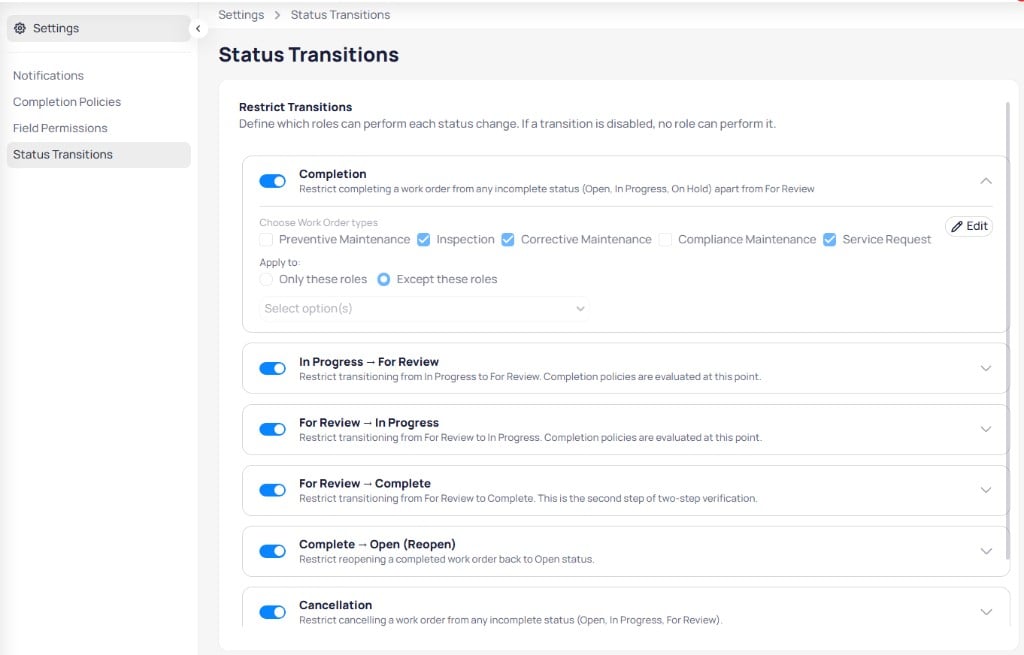
Restrict status transitions by work order type and role
Restrict transitions
Each rule includes a toggle, description, and expandable configuration. Select Edit to choose work order types and roles.Transition rules
Configure a rule
When you expand a rule:- Enable the toggle to activate the restriction.
- Under Choose work order types, select programs such as inspection, corrective maintenance, or service request.
- Under Apply to, choose Only these roles or Except these roles.
- Select roles in the dropdown.
- Select Edit to save.
Completion policies run when work orders move to For review or Complete. Align completion policies with status transition rules.