

Filter types
Standard filters apply to one chart in the Chart ParametersSetup tab.
Cross filters, slicers, page filters, and dashboard filters can affect many widgets. Use Edit Scope to control which widgets a cross filter or slicer impacts. Configure page and dashboard filters in the Filter panel.
A metric filter is an alternative to a standard filter. It keeps rows based on an aggregation such as Sum, Count, or Max.
Bar, Line, Pie, Time Series, and Table charts also support a Top N filter. Top N limits the chart to the top or bottom N values in a column. Use it mainly for focus and styling.
Operators by data type
The filter UI adapts to the data type of the selected column.String
Starts with · Doesn't Start with · Ends with · Contains · Doesn't Contain · Equals · Not Equal · In · Not in · Is null · Is not null · Is blank · Is not blank
The null and blank operators take no value. The value input is hidden and null is sent to the backend.
Numeric
Greater Than · Greater than or equals · Less than · Less than or equals · Between · Not between · Equals · Not equal · In · Not in · Is not a number
Not between treats both bounds as exclusive. Is not a number takes no value.
Boolean
True · False · Is null · Is not null
Date and time
Date and time filters offer these time-range types:
Granularity options for Specific Range with Granularity:
- Date columns: Year, Year-Quarter, Year-Month, Year-Week, Quarter, Month, Week, Day of Year, Day of Month, Day of Week.
- DateTime columns: all of the above plus Date, Date-Hour, Date-Half-Hour, Date-Hour-15min, Date-Hour-Minute, Hour, Minute.
Always check the actual time range shown at the bottom of the date-time filter configuration. That readout is the resolved range the query uses.
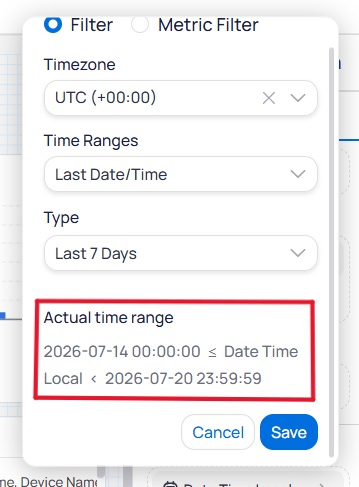
Actual time range readout in the date-time filter
Metric filters
A metric filter keeps rows based on an aggregation of a column, not the raw column values. For example, keep devices where the count of alarms is greater than 10. Configure a metric filter in this order:- Choose an aggregation, such as
Count,Count Distinct,Sum,Min,Max, orAverage. - Set the
Show Value Whenoperator and value.
Show Value When uses the same operators as a Numeric filter, including Equals, In, Greater Than, and Is not a number.
For String columns, the available aggregations are Count and Count Distinct only.
If you select a metric column instead of a raw column, Building BI skips the aggregation step. You configure only Show Value When and the operator.
Top N filters
A standard visual set to show many items with scrolling can work better than a hard Top N. Viewers can still reach lower-ranked data without changing the filter. Label Top N cuts so viewers know data is hidden. Prefer Top N for glance-only displays; prefer scrolling (for example top 20 with a scrollbar) for interactive ops dashboards.
Interaction widgets and behaviors
Multi-widget filter matching
Slicers and other multi-widget filters work across different data sources when the underlying database column names match exactly. Display names do not matter. For example, filtering ondevice_name in a Real-Time data source updates a Last Value widget when that source also uses the exact device_name column. Prefer ID columns such as device_id when names can change. See Column reference.
Filter interdependence
Filters applied to a dataset restrict the options available in other filters. If a value is missing from a dropdown, current filter combinations have likely excluded it.If a target option is missing, remove other filters to expose the full dataset. You can also bypass the dropdown with a
Contains filter and type the expected value.Filter scope hierarchy
Which filter types can affect others, and which they can exclude from scope:
A filter can only exclude (scope out) filters at or below its own level. New widgets are affected by existing filters by default, so re-check exclusions as a dashboard grows.
Use scopes when one widget must stay as an unfiltered reference (for example, a portfolio benchmark card) while a slicer updates the rest of the page. Excluded widgets also skip re-query when that filter changes.
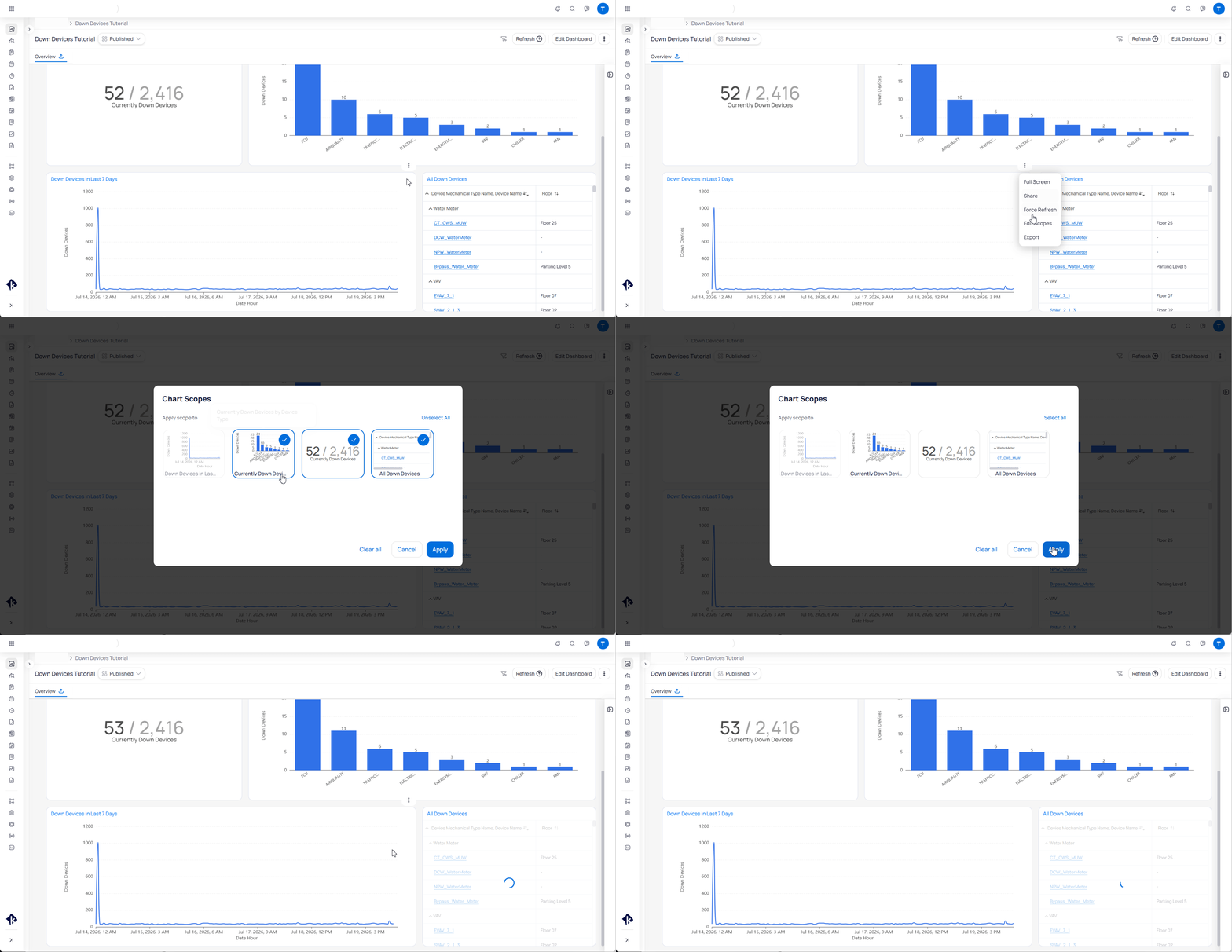
Edit Scope mapping for a filter
Slicer filters
A slicer holds one filter. The operator is fixed by the column data type:- String →
In(single or multi-select) - Boolean →
Equals(single select) - Number →
Between(min/max slider) - Date/Time → Current, Previous, Last, or Specific
slicerFilters. Dashboard, page, and cross filters can affect slicers. Slicers cannot be metric filters.
Next steps
How filtering works
Understand how filters combine into one query and why dropdown options can disappear.
Drill-through filters
Jump from a summary chart to a detail view that opens already filtered.
Slicer widget
Configure the on-canvas filter control for a single column.
Dashboard filters
Set dashboard and page filters in the Filter panel.