

Virtual sources are flexible and editable, but they compute on demand. Use virtual tables where on-demand computation helps, especially real-time reshaping.
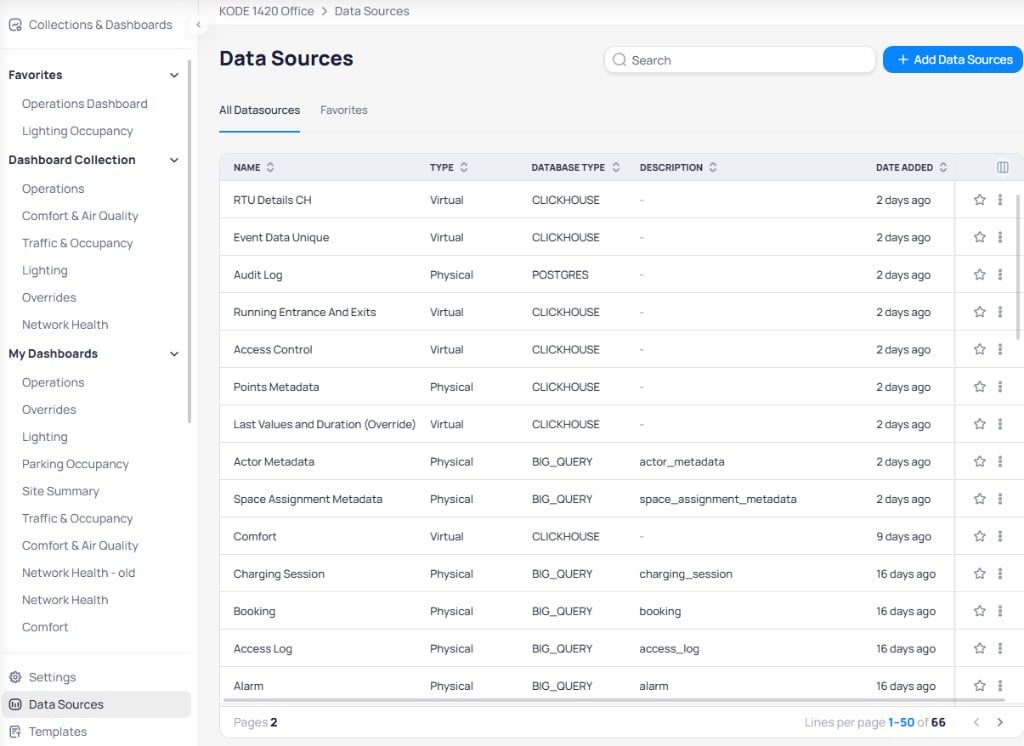
Data Sources list with Physical and Virtual types
Physical tables store rows; virtual tables compute them
- A physical source is a materialized table. The rows already exist. They are direct pulls from the KODE backend. Point Time Series Real-Time is the canonical example: every reading is a stored row.
- A virtual source is a view: a SQL expression that runs against one or more physical tables when queried. Nothing is stored; the rows are derived each time. Point Time Series Last Value is a virtual view that returns the most recent reading per sensor. See Key data sources.
Choose physical or virtual
When you hit a calculated column or metric ceiling — for example, no window functions or aggregations of aggregations — put that logic in a virtual table SQL view. See Calculated fields and Database types.
- Virtual tables are quick to create and edit, but they recompute every time and can become slow on large datasets.
- Editing a virtual source’s SQL is organization-wide. It affects every dashboard in your organization that uses it. It does not change other organizations. Validate before saving.
- Virtual tables can be built on ClickHouse and PostgreSQL, but not BigQuery.
- A “Not Optimized” status on a virtual source is a common hidden cause of slow dashboards. See Dashboard performance.
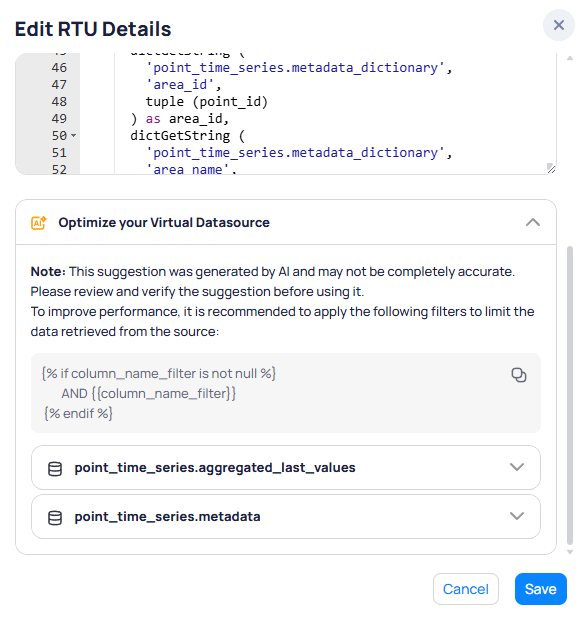
Optimization suggestions on a virtual data source
Next steps
Optimize virtual sources
Fix virtual table performance in Data Sources.
Key data sources
See the most common physical and virtual Point Time Series pair.