> ## Documentation Index
> Fetch the complete documentation index at: https://documentation.kodelabs.com/llms.txt
> Use this file to discover all available pages before exploring further.

# Use bookmarks on mobile

> Pin devices and views with notes and reminders, then open them from the Bookmarks app on the KODE OS mobile app.

Save the equipment or views you check most often so you can jump back to them without searching. Add a note and an optional push reminder to each bookmark.

## Open Bookmarks

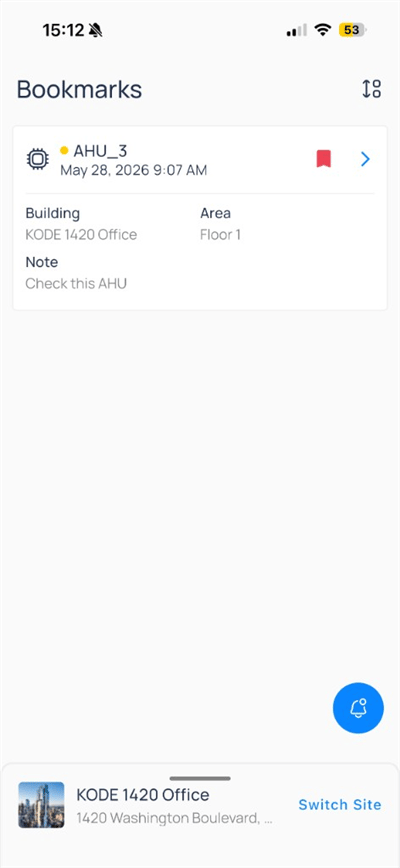
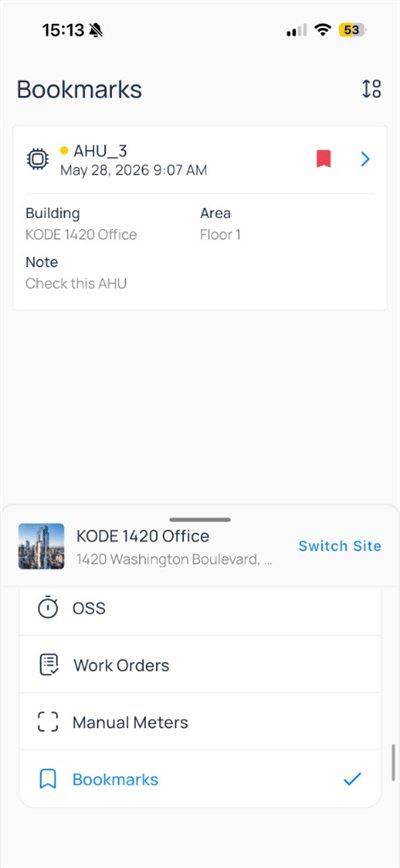
Open `Bookmarks` from the building app launcher (bottom sheet) or from profile flows. The launcher also lists other modules like `OSS`, `Work Orders`, and `Manual Meters` when published for your site.

<div className="flex justify-center w-full my-4">
  <Frame className="w-fit mx-auto" caption="Bookmarks selected in the app launcher">
    <img className="mx-auto block h-auto max-w-[400px] w-full" src="https://mintcdn.com/kodelabs/QV43LEddE2aJcRYU/images/mobile-app/kode-os-mobile-bookmarks-app-launcher.png?fit=max&auto=format&n=QV43LEddE2aJcRYU&q=85&s=d655b05367fce0343ccccd8e1ffd621e" alt="App launcher with Bookmarks checked and site card for KODE 1420 Office" width="400" height="868" data-path="images/mobile-app/kode-os-mobile-bookmarks-app-launcher.png" />
  </Frame>
</div>

Use the `sort` icon in the Bookmarks header to change list order.

## Bookmark list

Each card summarizes a saved item:

<div className="flex justify-center w-full my-4">
  <Frame className="w-fit mx-auto">
    <img className="mx-auto block h-auto max-w-[400px] w-full" src="https://mintcdn.com/kodelabs/QV43LEddE2aJcRYU/images/mobile-app/kode-os-mobile-bookmarks-list.png?fit=max&auto=format&n=QV43LEddE2aJcRYU&q=85&s=a3b16a3bdd253e08e2c83eabddede54a" alt="Bookmarks list showing AHU_3 with building Floor 1 and note Check this AHU" width="400" height="868" data-path="images/mobile-app/kode-os-mobile-bookmarks-list.png" />
  </Frame>
</div>

| Element             | Description                                            |
| ------------------- | ------------------------------------------------------ |
| Icon and status dot | Entity type (for example, device) and health indicator |
| Name                | Asset label such as `AHU_3`                            |
| Timestamp           | When the bookmark was created                          |
| Building / Area     | Site and floor context                                 |
| Note                | Text you entered when saving                           |
| Chevron             | Opens the underlying device or view                    |

Tap a card to jump directly to that asset. Use the notification bell when your site sends bookmark-related alerts.

## Create or edit a bookmark

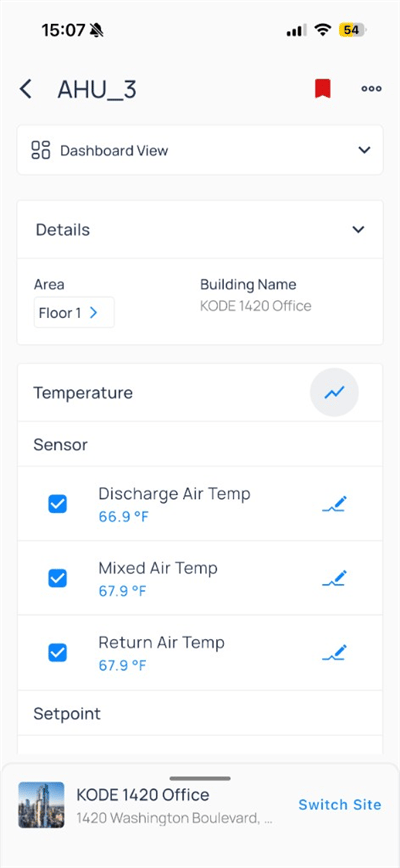
From a [device](/products/mobile-app/building/devices#device-detail-view), [system](/products/mobile-app/destinations/systems), or floor plan, tap the bookmark icon in the header.

<div className="flex justify-center w-full my-4">
  <Frame className="w-fit mx-auto" caption="Filled bookmark on a saved device">
    <img className="mx-auto block h-auto max-w-[400px] w-full" src="https://mintcdn.com/kodelabs/IXjGUtCN1G_ZdIHf/images/mobile-app/kode-os-mobile-device-bookmarked.png?fit=max&auto=format&n=IXjGUtCN1G_ZdIHf&q=85&s=acef36678ba97149eccb3740147d6b0b" alt="AHU_3 device with red filled bookmark icon in the header" width="400" height="868" data-path="images/mobile-app/kode-os-mobile-device-bookmarked.png" />
  </Frame>
</div>

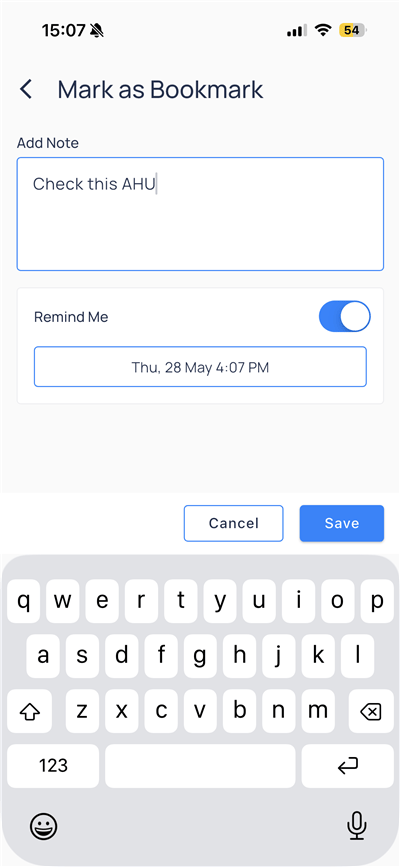
Configure the bookmark:

<div className="flex justify-center w-full my-4">
  <Frame className="w-fit mx-auto" caption="Note and reminder">
    <img className="mx-auto block h-auto max-w-[400px] w-full" src="https://mintcdn.com/kodelabs/QV43LEddE2aJcRYU/images/mobile-app/kode-os-mobile-bookmark-note-reminder.png?fit=max&auto=format&n=QV43LEddE2aJcRYU&q=85&s=0b134c7fff39dd82053235f3c64a2d66" alt="Mark as Bookmark with note Check this AHU and Remind Me on Thu 28 May 4:07 PM" width="400" height="867" data-path="images/mobile-app/kode-os-mobile-bookmark-note-reminder.png" />
  </Frame>
</div>

| Field       | Description                                       |
| ----------- | ------------------------------------------------- |
| `Add Note`  | Free-text context (for example, `Check this AHU`) |
| `Remind Me` | Schedule a push reminder at a date and time       |
| `Save`      | Store the bookmark                                |
| `Cancel`    | Discard changes                                   |

After you save, the header bookmark icon appears filled (red) on the asset.

## Remove a bookmark

Open the saved item and tap the filled bookmark icon to remove it, or delete from the Bookmarks list when your role allows.

## Compare to web

| Capability                 | Web | Mobile             |
| -------------------------- | --- | ------------------ |
| Bookmark devices and views | Yes | Yes                |
| Notes and reminders        | Yes | Yes                |
| Bookmarks app / list       | Yes | Yes (app launcher) |

## Next steps

<CardGroup cols={2}>
  <Card title="Devices on mobile" icon="hard-drive" href="/products/mobile-app/building/devices" arrow={true}>
    Open equipment, trends, and device actions.
  </Card>

  <Card title="Navigate the app" icon="compass" href="/products/mobile-app/get-started/navigation" arrow={true}>
    Move between portfolio, site, and modules.
  </Card>

  <Card title="Customize experience" icon="settings" href="/products/mobile-app/get-started/customize-experience" arrow={true}>
    Manage profile, theme, and organizations.
  </Card>
</CardGroup>