> ## Documentation Index
> Fetch the complete documentation index at: https://documentation.kodelabs.com/llms.txt
> Use this file to discover all available pages before exploring further.
# What is Cloud BMS?
> Cloud BMS is the cloud building management product in KODE OS. Connect systems, normalize data, and command equipment across your portfolio.
Cloud BMS is the cloud building management product in KODE OS. It connects building management systems, IoT devices, and operational tools into one layer.
You monitor, analyze, and command equipment across your portfolio regardless of manufacturer.
Cloud BMS includes core operations tools plus analytics modules. Those modules include [Building BI](/products/building-bi/overview), [Fault Detection and Diagnostics (FDD)](/products/fdd/overview), and the [Functional Testing Tool (FTT)](/products/ftt/overview).
Related KODE OS apps such as [AssetOps](/products/assetops/quickstart/overview), [EnerG](/products/energ/get-started/introduction), and the [mobile app](/products/mobile-app/get-started/sign-in-and-workspace) extend the same data foundation.
## How Cloud BMS fits together
Cloud BMS sits above your existing building systems. Connectors bring data in. Discovery finds equipment. Ontology and device templates make every site look the same. Graphics, schedules, FDD, Building BI, and other modules then work from that shared model.
```mermaid actions={false} theme={"theme":{"light":"github-dark","dark":"github-dark"}}
---
config:
theme: neutral
---
flowchart LR
subgraph ingest["Connect"]
DS["Data Sources"]
end
subgraph model["Standardize"]
DIS["Discovery"]
ONT["Ontology and templates"]
end
subgraph act["Operate and analyze"]
OPS["Graphics, points, schedules"]
MOD["Building BI, FDD, FTT"]
end
DS --> DIS
DIS --> ONT
ONT --> OPS
ONT --> MOD
classDef Sky stroke-width:1px,stroke:#374D7C,fill:#E2EBFF,color:#374D7C
classDef Green fill:#B0E4CC,color:#285A48,stroke:#285A48
classDef Peach stroke-width:1px,stroke:#FBB35A,fill:#FFEFDB,color:#8F632D
class DS Sky
class DIS,ONT Peach
class OPS,MOD Green
linkStyle 0,1,2,3 stroke:#00C853,fill:none
```
Unlike read-only analytics platforms, Cloud BMS supports **write-back command and control**. You can change setpoints, override schedules, and command equipment from one interface. Sites can run different BMS vendors. See [Command and control points](/products/kode-os/points/commanding-points).
## What you can do
Many tools in Cloud BMS are open-ended. After equipment is modeled, you can build the graphics, trends, dashboards, routines, and metrics your portfolio needs. You are not limited to the defaults shipped with each module.
Common use cases include:
* **Monitor and control** HVAC, lighting, fire, electrical, and other systems from [devices](/products/kode-os/devices/devices), [points](/products/kode-os/points/points), and [graphics](/products/kode-os/graphics/graphic-tool)
* **Visualize** live and historical data with floor plans, system graphics, and [trends](/products/kode-os/trends)
* **Automate** equipment schedules and [Optimized Start/Stop (OSS)](/products/kode-os/schedules)
* **Detect faults and commission** equipment with [FDD](/products/fdd/overview) and [FTT](/products/ftt/overview)
* **Build dashboards and metrics** with [Building BI](/products/building-bi/overview)
* **Scale across vendors** with [device templates](/products/kode-os/devices/device-templates) so VAVs, AHUs, and meters behave the same in every building
Cloud BMS connects to 200+ building systems. Supported protocols include BACnet, Modbus, DALI, MQTT, OPC, and RESTful APIs. Browse the [integrations catalog](/products/integrations/get-started/introduction) for connector details.
## Who uses Cloud BMS
**Building operators** monitor equipment, respond to alarms, and command points from the web app or [mobile app](/products/mobile-app/get-started/sign-in-and-workspace).
**Controls and commissioning teams** connect data sources, run discovery, apply templates, and validate equipment with FTT.
**Portfolio and analytics teams** compare sites, build Building BI dashboards, and track faults across the estate.
**Energy and sustainability teams** use the same normalized data in [EnerG](/products/energ/get-started/introduction) for usage, emissions, and capital planning.
**Administrators** provision products, users, and buildings in [Launchpad](/products/launchpad/get-started/introduction), then work in Cloud BMS day to day.
## Portfolio and building
Cloud BMS organizes operations and analysis at two scopes: **portfolio** and **building**.
* **Portfolio** — Cross-building view of your estate. Open analytics, mass operations, documents, and settings before you select a site.
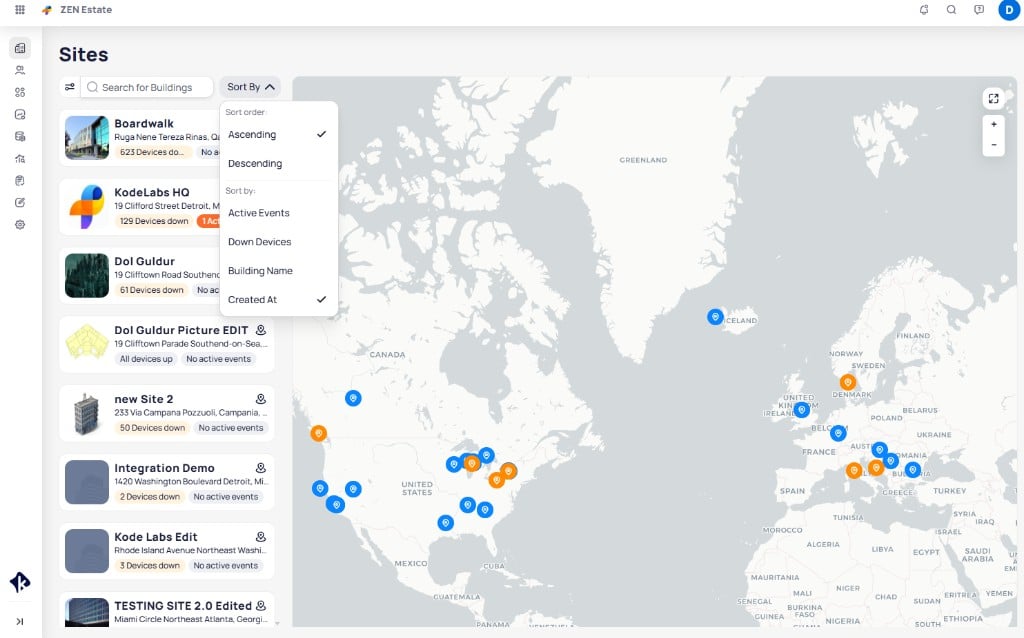
* **Building** — Site-level operations after you select a building from `Sites`.
Many modules work at both scopes. Building BI, FDD, FTT, and Documents use the same features at each level. The difference is data scope: portfolio spans sites; building focuses on one site.
**Portfolio-only tools** include `Sites`, `Mass Write`, and portfolio `Settings`.
**Building-only tools** include Systems, Areas, Devices, Points, Data Sources, Graphics, Trends, Schedules, and OSS.
When you open Cloud BMS, you start at the portfolio level. Select a building from `Sites` to enter the building level.
```mermaid actions={false} theme={"theme":{"light":"github-dark","dark":"github-dark"}}
---
config:
theme: neutral
---
flowchart LR
PORT["Portfolio"] -- "select building in Sites" --> BLD["Building"]
PORT -- "portfolio tools" --> P1["Mass Write, Settings, portfolio analytics"]
BLD -- "building tools" --> B1["Devices, Points, Graphics, Schedules"]
classDef Sky stroke-width:1px,stroke:#374D7C,fill:#E2EBFF,color:#374D7C
classDef Green fill:#B0E4CC,color:#285A48,stroke:#285A48
classDef Ash stroke-width:1px,stroke:#999999,fill:#EEEEEE,color:#000000
class PORT,BLD Sky
class P1 Ash
class B1 Green
linkStyle 0 stroke:#00C853,fill:none
linkStyle 1,2 stroke:#FF6D00,fill:none
```
## Building structure
Inside a building, Cloud BMS organizes the site as a hierarchy:
1. **[Areas](/products/kode-os/areas)** — Floors, rooms, and other locations
2. **[Systems](/products/kode-os/systems)** — Logical groups such as HVAC or lighting
3. **[Devices](/products/kode-os/devices/devices)** — Equipment and controllers
4. **[Points](/products/kode-os/points/points)** — Sensor values, setpoints, and commands
That hierarchy is how you navigate the sidebar and how analytics attach to real equipment.
## Key concepts
These ideas show up across Cloud BMS. They follow the order you typically encounter them when a building comes online. For full definitions, see the [glossary](/products/kode-os/glossary).
### Data sources and discovery
A `Data Source` is a connector to an external system. [Device discovery](/products/kode-os/device-discovery) finds devices, points, and schedules from that connection so you do not configure every entity by hand.
The communication score shows how reliably a data source stays connected and delivers data.
### Ontology and device templates
Ontology maps manufacturer-specific labels to a shared vocabulary. Normalization applies those standards. Analytics and control then work across buildings and brands.
[Device templates](/products/kode-os/devices/device-templates) capture those mappings once. Apply a template to similar equipment across the portfolio. A VAV from one vendor and a VAV from another then look and behave the same in graphics, FDD, FTT, and Building BI.
### Command and control
Writable points accept commands from Cloud BMS. You adjust setpoints and overrides from device details or floor plans without switching to the underlying BMS. See [Command and control points](/products/kode-os/points/commanding-points).
### Open analytics and operations modules
With modeled data in place, modules share the same foundation. Build custom Building BI dashboards, FDD routines, and FTT workflows without re-integrating each site.
## Explore the platform
Use these links when you know which area you need. Prefer [Next steps](#next-steps) if you are choosing a starting path.
### Core platform
| Area | What it covers |
| --------------------------------------------------------------------------------------------------------------- | ---------------------------------------------------------- |
| [Sites and map](/products/kode-os/sites-and-map) | Browse the portfolio and open buildings |
| [Data sources](/products/kode-os/data-sources) | Connect systems and monitor connection health |
| [Device discovery](/products/kode-os/device-discovery) | Find devices, points, and schedules from a connector |
| [Devices](/products/kode-os/devices/devices) and [device templates](/products/kode-os/devices/device-templates) | Configure equipment and standardize point models |
| [Points](/products/kode-os/points/points) | Work with values, setpoints, and commands |
| [Graphics](/products/kode-os/graphics/graphic-tool) | Build floor plans, system graphics, and device graphics |
| [Schedules and OSS](/products/kode-os/schedules) | Automate equipment operation and optimize HVAC start times |
| [Systems](/products/kode-os/systems) and [Areas](/products/kode-os/areas) | Organize equipment and locations in the building |
### Analytics and operations modules
These modules live in Cloud BMS and have their own documentation sets.
| Module | What it covers |
| --------------------------------------------- | -------------------------------------------------------- |
| [Building BI](/products/building-bi/overview) | Dashboards and visualizations across buildings and sites |
| [FDD](/products/fdd/overview) | Equipment faults, events, and escalations in real time |
| [FTT](/products/ftt/overview) | Automated commissioning tests and pass or fail results |
### Related apps
| App | What it covers |
| -------------------------------------------------------------------- | --------------------------------------------------------- |
| [AssetOps](/products/assetops/quickstart/overview) | Work orders and asset workflows connected to Cloud BMS |
| [EnerG](/products/energ/get-started/introduction) | Energy, sustainability, and finance across your portfolio |
| [Launchpad](/products/launchpad/get-started/introduction) | Provision apps, users, roles, and buildings |
| [Integrations](/products/integrations/get-started/introduction) | Connectors and capabilities for 200+ building systems |
| [Mobile app](/products/mobile-app/get-started/sign-in-and-workspace) | On-the-go monitoring, bookmarks, and building operations |
## Next steps
Pick the path that matches what you need to do first.
Open Sites, enter a building, and move into graphics, points, and schedules.
Add a data source, run discovery, then standardize devices with templates.
Create a Building BI dashboard, or jump to FDD when you are ready to monitor faults.
Find definitions for Cloud BMS, ontology, discovery, and related product terms.
 ## How Cloud BMS fits together
Cloud BMS sits above your existing building systems. Connectors bring data in. Discovery finds equipment. Ontology and device templates make every site look the same. Graphics, schedules, FDD, Building BI, and other modules then work from that shared model.
```mermaid actions={false} theme={"theme":{"light":"github-dark","dark":"github-dark"}}
---
config:
theme: neutral
---
flowchart LR
subgraph ingest["Connect"]
DS["Data Sources"]
end
subgraph model["Standardize"]
DIS["Discovery"]
ONT["Ontology and templates"]
end
subgraph act["Operate and analyze"]
OPS["Graphics, points, schedules"]
MOD["Building BI, FDD, FTT"]
end
DS --> DIS
DIS --> ONT
ONT --> OPS
ONT --> MOD
classDef Sky stroke-width:1px,stroke:#374D7C,fill:#E2EBFF,color:#374D7C
classDef Green fill:#B0E4CC,color:#285A48,stroke:#285A48
classDef Peach stroke-width:1px,stroke:#FBB35A,fill:#FFEFDB,color:#8F632D
class DS Sky
class DIS,ONT Peach
class OPS,MOD Green
linkStyle 0,1,2,3 stroke:#00C853,fill:none
```
Unlike read-only analytics platforms, Cloud BMS supports **write-back command and control**. You can change setpoints, override schedules, and command equipment from one interface. Sites can run different BMS vendors. See [Command and control points](/products/kode-os/points/commanding-points).
## What you can do
Many tools in Cloud BMS are open-ended. After equipment is modeled, you can build the graphics, trends, dashboards, routines, and metrics your portfolio needs. You are not limited to the defaults shipped with each module.
Common use cases include:
* **Monitor and control** HVAC, lighting, fire, electrical, and other systems from [devices](/products/kode-os/devices/devices), [points](/products/kode-os/points/points), and [graphics](/products/kode-os/graphics/graphic-tool)
* **Visualize** live and historical data with floor plans, system graphics, and [trends](/products/kode-os/trends)
* **Automate** equipment schedules and [Optimized Start/Stop (OSS)](/products/kode-os/schedules)
* **Detect faults and commission** equipment with [FDD](/products/fdd/overview) and [FTT](/products/ftt/overview)
* **Build dashboards and metrics** with [Building BI](/products/building-bi/overview)
* **Scale across vendors** with [device templates](/products/kode-os/devices/device-templates) so VAVs, AHUs, and meters behave the same in every building
Cloud BMS connects to 200+ building systems. Supported protocols include BACnet, Modbus, DALI, MQTT, OPC, and RESTful APIs. Browse the [integrations catalog](/products/integrations/get-started/introduction) for connector details.
## Who uses Cloud BMS
**Building operators** monitor equipment, respond to alarms, and command points from the web app or [mobile app](/products/mobile-app/get-started/sign-in-and-workspace).
**Controls and commissioning teams** connect data sources, run discovery, apply templates, and validate equipment with FTT.
**Portfolio and analytics teams** compare sites, build Building BI dashboards, and track faults across the estate.
**Energy and sustainability teams** use the same normalized data in [EnerG](/products/energ/get-started/introduction) for usage, emissions, and capital planning.
**Administrators** provision products, users, and buildings in [Launchpad](/products/launchpad/get-started/introduction), then work in Cloud BMS day to day.
## Portfolio and building
Cloud BMS organizes operations and analysis at two scopes: **portfolio** and **building**.
* **Portfolio** — Cross-building view of your estate. Open analytics, mass operations, documents, and settings before you select a site.
* **Building** — Site-level operations after you select a building from `Sites`.
Many modules work at both scopes. Building BI, FDD, FTT, and Documents use the same features at each level. The difference is data scope: portfolio spans sites; building focuses on one site.
**Portfolio-only tools** include `Sites`, `Mass Write`, and portfolio `Settings`.
**Building-only tools** include Systems, Areas, Devices, Points, Data Sources, Graphics, Trends, Schedules, and OSS.
When you open Cloud BMS, you start at the portfolio level. Select a building from `Sites` to enter the building level.
```mermaid actions={false} theme={"theme":{"light":"github-dark","dark":"github-dark"}}
---
config:
theme: neutral
---
flowchart LR
PORT["Portfolio"] -- "select building in Sites" --> BLD["Building"]
PORT -- "portfolio tools" --> P1["Mass Write, Settings, portfolio analytics"]
BLD -- "building tools" --> B1["Devices, Points, Graphics, Schedules"]
classDef Sky stroke-width:1px,stroke:#374D7C,fill:#E2EBFF,color:#374D7C
classDef Green fill:#B0E4CC,color:#285A48,stroke:#285A48
classDef Ash stroke-width:1px,stroke:#999999,fill:#EEEEEE,color:#000000
class PORT,BLD Sky
class P1 Ash
class B1 Green
linkStyle 0 stroke:#00C853,fill:none
linkStyle 1,2 stroke:#FF6D00,fill:none
```
## Building structure
Inside a building, Cloud BMS organizes the site as a hierarchy:
1. **[Areas](/products/kode-os/areas)** — Floors, rooms, and other locations
2. **[Systems](/products/kode-os/systems)** — Logical groups such as HVAC or lighting
3. **[Devices](/products/kode-os/devices/devices)** — Equipment and controllers
4. **[Points](/products/kode-os/points/points)** — Sensor values, setpoints, and commands
That hierarchy is how you navigate the sidebar and how analytics attach to real equipment.
## Key concepts
These ideas show up across Cloud BMS. They follow the order you typically encounter them when a building comes online. For full definitions, see the [glossary](/products/kode-os/glossary).
### Data sources and discovery
A `Data Source` is a connector to an external system. [Device discovery](/products/kode-os/device-discovery) finds devices, points, and schedules from that connection so you do not configure every entity by hand.
The
## How Cloud BMS fits together
Cloud BMS sits above your existing building systems. Connectors bring data in. Discovery finds equipment. Ontology and device templates make every site look the same. Graphics, schedules, FDD, Building BI, and other modules then work from that shared model.
```mermaid actions={false} theme={"theme":{"light":"github-dark","dark":"github-dark"}}
---
config:
theme: neutral
---
flowchart LR
subgraph ingest["Connect"]
DS["Data Sources"]
end
subgraph model["Standardize"]
DIS["Discovery"]
ONT["Ontology and templates"]
end
subgraph act["Operate and analyze"]
OPS["Graphics, points, schedules"]
MOD["Building BI, FDD, FTT"]
end
DS --> DIS
DIS --> ONT
ONT --> OPS
ONT --> MOD
classDef Sky stroke-width:1px,stroke:#374D7C,fill:#E2EBFF,color:#374D7C
classDef Green fill:#B0E4CC,color:#285A48,stroke:#285A48
classDef Peach stroke-width:1px,stroke:#FBB35A,fill:#FFEFDB,color:#8F632D
class DS Sky
class DIS,ONT Peach
class OPS,MOD Green
linkStyle 0,1,2,3 stroke:#00C853,fill:none
```
Unlike read-only analytics platforms, Cloud BMS supports **write-back command and control**. You can change setpoints, override schedules, and command equipment from one interface. Sites can run different BMS vendors. See [Command and control points](/products/kode-os/points/commanding-points).
## What you can do
Many tools in Cloud BMS are open-ended. After equipment is modeled, you can build the graphics, trends, dashboards, routines, and metrics your portfolio needs. You are not limited to the defaults shipped with each module.
Common use cases include:
* **Monitor and control** HVAC, lighting, fire, electrical, and other systems from [devices](/products/kode-os/devices/devices), [points](/products/kode-os/points/points), and [graphics](/products/kode-os/graphics/graphic-tool)
* **Visualize** live and historical data with floor plans, system graphics, and [trends](/products/kode-os/trends)
* **Automate** equipment schedules and [Optimized Start/Stop (OSS)](/products/kode-os/schedules)
* **Detect faults and commission** equipment with [FDD](/products/fdd/overview) and [FTT](/products/ftt/overview)
* **Build dashboards and metrics** with [Building BI](/products/building-bi/overview)
* **Scale across vendors** with [device templates](/products/kode-os/devices/device-templates) so VAVs, AHUs, and meters behave the same in every building
Cloud BMS connects to 200+ building systems. Supported protocols include BACnet, Modbus, DALI, MQTT, OPC, and RESTful APIs. Browse the [integrations catalog](/products/integrations/get-started/introduction) for connector details.
## Who uses Cloud BMS
**Building operators** monitor equipment, respond to alarms, and command points from the web app or [mobile app](/products/mobile-app/get-started/sign-in-and-workspace).
**Controls and commissioning teams** connect data sources, run discovery, apply templates, and validate equipment with FTT.
**Portfolio and analytics teams** compare sites, build Building BI dashboards, and track faults across the estate.
**Energy and sustainability teams** use the same normalized data in [EnerG](/products/energ/get-started/introduction) for usage, emissions, and capital planning.
**Administrators** provision products, users, and buildings in [Launchpad](/products/launchpad/get-started/introduction), then work in Cloud BMS day to day.
## Portfolio and building
Cloud BMS organizes operations and analysis at two scopes: **portfolio** and **building**.
* **Portfolio** — Cross-building view of your estate. Open analytics, mass operations, documents, and settings before you select a site.
* **Building** — Site-level operations after you select a building from `Sites`.
Many modules work at both scopes. Building BI, FDD, FTT, and Documents use the same features at each level. The difference is data scope: portfolio spans sites; building focuses on one site.
**Portfolio-only tools** include `Sites`, `Mass Write`, and portfolio `Settings`.
**Building-only tools** include Systems, Areas, Devices, Points, Data Sources, Graphics, Trends, Schedules, and OSS.
When you open Cloud BMS, you start at the portfolio level. Select a building from `Sites` to enter the building level.
```mermaid actions={false} theme={"theme":{"light":"github-dark","dark":"github-dark"}}
---
config:
theme: neutral
---
flowchart LR
PORT["Portfolio"] -- "select building in Sites" --> BLD["Building"]
PORT -- "portfolio tools" --> P1["Mass Write, Settings, portfolio analytics"]
BLD -- "building tools" --> B1["Devices, Points, Graphics, Schedules"]
classDef Sky stroke-width:1px,stroke:#374D7C,fill:#E2EBFF,color:#374D7C
classDef Green fill:#B0E4CC,color:#285A48,stroke:#285A48
classDef Ash stroke-width:1px,stroke:#999999,fill:#EEEEEE,color:#000000
class PORT,BLD Sky
class P1 Ash
class B1 Green
linkStyle 0 stroke:#00C853,fill:none
linkStyle 1,2 stroke:#FF6D00,fill:none
```
## Building structure
Inside a building, Cloud BMS organizes the site as a hierarchy:
1. **[Areas](/products/kode-os/areas)** — Floors, rooms, and other locations
2. **[Systems](/products/kode-os/systems)** — Logical groups such as HVAC or lighting
3. **[Devices](/products/kode-os/devices/devices)** — Equipment and controllers
4. **[Points](/products/kode-os/points/points)** — Sensor values, setpoints, and commands
That hierarchy is how you navigate the sidebar and how analytics attach to real equipment.
## Key concepts
These ideas show up across Cloud BMS. They follow the order you typically encounter them when a building comes online. For full definitions, see the [glossary](/products/kode-os/glossary).
### Data sources and discovery
A `Data Source` is a connector to an external system. [Device discovery](/products/kode-os/device-discovery) finds devices, points, and schedules from that connection so you do not configure every entity by hand.
The