> ## Documentation Index
> Fetch the complete documentation index at: https://documentation.kodelabs.com/llms.txt
> Use this file to discover all available pages before exploring further.
# Device referencing
> Create a digital twin of your building by linking devices according to their physical and functional relationships.
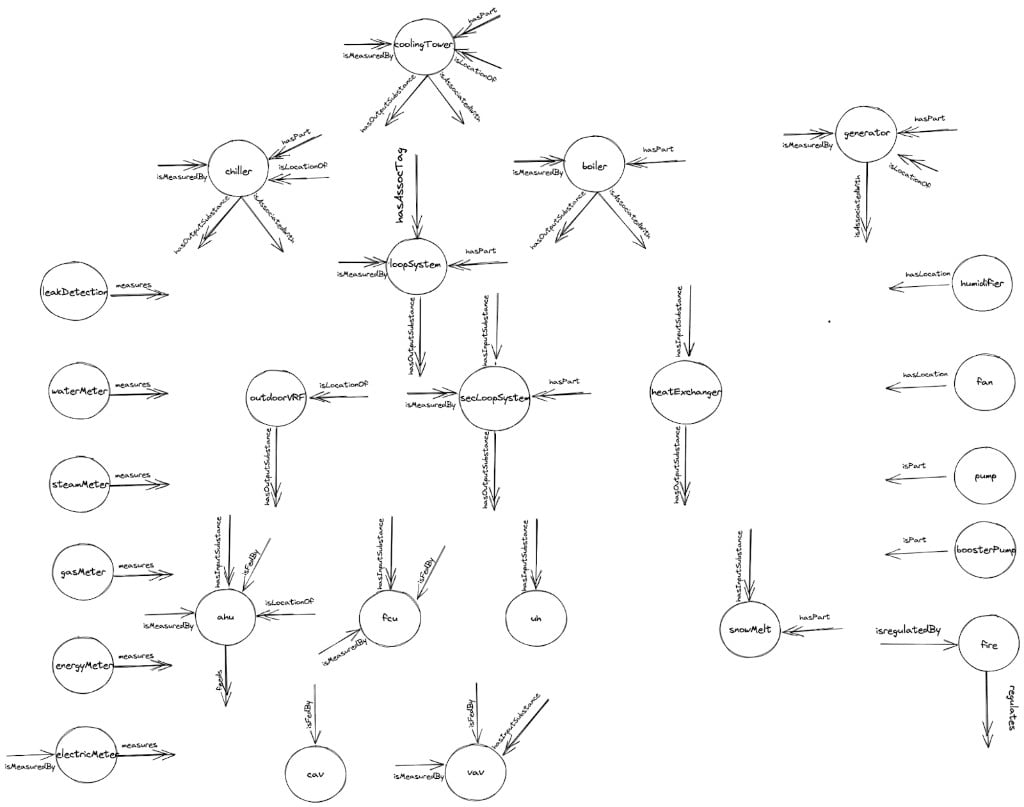
Device Referencing in Cloud BMS enables the creation of a digital twin for a building's systems by linking devices according to their physical and functional relationships. This interconnected digital model mirrors real-world interactions, such as how one device supplies air, water, or power to another, or how meters monitor specific equipment.
 ## Why device referencing matters
Device referencing transforms raw device data into a structured, relational framework that enhances building management:
* **Diagnostics and troubleshooting** — By mapping device connections, operators can swiftly trace issues. For instance, if a VAV unit malfunctions, its relationship to an AHU via a `feeds` reference can pinpoint the source of the problem.
* **Fault Detection and Diagnosis (FDD)** — The system leverages these references to generate contextual alarms, considering not just individual devices but their interconnected dependencies, offering a holistic view of system health.
* **Energy analysis** — Linking meters to the devices they measure enables detailed energy consumption insights, empowering operators to optimize efficiency and reduce costs.
## Reference types
Reference types define the specific nature of relationships between devices. Each reference type has a corresponding reverse reference, automatically establishing a two-way connection. For example, if you connect an AHU to a VAV using the `feeds` reference, the VAV will automatically show an `isFedBy` reference back to the AHU.
### HVAC references
**feeds** indicates that a device supplies an output (air, water, power) to another device or system.
**Reverse reference:** `isFedBy`
**isFedBy** indicates that a device receives an input from another device or system.
**Reverse reference:** `feeds`
**Examples:**
* An AHU `feeds` a VAV — the AHU provides air to the VAV
* A VAV `isFedBy` an AHU — the AHU supplies air to the VAV
* An AHU `isFedBy` a Chilled Water System — the chilled water system supplies water to the AHU for cooling
**hasPart** denotes that a device or system includes another device as a component or subsystem.
**Reverse reference:** `isPartOf`
**isPartOf** indicates that a device is a component or subsystem within a larger device or system.
**Reverse reference:** `hasPart`
**Examples:**
* A chilledWaterSystem `hasPart` a chiller — the chiller is a component of the system
* A chiller `isPartOf` a chilledWaterSystem — the chiller belongs to that system
### Metering references
**measures** indicates that a meter monitors the performance or consumption of a device or system.
**Reverse reference:** `isMeasuredBy`
**isMeasuredBy** specifies that a device's performance or consumption is monitored by a meter.
**Reverse reference:** `measures`
**Examples:**
* An electricMeter `measures` an AHU — it tracks the AHU's electrical consumption
* An AHU `isMeasuredBy` an electricMeter — the meter tracks the AHU's electrical usage
**hasSubmeter** indicates that a meter has another meter as its submeter.
**Reverse reference:** `isSubmeterOf`
**isSubmeterOf** specifies that a meter is a submeter of another meter, often in hierarchical metering setups.
**Reverse reference:** `hasSubmeter`
**Examples:**
* A main electricMeter `hasSubmeter` a submeter — it oversees the submeter
* A submeter `isSubmeterOf` a main electricMeter — it reports to the main meter
### API references
**mirrors** indicates that a device mirrors another device via an API connection.
**Reverse reference:** `isMirrorOf`
**isMirrorOf** indicates that a device is a mirrored or API-referenced version of another device, typically for integration with external systems.
**Reverse reference:** `mirrors`
**Examples:**
* A device `mirrors` an external device — it reflects its data in Cloud BMS
* A device `isMirrorOf` another device in an external system — it replicates its data
## Example reference flows
The following diagrams illustrate common device referencing patterns in building systems.
### Chilled and condenser water systems
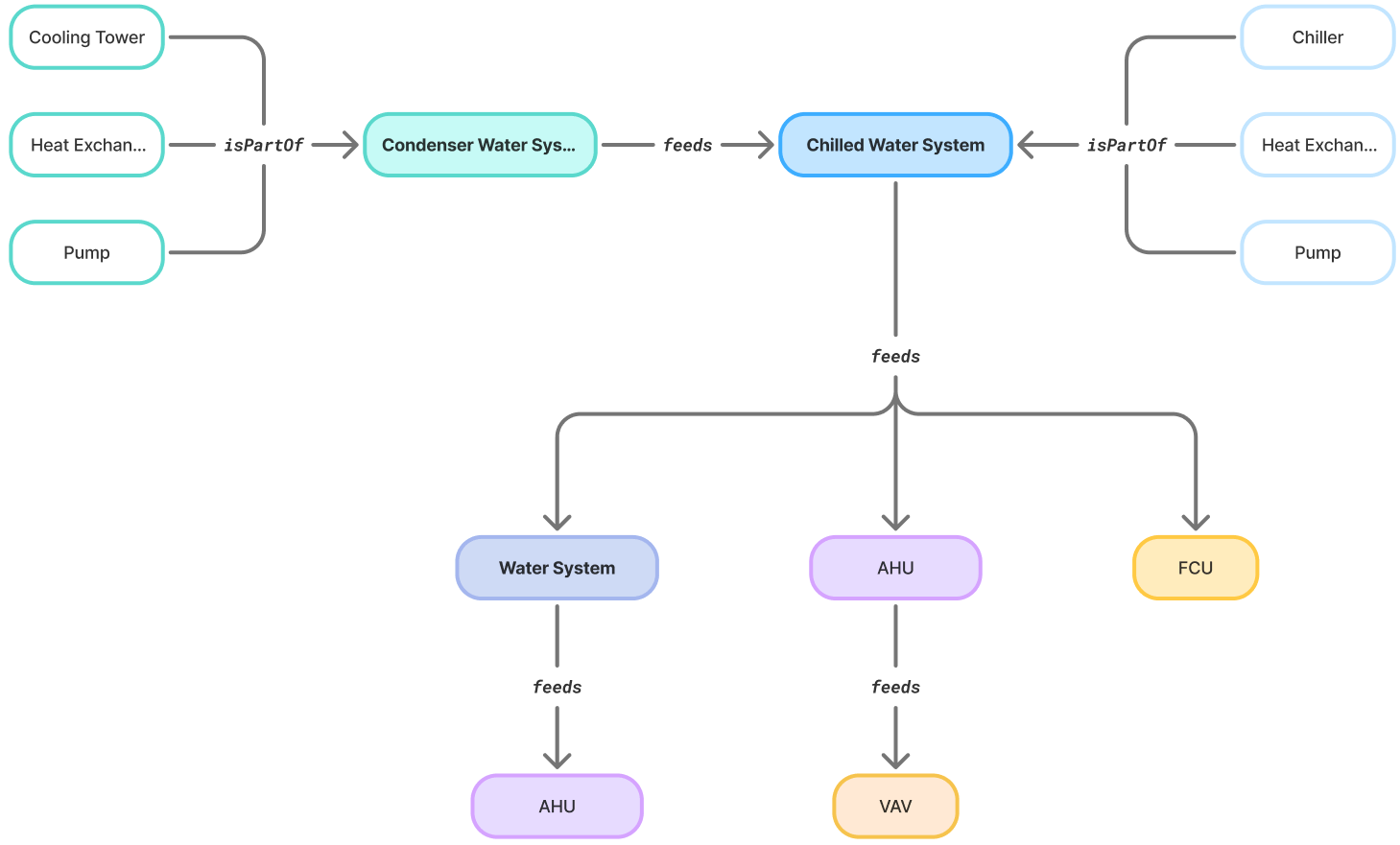
A condenser water system feeds a chilled water system, which in turn feeds downstream equipment like AHUs, FCUs, and water systems. Components like cooling towers, heat exchangers, and pumps are parts of each system.
## Why device referencing matters
Device referencing transforms raw device data into a structured, relational framework that enhances building management:
* **Diagnostics and troubleshooting** — By mapping device connections, operators can swiftly trace issues. For instance, if a VAV unit malfunctions, its relationship to an AHU via a `feeds` reference can pinpoint the source of the problem.
* **Fault Detection and Diagnosis (FDD)** — The system leverages these references to generate contextual alarms, considering not just individual devices but their interconnected dependencies, offering a holistic view of system health.
* **Energy analysis** — Linking meters to the devices they measure enables detailed energy consumption insights, empowering operators to optimize efficiency and reduce costs.
## Reference types
Reference types define the specific nature of relationships between devices. Each reference type has a corresponding reverse reference, automatically establishing a two-way connection. For example, if you connect an AHU to a VAV using the `feeds` reference, the VAV will automatically show an `isFedBy` reference back to the AHU.
### HVAC references
**feeds** indicates that a device supplies an output (air, water, power) to another device or system.
**Reverse reference:** `isFedBy`
**isFedBy** indicates that a device receives an input from another device or system.
**Reverse reference:** `feeds`
**Examples:**
* An AHU `feeds` a VAV — the AHU provides air to the VAV
* A VAV `isFedBy` an AHU — the AHU supplies air to the VAV
* An AHU `isFedBy` a Chilled Water System — the chilled water system supplies water to the AHU for cooling
**hasPart** denotes that a device or system includes another device as a component or subsystem.
**Reverse reference:** `isPartOf`
**isPartOf** indicates that a device is a component or subsystem within a larger device or system.
**Reverse reference:** `hasPart`
**Examples:**
* A chilledWaterSystem `hasPart` a chiller — the chiller is a component of the system
* A chiller `isPartOf` a chilledWaterSystem — the chiller belongs to that system
### Metering references
**measures** indicates that a meter monitors the performance or consumption of a device or system.
**Reverse reference:** `isMeasuredBy`
**isMeasuredBy** specifies that a device's performance or consumption is monitored by a meter.
**Reverse reference:** `measures`
**Examples:**
* An electricMeter `measures` an AHU — it tracks the AHU's electrical consumption
* An AHU `isMeasuredBy` an electricMeter — the meter tracks the AHU's electrical usage
**hasSubmeter** indicates that a meter has another meter as its submeter.
**Reverse reference:** `isSubmeterOf`
**isSubmeterOf** specifies that a meter is a submeter of another meter, often in hierarchical metering setups.
**Reverse reference:** `hasSubmeter`
**Examples:**
* A main electricMeter `hasSubmeter` a submeter — it oversees the submeter
* A submeter `isSubmeterOf` a main electricMeter — it reports to the main meter
### API references
**mirrors** indicates that a device mirrors another device via an API connection.
**Reverse reference:** `isMirrorOf`
**isMirrorOf** indicates that a device is a mirrored or API-referenced version of another device, typically for integration with external systems.
**Reverse reference:** `mirrors`
**Examples:**
* A device `mirrors` an external device — it reflects its data in Cloud BMS
* A device `isMirrorOf` another device in an external system — it replicates its data
## Example reference flows
The following diagrams illustrate common device referencing patterns in building systems.
### Chilled and condenser water systems
A condenser water system feeds a chilled water system, which in turn feeds downstream equipment like AHUs, FCUs, and water systems. Components like cooling towers, heat exchangers, and pumps are parts of each system.
 ### Hot water system
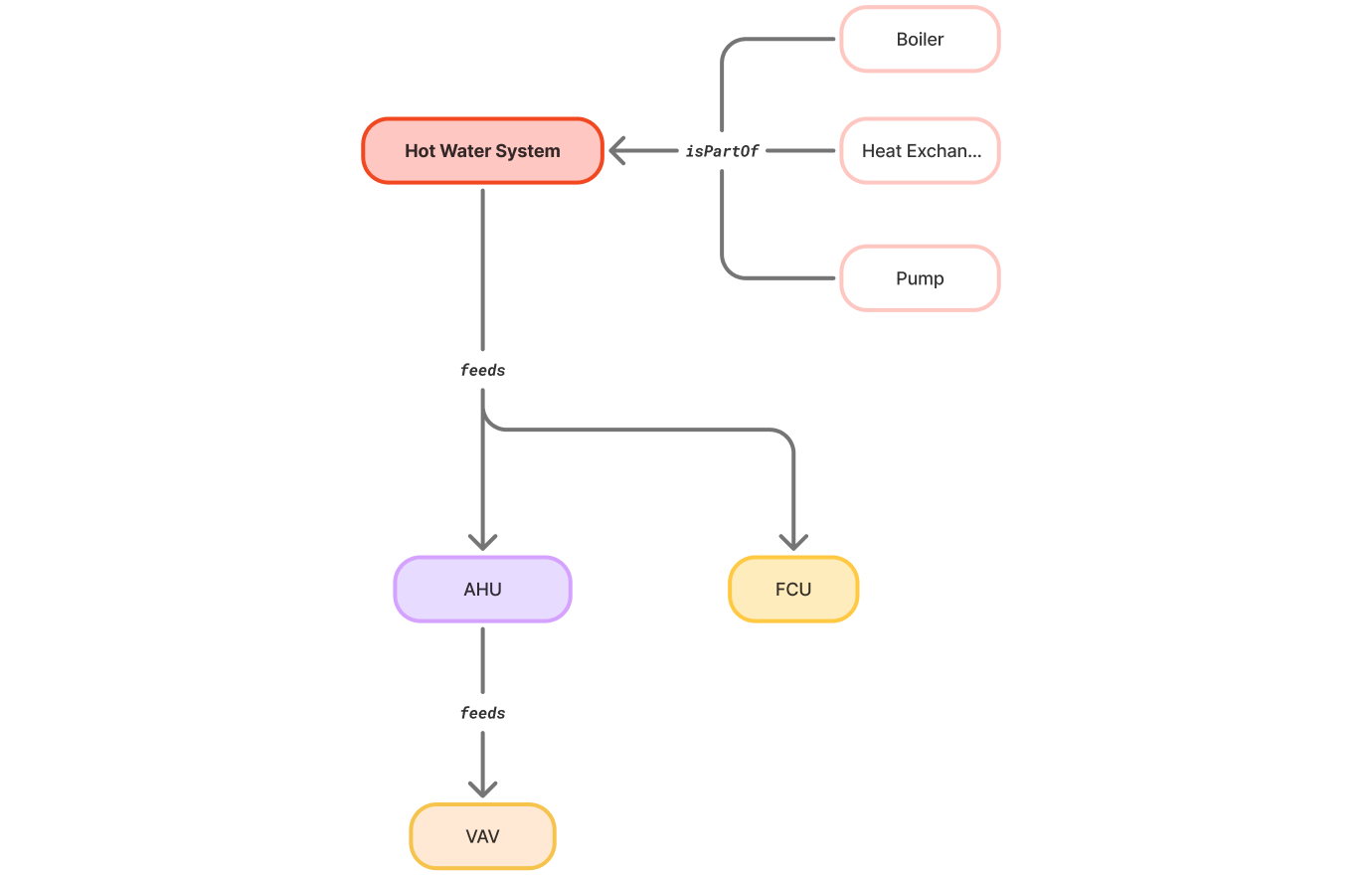
A hot water system contains boilers, heat exchangers, and pumps as components, and feeds AHUs and FCUs, which in turn feed VAVs.
### Hot water system
A hot water system contains boilers, heat exchangers, and pumps as components, and feeds AHUs and FCUs, which in turn feed VAVs.
 ### Metering hierarchy
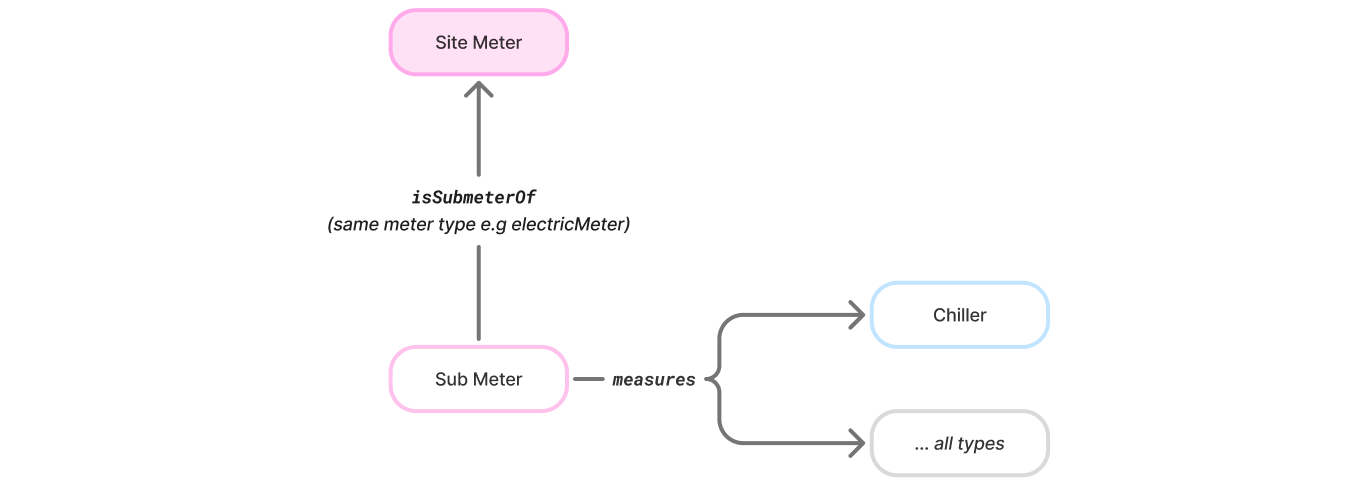
Meters follow a hierarchical structure where site meters have submeters, and each submeter measures specific devices.
### Metering hierarchy
Meters follow a hierarchical structure where site meters have submeters, and each submeter measures specific devices.
 ## Manage device references
Navigate to **Devices** > **Device Referencing** from the building left sidebar. The page lists devices so you can add **device references** (device-to-device) and **space references** (device-to-space).
## Manage device references
Navigate to **Devices** > **Device Referencing** from the building left sidebar. The page lists devices so you can add **device references** (device-to-device) and **space references** (device-to-space).
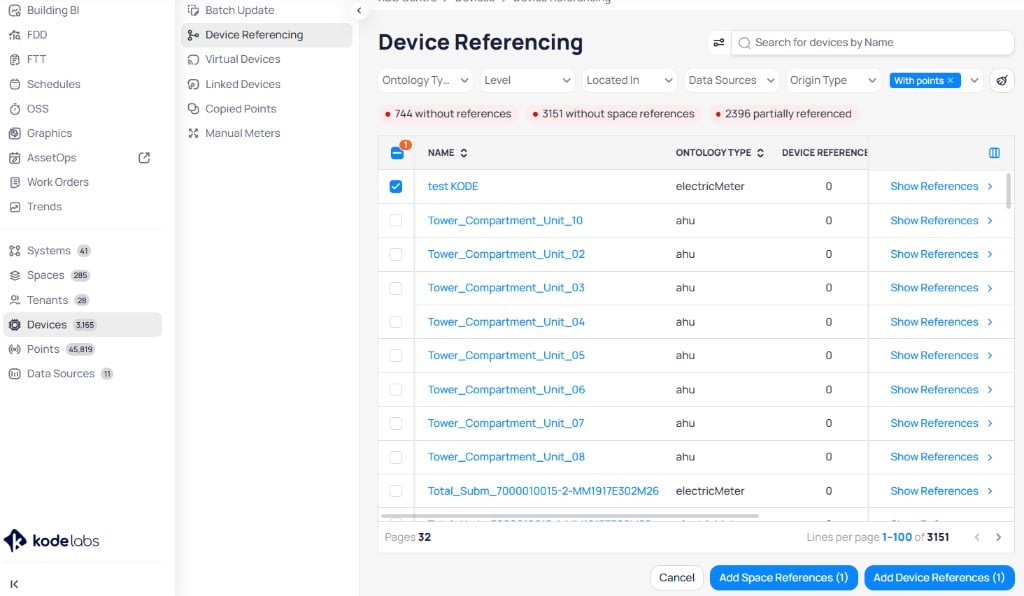 Use **search for devices by name** and the filter dropdowns to narrow the list:
| Filter | Purpose |
| ----------------- | ----------------------------------- |
| **Ontology type** | Limit to a canonical device type |
| **Level** | Filter by floor or level |
| **Located in** | Filter by physical space assignment |
| **Data sources** | Filter by connector or source |
| **Origin type** | Filter by discovery origin |
Status indicators at the top summarize reference health, including devices **without references** and **partially referenced**. Apply tags such as **with points** when you only want devices that have point data.
The table shows **name**, **ontology type**, and **device reference** count. Click **show references** on a row to open that device's reference detail view.
### Add device references to multiple devices
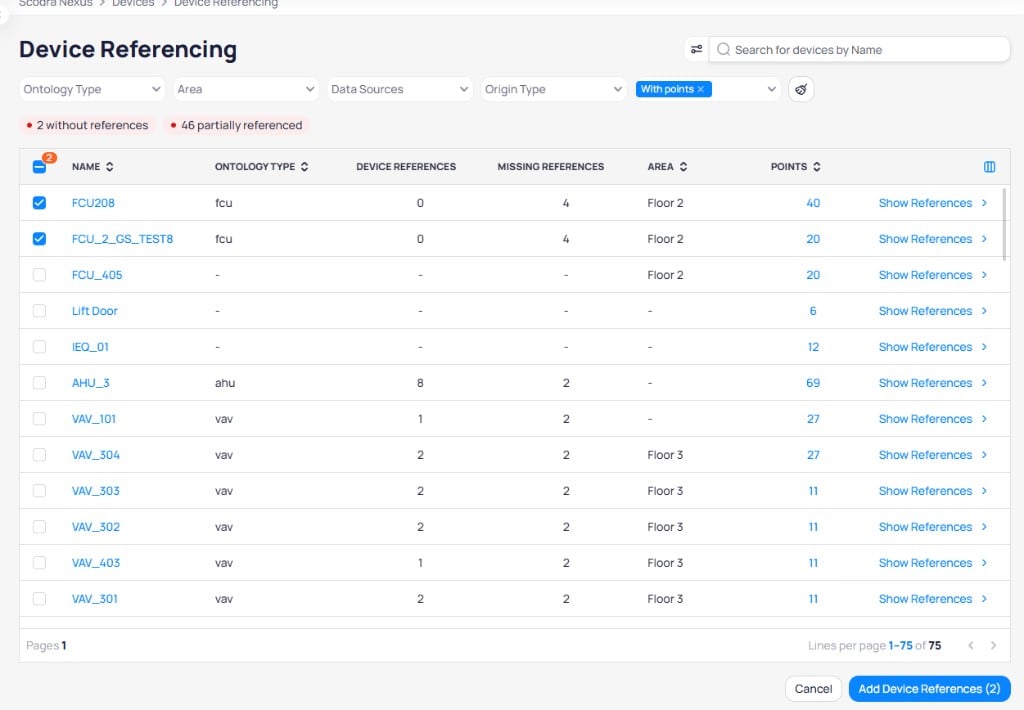
Check the boxes next to the devices you want to add references to. Click **Add Device References** at the bottom of the page.
Use **search for devices by name** and the filter dropdowns to narrow the list:
| Filter | Purpose |
| ----------------- | ----------------------------------- |
| **Ontology type** | Limit to a canonical device type |
| **Level** | Filter by floor or level |
| **Located in** | Filter by physical space assignment |
| **Data sources** | Filter by connector or source |
| **Origin type** | Filter by discovery origin |
Status indicators at the top summarize reference health, including devices **without references** and **partially referenced**. Apply tags such as **with points** when you only want devices that have point data.
The table shows **name**, **ontology type**, and **device reference** count. Click **show references** on a row to open that device's reference detail view.
### Add device references to multiple devices
Check the boxes next to the devices you want to add references to. Click **Add Device References** at the bottom of the page.
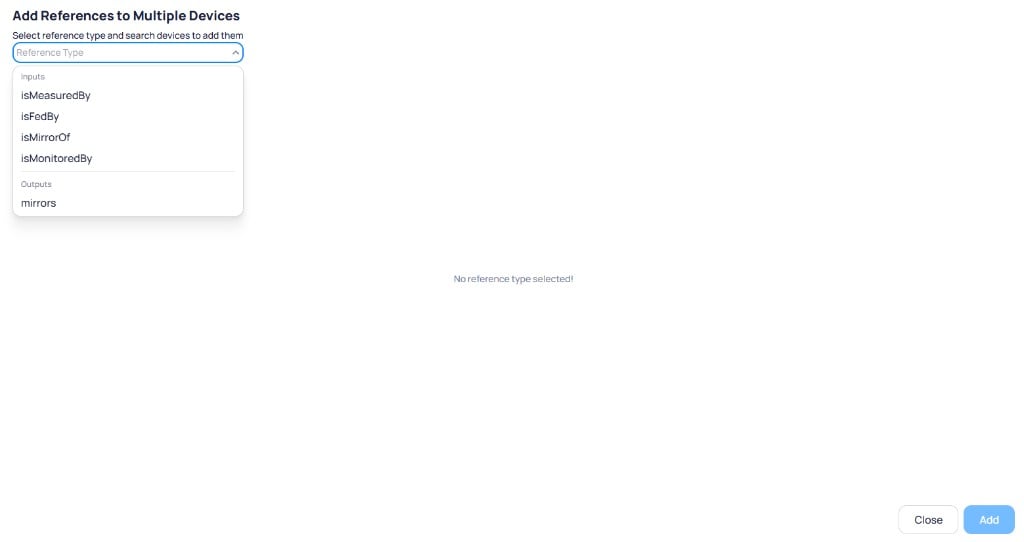
 In the **Add References to Multiple Devices** dialog, select a reference type from the dropdown. References are grouped into **Inputs** (isMeasuredBy, isFedBy, isMirrorOf, isMonitoredBy) and **Outputs** (mirrors).
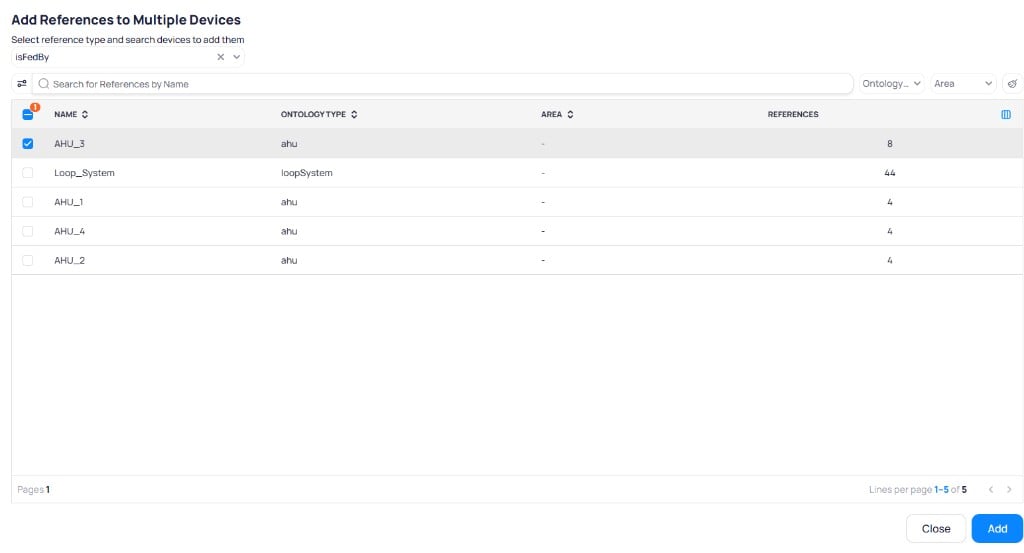
 After choosing a reference type, the dialog shows a list of compatible devices. Filter by name, ontology type, or area to find the target device, then select it and click **Add**.
 ### View and drill into references
Click **Show References** on any device to see its current references. The detail view shows each reference grouped by type (for example, `isFedBy`) with the referenced device's name, ontology type, and reference counts.
### View and drill into references
Click **Show References** on any device to see its current references. The detail view shows each reference grouped by type (for example, `isFedBy`) with the referenced device's name, ontology type, and reference counts.
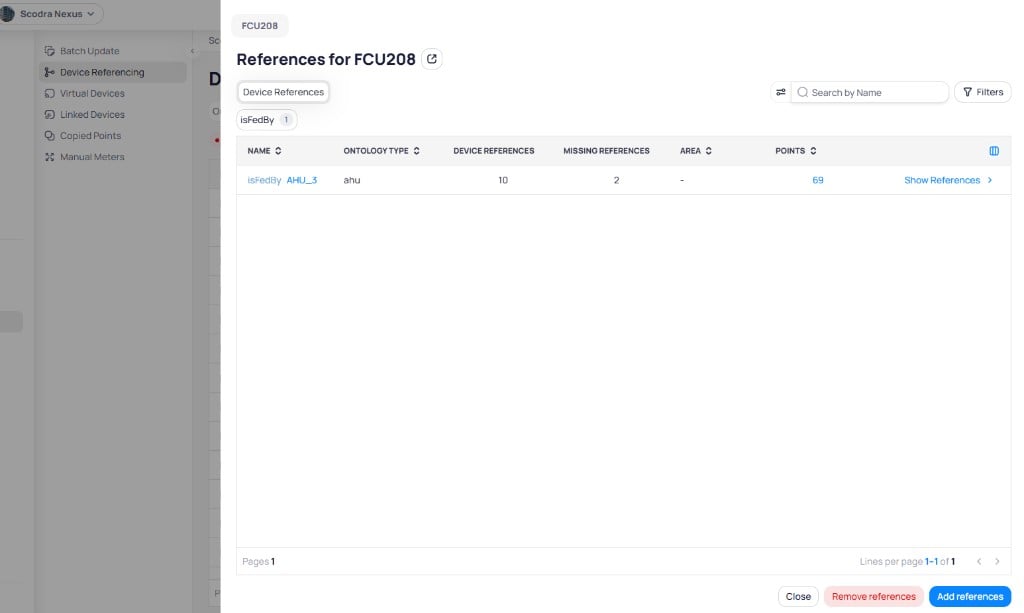 A **Missing references** count can still appear after you add expected relationships. Cloud BMS compares against the full expected reference set for the device type. The count does not always mean your referencing work is incomplete.
Click **Show References** on a referenced device to drill deeper into the reference chain. For example, clicking into AHU\_3 shows all the devices it feeds.
A **Missing references** count can still appear after you add expected relationships. Cloud BMS compares against the full expected reference set for the device type. The count does not always mean your referencing work is incomplete.
Click **Show References** on a referenced device to drill deeper into the reference chain. For example, clicking into AHU\_3 shows all the devices it feeds.
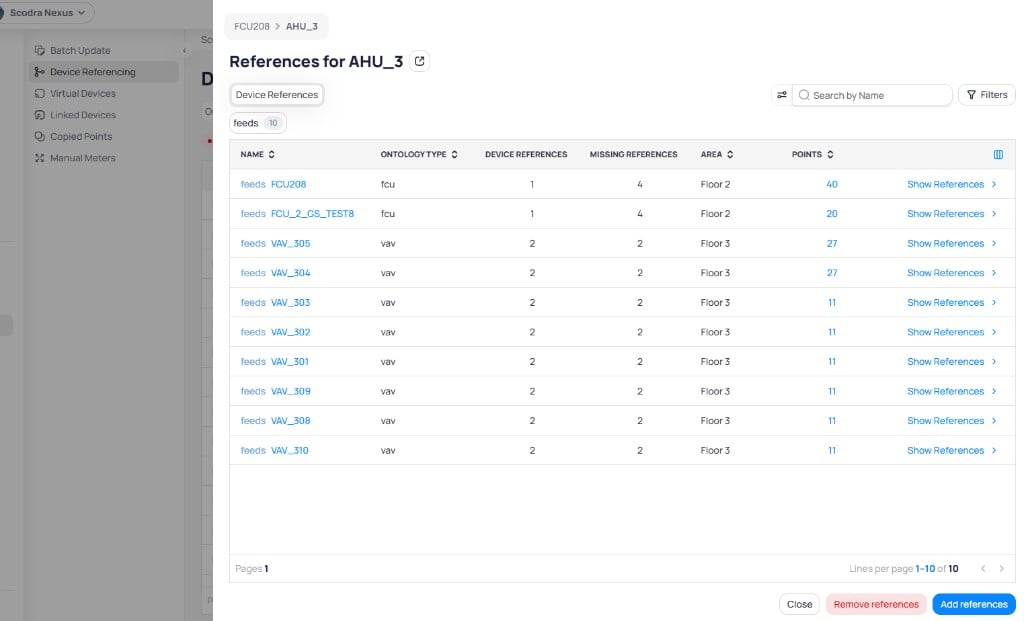 From the reference detail view you can:
* Click **Add references** to add more references to the device
* Click **Remove references** to delete existing references
* Click the external link icon next to the device name to navigate directly to that device
### View references from device details
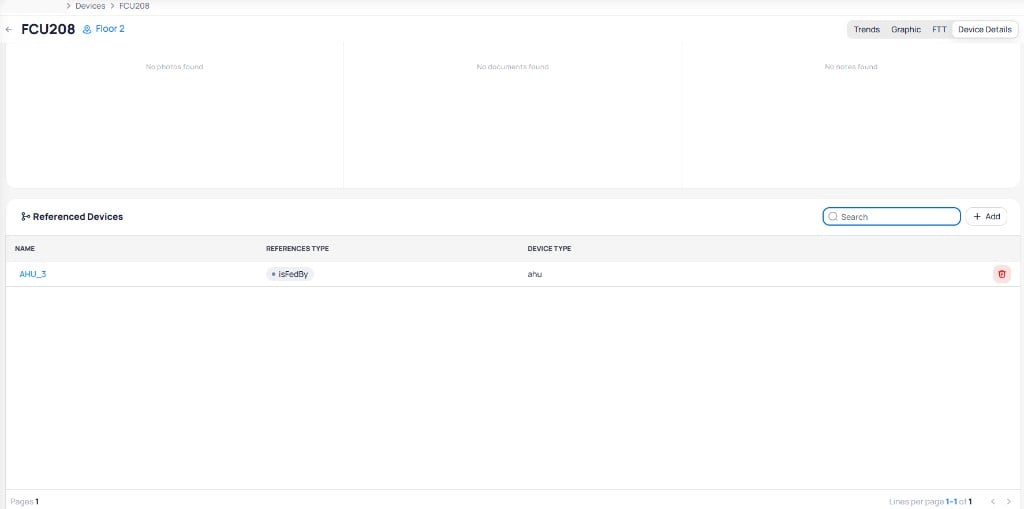
References are also available on a device's **Device Details** tab. The **Referenced Devices** section lists all references with their name, reference type, and device type. From here you can add new references with the **+ Add** button or delete existing ones with the delete icon.
From the reference detail view you can:
* Click **Add references** to add more references to the device
* Click **Remove references** to delete existing references
* Click the external link icon next to the device name to navigate directly to that device
### View references from device details
References are also available on a device's **Device Details** tab. The **Referenced Devices** section lists all references with their name, reference type, and device type. From here you can add new references with the **+ Add** button or delete existing ones with the delete icon.
 ### View referenced points on trends
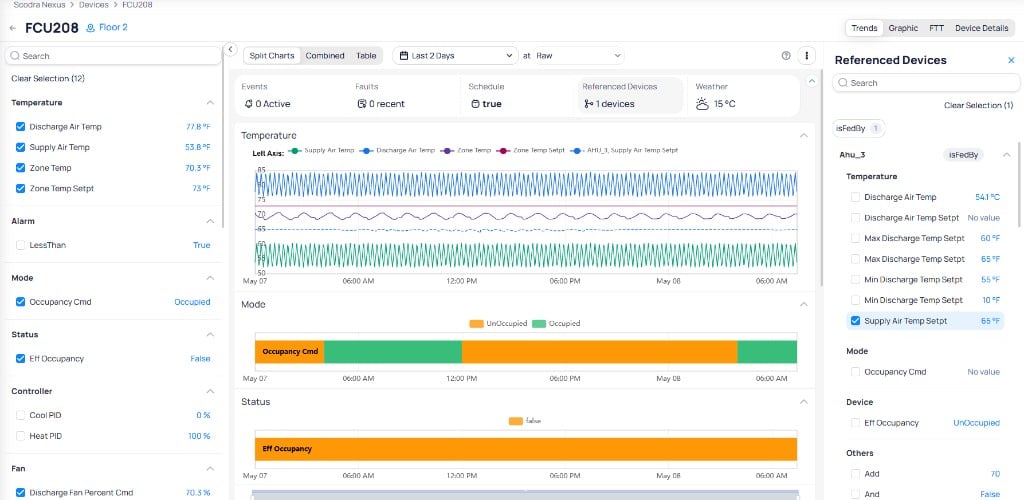
You can overlay referenced device points directly on a device's **Trends** tab. Click **Referenced Devices** in the device header to open the referenced devices panel on the right. The panel lists all references grouped by type (for example, `isFedBy`), along with the referenced device's points.
Select a referenced device's points to overlay them on the trend charts. Referenced point data appears as **dashed lines** on the chart, making it easy to distinguish from the device's own point data.
### View referenced points on trends
You can overlay referenced device points directly on a device's **Trends** tab. Click **Referenced Devices** in the device header to open the referenced devices panel on the right. The panel lists all references grouped by type (for example, `isFedBy`), along with the referenced device's points.
Select a referenced device's points to overlay them on the trend charts. Referenced point data appears as **dashed lines** on the chart, making it easy to distinguish from the device's own point data.
 ## Supported references by canonical type
The table below lists each canonical device type, its supported input references (relationships where the device is the target), and output references (relationships where the device is the source).
| Device Type | isFedBy | feeds | isPartOf | hasPart |
| ------------------------ | --------------------------------------------------------------------- | -------------------------------------------------------------------------------------- | -------- | ---------------------------------------------------------------------------------------- |
| **chilledWaterSystem** | condenserWaterSystem, waterSystem | ahu, fcu, heatPump, waterSystem, radiantDevice | — | chiller, primaryPump, secondaryPump, pump, heatExchanger, waterTank |
| **condenserWaterSystem** | waterSystem | chilledWaterSystem, waterSystem, radiantDevice | — | coolingTower, pump, heatExchanger |
| **hotWaterSystem** | hotWaterSystem, waterSystem | ahu, cav, fcu, vav, uh, heatPump, snowMelt, waterSystem, hotWaterSystem, radiantDevice | — | primaryPump, secondaryPump, pump, heatExchanger, boiler, waterTank |
| **waterSystem** | chilledWaterSystem, hotWaterSystem, waterSystem, condenserWaterSystem | ahu, cav, fcu, heatPump, radiantDevice, snowMelt, uh, vav | — | boiler, boosterPump, chiller, heatExchanger, pump, waterTank, primaryPump, secondaryPump |
| **loopSystem** | — | secLoopSystem, ahu, cav, fcu, heatPump, radiantDevice, snowMelt, uh, vav | — | boiler, boosterPump, chiller, heatExchanger, pump, waterTank |
| **secLoopSystem** | — | ahu, cav, fcu, heatPump, radiantDevice, snowMelt, uh, vav | — | heatExchanger, pump, waterTank |
| Device Type | isFedBy | feeds | isPartOf | hasPart |
| -------------- | ------------------------------------------------------------------------------------------------------------- | --------------------------- | -------- | ------- |
| **ahu** | chilledWaterSystem, hotWaterSystem, waterSystem, ahu, heatExchanger, fan, secLoopSystem | vav, cav, fcu, ahu, uh, fan | — | fan |
| **vav** | ahu, hotWaterSystem, waterSystem, fcu, secLoopSystem | — | — | — |
| **cav** | ahu, fcu, hotWaterSystem, waterSystem, secLoopSystem | — | — | — |
| **fcu** | chilledWaterSystem, hotWaterSystem, waterSystem, ahu, heatExchanger, fan, condenserWaterSystem, secLoopSystem | — | — | — |
| **uh** | ahu, fcu, hotWaterSystem, waterSystem, secLoopSystem | — | — | — |
| **fan** | ahu, fcu | ahu | ahu | — |
| **outdoorVRF** | — | fcu, ahu, heatPump | — | — |
| Device Type | isFedBy | feeds | isPartOf | hasPart |
| ----------------- | --------------------------------------------------------------------------------------------------- | ----- | --------------------------------------------------------------------------------------------------------------------- | ------- |
| **boiler** | — | — | hotWaterSystem, waterSystem, loopSystem | — |
| **chiller** | — | — | chilledWaterSystem, waterSystem, loopSystem | — |
| **coolingTower** | — | — | condenserWaterSystem | fan |
| **heatExchanger** | — | — | hotWaterSystem, condenserWaterSystem, chilledWaterSystem, waterSystem, loopSystem, secLoopSystem | — |
| **heatPump** | chilledWaterSystem, condenserWaterSystem, hotWaterSystem, waterSystem, heatExchanger, secLoopSystem | — | — | — |
| **pump** | — | — | hotWaterSystem, condenserWaterSystem, chilledWaterSystem, waterSystem, waterTank, snowMelt, loopSystem, secLoopSystem | — |
| **boosterPump** | — | — | waterSystem, waterTank, loopSystem | — |
| **waterTank** | — | — | waterSystem, chilledWaterSystem, hotWaterSystem, condenserWaterSystem, loopSystem, secLoopSystem | pump |
| **snowMelt** | hotWaterSystem, waterSystem, secLoopSystem, loopSystem | — | — | pump |
| **humidifier** | — | — | — | — |
| **radiantDevice** | chilledWaterSystem, hotWaterSystem, waterSystem, heatExchanger, condenserWaterSystem, secLoopSystem | — | — | — |
| Device Type | measures | isMeasuredBy | hasSubmeter | isSubmeterOf |
| ----------------- | ------------------------------------------------------------------------------------------------------------------------------------------------------------------------------------ | ------------ | ------------- | ------------- |
| **electricMeter** | All canonical types except meters | — | electricMeter | electricMeter |
| **energyMeter** | ahu, boiler, chiller, coolingTower, fcu, heatExchanger, heatPump, radiantDevice, snowMelt, uh, waterTank, loopSystem, secLoopSystem, chilledWaterSystem, hotWaterSystem, waterSystem | — | energyMeter | energyMeter |
| **waterMeter** | boiler, chiller, coolingTower, heatExchanger, heatPump, radiantDevice, snowMelt, uh, waterTank, loopSystem, secLoopSystem, chilledWaterSystem, hotWaterSystem, waterSystem | — | waterMeter | waterMeter |
| **gasMeter** | boiler, generator | — | gasMeter | gasMeter |
| **steamMeter** | boiler | — | steamMeter | steamMeter |
| Device Type | isFedBy | isMeasuredBy |
| ------------------------- | ---------------- | ------------------------- |
| **airCompressor** | — | electricMeter |
| **airQuality** | — | electricMeter |
| **av** | — | electricMeter |
| **blinds** | — | electricMeter |
| **bridge** | — | electricMeter |
| **camera** | — | electricMeter |
| **chargingStation** | — | electricMeter |
| **computerDevice** | networkingDevice | electricMeter |
| **doorLock** | — | electricMeter |
| **electricityMonitoring** | — | electricMeter |
| **elevator** | — | electricMeter |
| **externalWeather** | — | electricMeter |
| **fire** | — | electricMeter |
| **generator** | — | electricMeter, gasMeter |
| **leakDetection** | — | electricMeter, waterMeter |
| **lighting** | — | electricMeter |
| **networkingDevice** | — | electricMeter |
| **presenceDetection** | — | electricMeter |
| **sanitation** | — | electricMeter |
| **smartLocker** | — | electricMeter |
| **solarPanel** | — | electricMeter |
| **switchGear** | — | electricMeter |
| **thermohygrometer** | — | electricMeter |
| **trafficCounter** | — | electricMeter |
| **ups** | — | electricMeter |
| **wasteCollector** | — | electricMeter |
| **zone** | — | electricMeter |
## Next steps
Mirror a point value into another device for independent use.
Combine points from multiple sources into one logical device.
## Supported references by canonical type
The table below lists each canonical device type, its supported input references (relationships where the device is the target), and output references (relationships where the device is the source).
| Device Type | isFedBy | feeds | isPartOf | hasPart |
| ------------------------ | --------------------------------------------------------------------- | -------------------------------------------------------------------------------------- | -------- | ---------------------------------------------------------------------------------------- |
| **chilledWaterSystem** | condenserWaterSystem, waterSystem | ahu, fcu, heatPump, waterSystem, radiantDevice | — | chiller, primaryPump, secondaryPump, pump, heatExchanger, waterTank |
| **condenserWaterSystem** | waterSystem | chilledWaterSystem, waterSystem, radiantDevice | — | coolingTower, pump, heatExchanger |
| **hotWaterSystem** | hotWaterSystem, waterSystem | ahu, cav, fcu, vav, uh, heatPump, snowMelt, waterSystem, hotWaterSystem, radiantDevice | — | primaryPump, secondaryPump, pump, heatExchanger, boiler, waterTank |
| **waterSystem** | chilledWaterSystem, hotWaterSystem, waterSystem, condenserWaterSystem | ahu, cav, fcu, heatPump, radiantDevice, snowMelt, uh, vav | — | boiler, boosterPump, chiller, heatExchanger, pump, waterTank, primaryPump, secondaryPump |
| **loopSystem** | — | secLoopSystem, ahu, cav, fcu, heatPump, radiantDevice, snowMelt, uh, vav | — | boiler, boosterPump, chiller, heatExchanger, pump, waterTank |
| **secLoopSystem** | — | ahu, cav, fcu, heatPump, radiantDevice, snowMelt, uh, vav | — | heatExchanger, pump, waterTank |
| Device Type | isFedBy | feeds | isPartOf | hasPart |
| -------------- | ------------------------------------------------------------------------------------------------------------- | --------------------------- | -------- | ------- |
| **ahu** | chilledWaterSystem, hotWaterSystem, waterSystem, ahu, heatExchanger, fan, secLoopSystem | vav, cav, fcu, ahu, uh, fan | — | fan |
| **vav** | ahu, hotWaterSystem, waterSystem, fcu, secLoopSystem | — | — | — |
| **cav** | ahu, fcu, hotWaterSystem, waterSystem, secLoopSystem | — | — | — |
| **fcu** | chilledWaterSystem, hotWaterSystem, waterSystem, ahu, heatExchanger, fan, condenserWaterSystem, secLoopSystem | — | — | — |
| **uh** | ahu, fcu, hotWaterSystem, waterSystem, secLoopSystem | — | — | — |
| **fan** | ahu, fcu | ahu | ahu | — |
| **outdoorVRF** | — | fcu, ahu, heatPump | — | — |
| Device Type | isFedBy | feeds | isPartOf | hasPart |
| ----------------- | --------------------------------------------------------------------------------------------------- | ----- | --------------------------------------------------------------------------------------------------------------------- | ------- |
| **boiler** | — | — | hotWaterSystem, waterSystem, loopSystem | — |
| **chiller** | — | — | chilledWaterSystem, waterSystem, loopSystem | — |
| **coolingTower** | — | — | condenserWaterSystem | fan |
| **heatExchanger** | — | — | hotWaterSystem, condenserWaterSystem, chilledWaterSystem, waterSystem, loopSystem, secLoopSystem | — |
| **heatPump** | chilledWaterSystem, condenserWaterSystem, hotWaterSystem, waterSystem, heatExchanger, secLoopSystem | — | — | — |
| **pump** | — | — | hotWaterSystem, condenserWaterSystem, chilledWaterSystem, waterSystem, waterTank, snowMelt, loopSystem, secLoopSystem | — |
| **boosterPump** | — | — | waterSystem, waterTank, loopSystem | — |
| **waterTank** | — | — | waterSystem, chilledWaterSystem, hotWaterSystem, condenserWaterSystem, loopSystem, secLoopSystem | pump |
| **snowMelt** | hotWaterSystem, waterSystem, secLoopSystem, loopSystem | — | — | pump |
| **humidifier** | — | — | — | — |
| **radiantDevice** | chilledWaterSystem, hotWaterSystem, waterSystem, heatExchanger, condenserWaterSystem, secLoopSystem | — | — | — |
| Device Type | measures | isMeasuredBy | hasSubmeter | isSubmeterOf |
| ----------------- | ------------------------------------------------------------------------------------------------------------------------------------------------------------------------------------ | ------------ | ------------- | ------------- |
| **electricMeter** | All canonical types except meters | — | electricMeter | electricMeter |
| **energyMeter** | ahu, boiler, chiller, coolingTower, fcu, heatExchanger, heatPump, radiantDevice, snowMelt, uh, waterTank, loopSystem, secLoopSystem, chilledWaterSystem, hotWaterSystem, waterSystem | — | energyMeter | energyMeter |
| **waterMeter** | boiler, chiller, coolingTower, heatExchanger, heatPump, radiantDevice, snowMelt, uh, waterTank, loopSystem, secLoopSystem, chilledWaterSystem, hotWaterSystem, waterSystem | — | waterMeter | waterMeter |
| **gasMeter** | boiler, generator | — | gasMeter | gasMeter |
| **steamMeter** | boiler | — | steamMeter | steamMeter |
| Device Type | isFedBy | isMeasuredBy |
| ------------------------- | ---------------- | ------------------------- |
| **airCompressor** | — | electricMeter |
| **airQuality** | — | electricMeter |
| **av** | — | electricMeter |
| **blinds** | — | electricMeter |
| **bridge** | — | electricMeter |
| **camera** | — | electricMeter |
| **chargingStation** | — | electricMeter |
| **computerDevice** | networkingDevice | electricMeter |
| **doorLock** | — | electricMeter |
| **electricityMonitoring** | — | electricMeter |
| **elevator** | — | electricMeter |
| **externalWeather** | — | electricMeter |
| **fire** | — | electricMeter |
| **generator** | — | electricMeter, gasMeter |
| **leakDetection** | — | electricMeter, waterMeter |
| **lighting** | — | electricMeter |
| **networkingDevice** | — | electricMeter |
| **presenceDetection** | — | electricMeter |
| **sanitation** | — | electricMeter |
| **smartLocker** | — | electricMeter |
| **solarPanel** | — | electricMeter |
| **switchGear** | — | electricMeter |
| **thermohygrometer** | — | electricMeter |
| **trafficCounter** | — | electricMeter |
| **ups** | — | electricMeter |
| **wasteCollector** | — | electricMeter |
| **zone** | — | electricMeter |
## Next steps
Mirror a point value into another device for independent use.
Combine points from multiple sources into one logical device.