> ## Documentation Index
> Fetch the complete documentation index at: https://documentation.kodelabs.com/llms.txt
> Use this file to discover all available pages before exploring further.
# Batch update devices
> Make mass edits to device metadata, area assignments, and templates across multiple devices at once.
Batch update allows you to make changes to multiple devices simultaneously. Use it when you need to rename devices, reassign areas, apply templates, or update device properties across a group of equipment.
## Open batch update
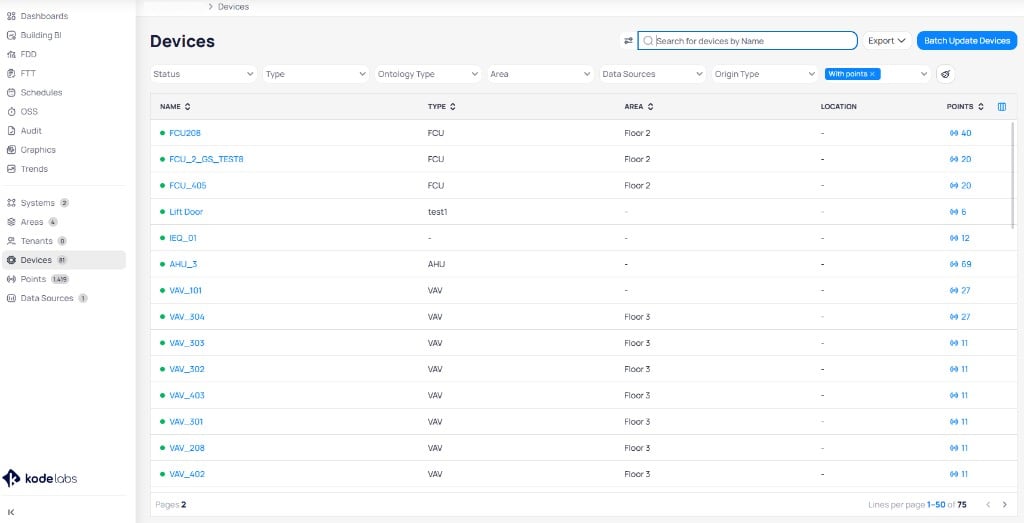
Navigate to **Devices** from the left sidebar. Click **Batch Update Devices** in the upper right corner of the devices list.
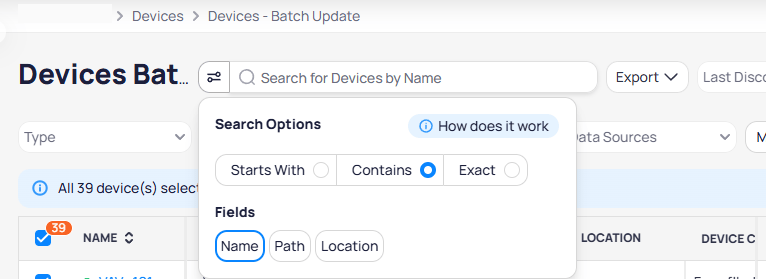
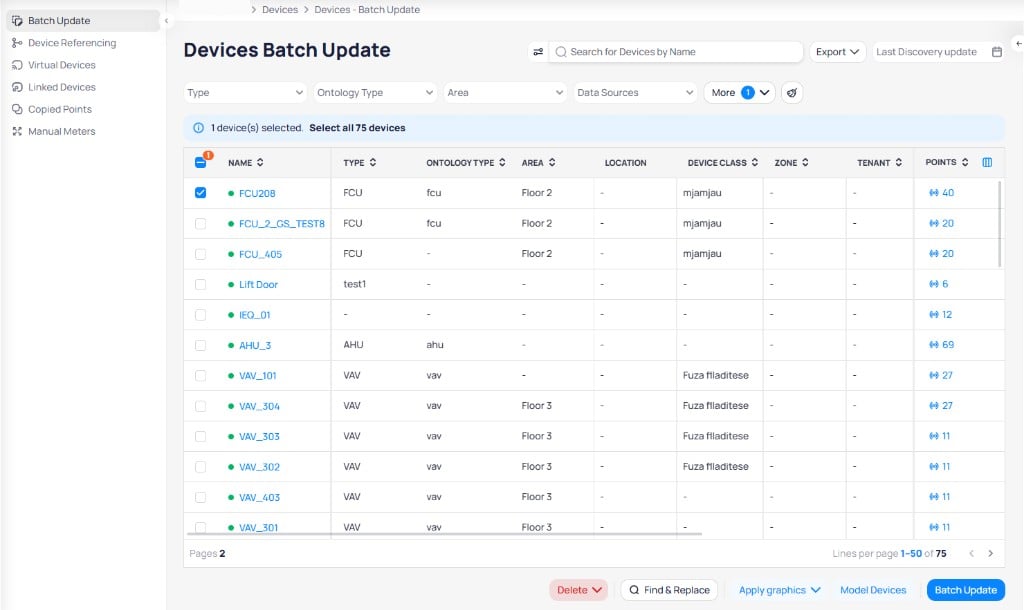
 The batch update page displays all devices in a table with columns for name, type, ontology type, area, location, device class, zone, tenant, and point count. Use the search bar to find devices by name, path, or location. Click the search options icon to switch between **Starts With**, **Contains**, or **Exact** matching and choose which fields to search.
 A bottom toolbar provides quick actions for the selected devices.
 ## Filter devices
Use the filter bar at the top of the page to narrow down the device list by **Type**, **Ontology Type**, **Area**, or **Data Sources**. Click **More** to access additional filters.
## Filter devices
Use the filter bar at the top of the page to narrow down the device list by **Type**, **Ontology Type**, **Area**, or **Data Sources**. Click **More** to access additional filters.
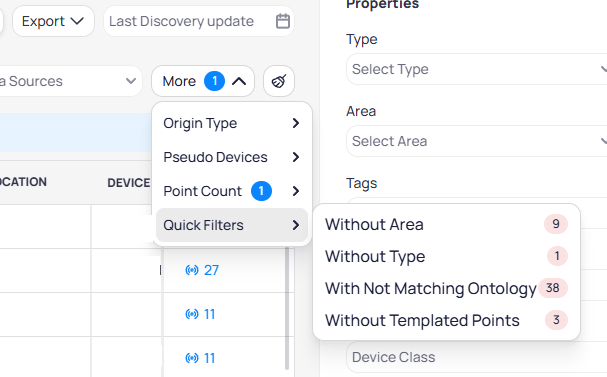
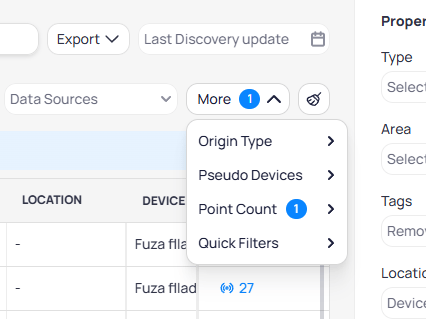 Select **Quick Filters** to quickly find devices that need attention, such as devices without an area, without a type, with non-matching ontology, or without templated points.
 ## Update device properties
Select the devices you want to update by checking the boxes next to each device name, or click **Select all** to select every device that matches your filters. The **Properties** panel appears on the right side where you can set values to apply in bulk.
## Update device properties
Select the devices you want to update by checking the boxes next to each device name, or click **Select all** to select every device that matches your filters. The **Properties** panel appears on the right side where you can set values to apply in bulk.
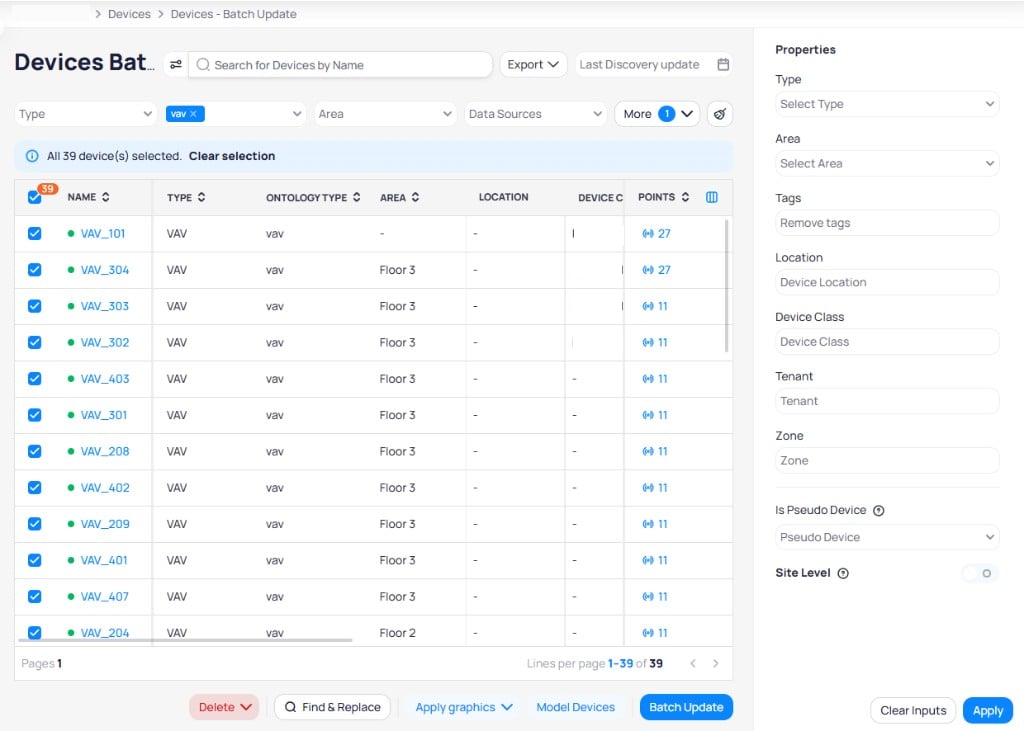 Set the values you want to apply, then click **Apply** to update all selected devices. Click **Clear Inputs** to reset the properties form.
| Property | Description |
| -------------------- | ------------------------------------------------ |
| **Type** | The device type classification |
| **Area** | The floor, zone, or room assignment |
| **Tags** | Metadata tags applied to the devices |
| **Location** | The physical location description |
| **Device Class** | The device classification category |
| **Tenant** | The tenant associated with the devices |
| **Zone** | The zone assignment |
| **Is Pseudo Device** | Whether the device is a virtual or pseudo device |
| **Site Level** | Whether the device operates at the site level |
## Batch actions
The bottom toolbar provides additional actions for selected devices:
| Action | Description |
| ------------------ | ------------------------------------------------------ |
| **Delete** | Remove devices, graphics, or ontology mappings |
| **Find & Replace** | Search and replace text in device names |
| **Apply graphics** | Assign graphic templates to the selected devices |
| **Model Devices** | Open the Points Modeling page for the selected devices |
| **Batch Update** | Apply property changes from the Properties panel |
### Delete
Click the **Delete** dropdown to choose from several removal options:
Set the values you want to apply, then click **Apply** to update all selected devices. Click **Clear Inputs** to reset the properties form.
| Property | Description |
| -------------------- | ------------------------------------------------ |
| **Type** | The device type classification |
| **Area** | The floor, zone, or room assignment |
| **Tags** | Metadata tags applied to the devices |
| **Location** | The physical location description |
| **Device Class** | The device classification category |
| **Tenant** | The tenant associated with the devices |
| **Zone** | The zone assignment |
| **Is Pseudo Device** | Whether the device is a virtual or pseudo device |
| **Site Level** | Whether the device operates at the site level |
## Batch actions
The bottom toolbar provides additional actions for selected devices:
| Action | Description |
| ------------------ | ------------------------------------------------------ |
| **Delete** | Remove devices, graphics, or ontology mappings |
| **Find & Replace** | Search and replace text in device names |
| **Apply graphics** | Assign graphic templates to the selected devices |
| **Model Devices** | Open the Points Modeling page for the selected devices |
| **Batch Update** | Apply property changes from the Properties panel |
### Delete
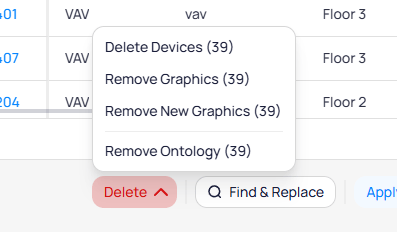
Click the **Delete** dropdown to choose from several removal options:
 | Option | Description |
| ------------------- | -------------------------------------------------- |
| **Delete Devices** | Permanently remove the selected devices |
| **Remove Graphics** | Remove assigned graphics from the selected devices |
| **Remove Ontology** | Clear ontology mappings from the selected devices |
### Find and replace
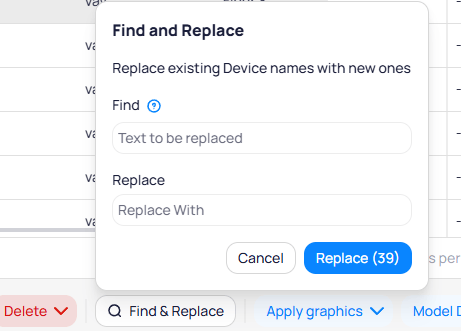
Click **Find & Replace** to open the find and replace dialog. Enter the text to find in existing device names and the replacement text, then click **Replace** to rename all matching devices at once.
| Option | Description |
| ------------------- | -------------------------------------------------- |
| **Delete Devices** | Permanently remove the selected devices |
| **Remove Graphics** | Remove assigned graphics from the selected devices |
| **Remove Ontology** | Clear ontology mappings from the selected devices |
### Find and replace
Click **Find & Replace** to open the find and replace dialog. Enter the text to find in existing device names and the replacement text, then click **Replace** to rename all matching devices at once.
 ### Export devices
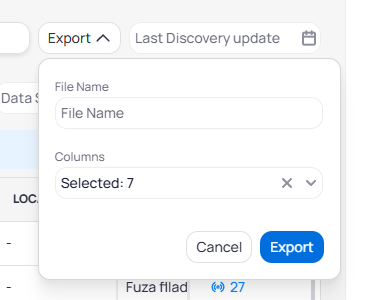
Click **Export** at the top of the page to download device data. Enter a file name, select the columns to include, and click **Export** to generate the file.
### Export devices
Click **Export** at the top of the page to download device data. Enter a file name, select the columns to include, and click **Export** to generate the file.
 Batch operations affect multiple devices at once. Review your selections carefully before applying. Reassigning areas or applying templates may affect dashboards, schedules, and analytics that reference these devices.
## Next steps
Create reusable configurations to apply during batch updates.
Return to the devices overview for individual device management.
Batch operations affect multiple devices at once. Review your selections carefully before applying. Reassigning areas or applying templates may affect dashboards, schedules, and analytics that reference these devices.
## Next steps
Create reusable configurations to apply during batch updates.
Return to the devices overview for individual device management.