> ## Documentation Index
> Fetch the complete documentation index at: https://documentation.kodelabs.com/llms.txt
> Use this file to discover all available pages before exploring further.
# Copied points
> Duplicate point values between devices so sensors and setpoints stay shared across equipment without templating workarounds.
Copied points let you mirror one or more points from a source device onto other devices in a single batch operation. You do not need to template devices or set up cross-references between source and target equipment.
The copy reflects the source point in real time. You can expose the same sensor or setpoint on multiple devices without reconfiguring the data source.
Unlike moving points on virtual devices, copying keeps the point on the **source** device and adds it to **target** devices.
```mermaid actions={false} theme={"theme":{"light":"github-dark","dark":"github-dark"}}
---
config:
theme: neutral
---
flowchart LR
SRC[Source Device] -- "owns" --> PT[OA Temp Sensor]
PT -- "copied to" --> T1[Target Device A]
PT -- "copied to" --> T2[Target Device B]
classDef sky stroke:#374D7C,fill:#E2EBFF,color:#374D7C
classDef rose stroke:#FF5978,fill:#FFDFE5,color:#8E2236
classDef green fill:#B0E4CC,color:#285A48,stroke:#285A48
class SRC sky
class PT rose
class T1,T2 green
```
## Use cases
Copied points help when you need to:
* Share a sensor reading (for example, outdoor air temperature) across multiple devices
* Mirror a setpoint into another device for dashboards or logic
* Surface a shared sensor on downstream equipment without cross-referencing
* Duplicate setpoints or sensors on major water systems where multiple devices use the same value
You can copy points only from **original (physical) devices**. Copying from virtual devices is not supported.
## Copy points from batch update
The main workflow starts on **Devices** and uses **Batch Update Devices** → **Copied Points** → **Copy Points**.
### Open Devices and batch update
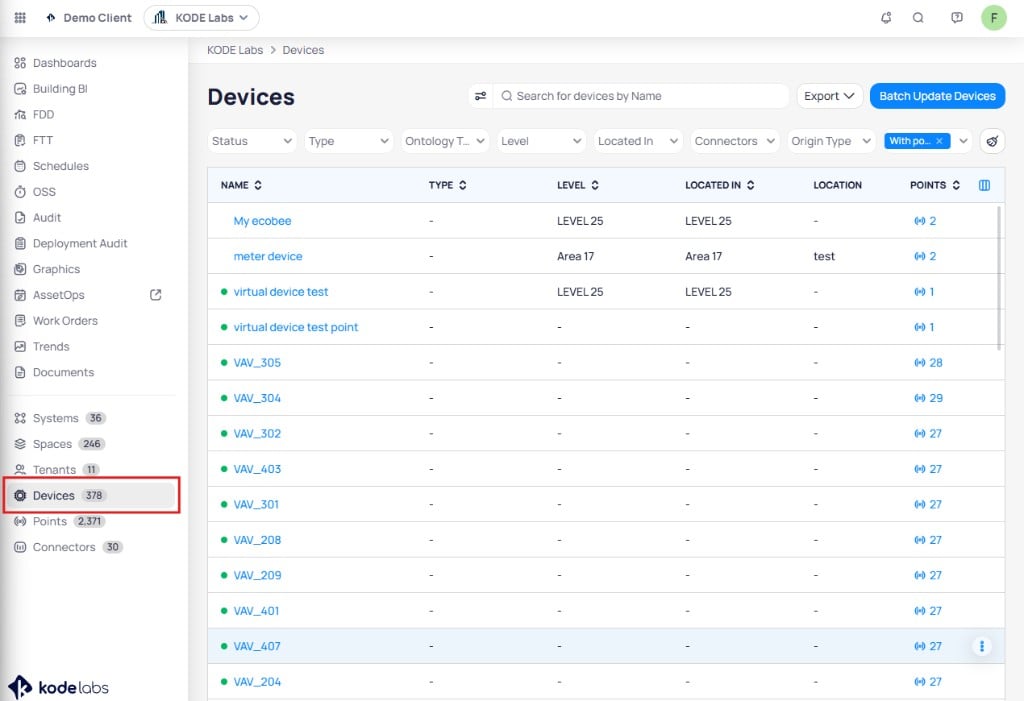
In the sidebar, select **`Devices`** to open the devices list for your site.
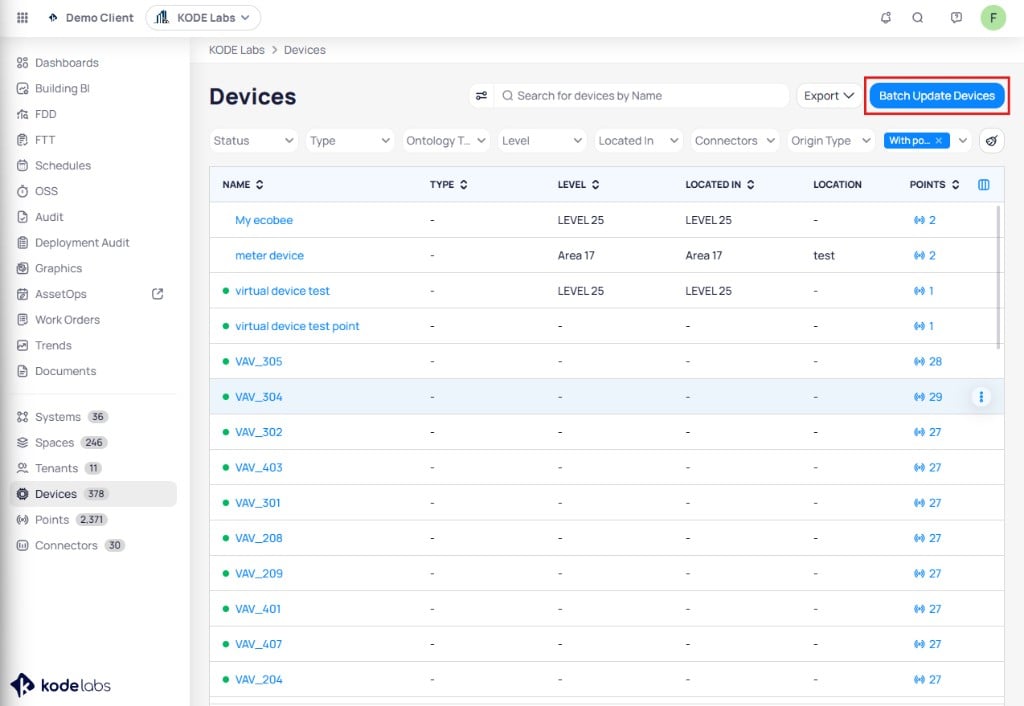
 On the **Devices** page, click **`Batch Update Devices`** in the upper right corner.
 ### Open Copied Points and start the wizard
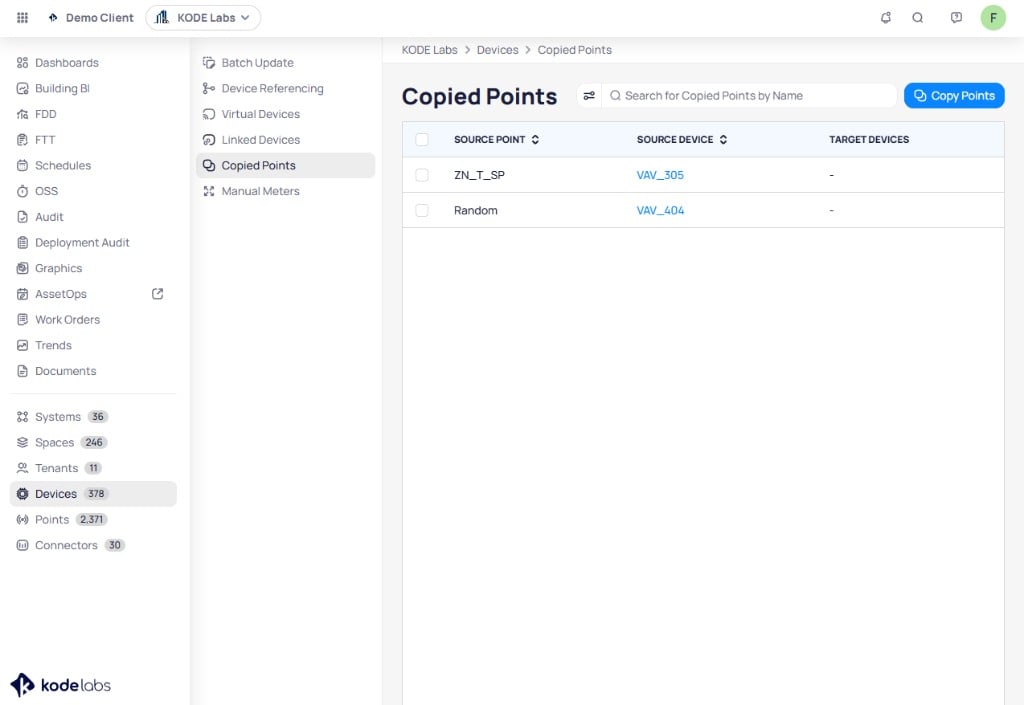
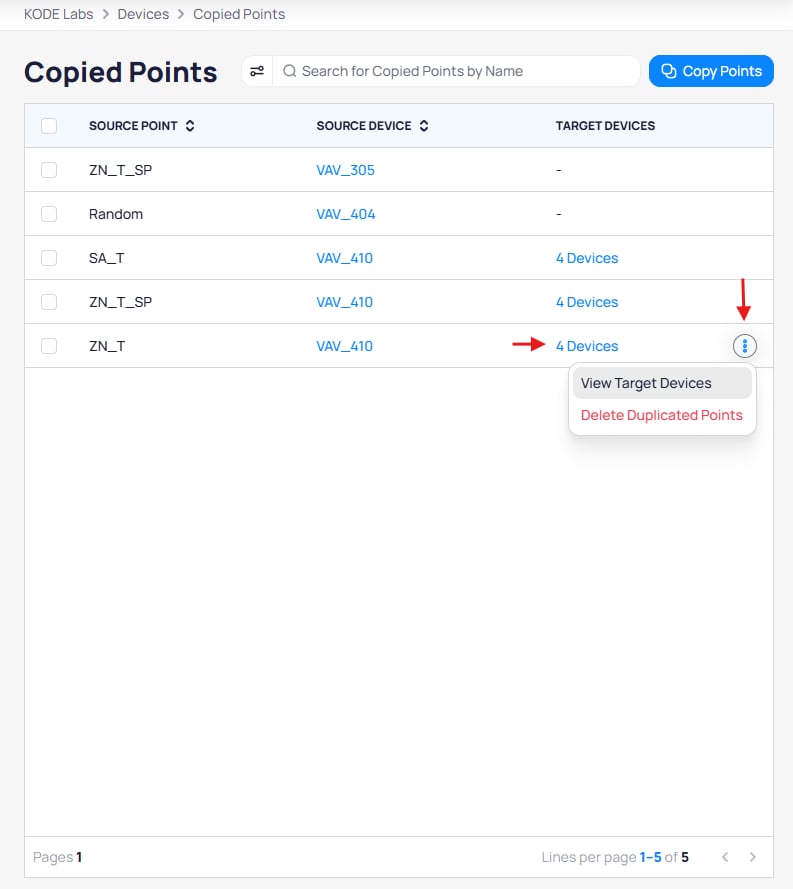
In the batch update sidebar, click **`Copied Points`**. The page lists existing copies with **SOURCE POINT**, **SOURCE DEVICE**, and **TARGET DEVICES**. Click **`Copy Points`** in the upper right to start the wizard.
### Open Copied Points and start the wizard
In the batch update sidebar, click **`Copied Points`**. The page lists existing copies with **SOURCE POINT**, **SOURCE DEVICE**, and **TARGET DEVICES**. Click **`Copy Points`** in the upper right to start the wizard.
 ### Step 1: Select source device
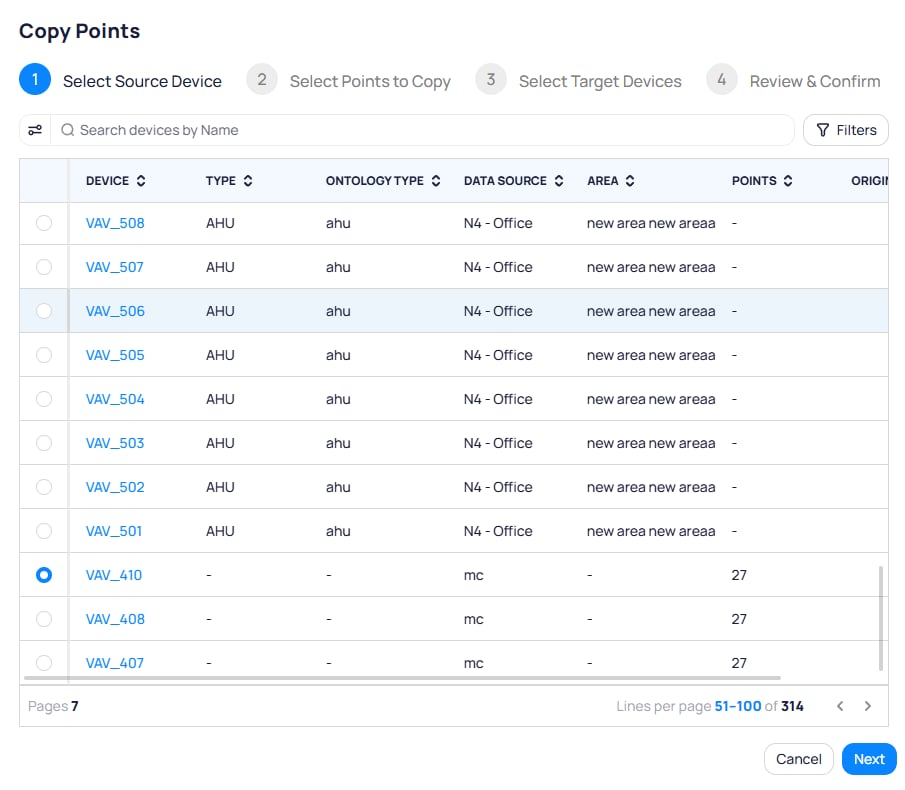
The **Copy Points** wizard opens on **Select Source Device**. Search or filter the table, select **one** source device (radio selection), then click **`Next`**.
### Step 1: Select source device
The **Copy Points** wizard opens on **Select Source Device**. Search or filter the table, select **one** source device (radio selection), then click **`Next`**.
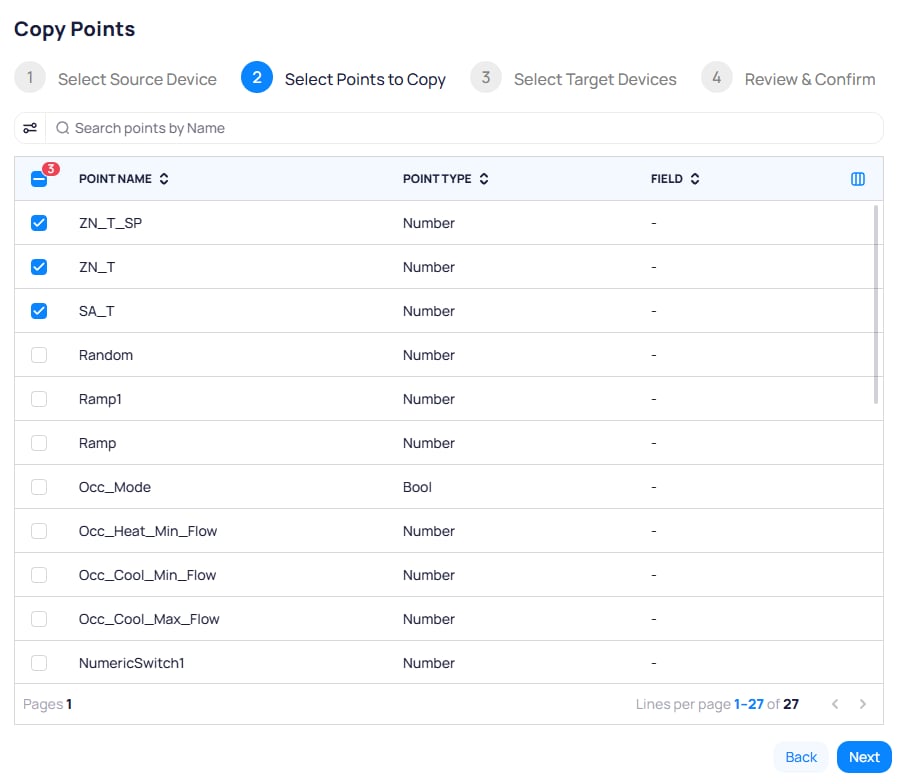
 ### Step 2: Select points to copy
On **Select Points to Copy**, use the search bar and select **one or more** points with the checkboxes. Click **`Next`**.
### Step 2: Select points to copy
On **Select Points to Copy**, use the search bar and select **one or more** points with the checkboxes. Click **`Next`**.
 ### Step 3: Select target devices
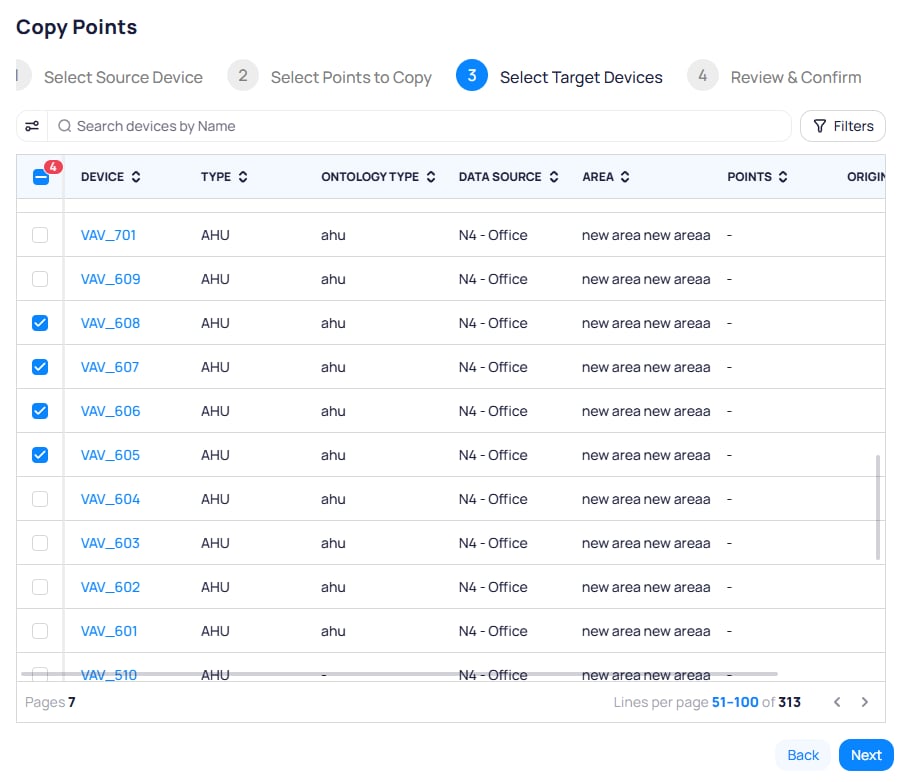
On **Select Target Devices**, search or filter, then select **one or more** target devices with the checkboxes. Click **`Next`**.
### Step 3: Select target devices
On **Select Target Devices**, search or filter, then select **one or more** target devices with the checkboxes. Click **`Next`**.
 ### Step 4: Review and confirm
On **Review & Confirm**, use the tabs **To be copied**, **Copy exists**, and **Copy limit reached** to review the proposed copies. When the list looks correct, click **`Copy Now`**.
Each building supports up to **1000** copied points. Rows that exceed this limit appear on the **Copy limit reached** tab and are not added until you remove existing copies.
### Step 4: Review and confirm
On **Review & Confirm**, use the tabs **To be copied**, **Copy exists**, and **Copy limit reached** to review the proposed copies. When the list looks correct, click **`Copy Now`**.
Each building supports up to **1000** copied points. Rows that exceed this limit appear on the **Copy limit reached** tab and are not added until you remove existing copies.
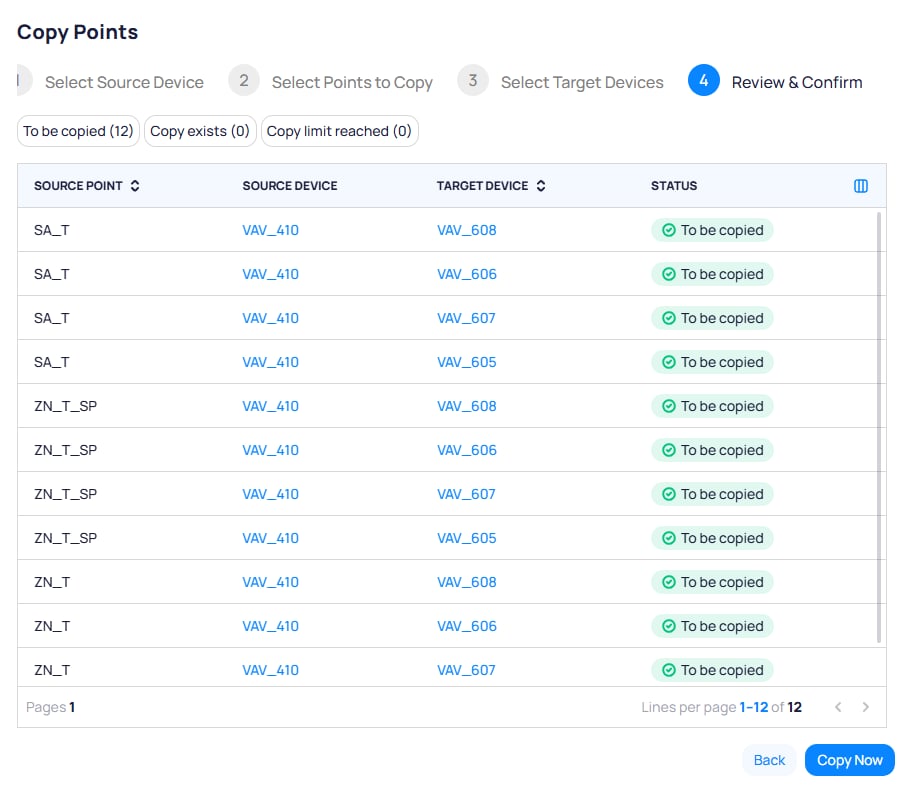 After the operation completes, the results screen summarizes what ran. Copied points appear on the selected targets and show up on the **Copied Points** list.
## Copy a point from device details
You can start a copy from a single device without opening **Copied Points** first. This path does not list points that are already duplicated in the building. To audit or manage existing copies, use the **Copied Points** page under **Batch Update Devices**.
Open the device from **`Devices`**, then click the **`Device Details`** tab on the device page (alongside **Trends**, **Graphic**, and other tabs).
After the operation completes, the results screen summarizes what ran. Copied points appear on the selected targets and show up on the **Copied Points** list.
## Copy a point from device details
You can start a copy from a single device without opening **Copied Points** first. This path does not list points that are already duplicated in the building. To audit or manage existing copies, use the **Copied Points** page under **Batch Update Devices**.
Open the device from **`Devices`**, then click the **`Device Details`** tab on the device page (alongside **Trends**, **Graphic**, and other tabs).
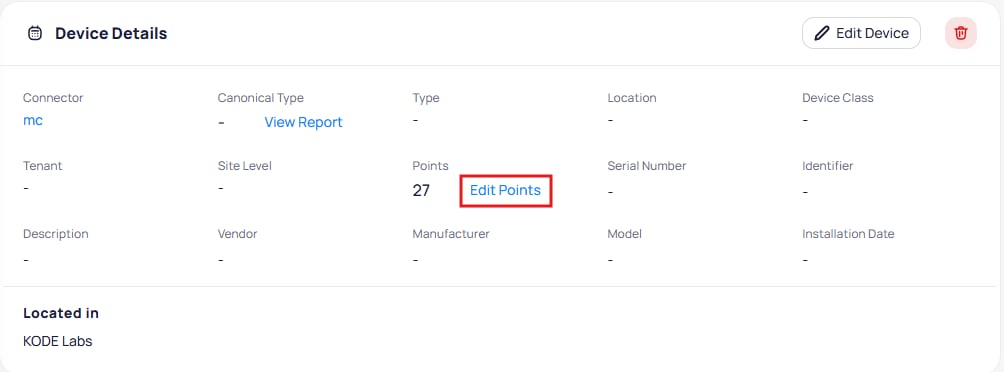
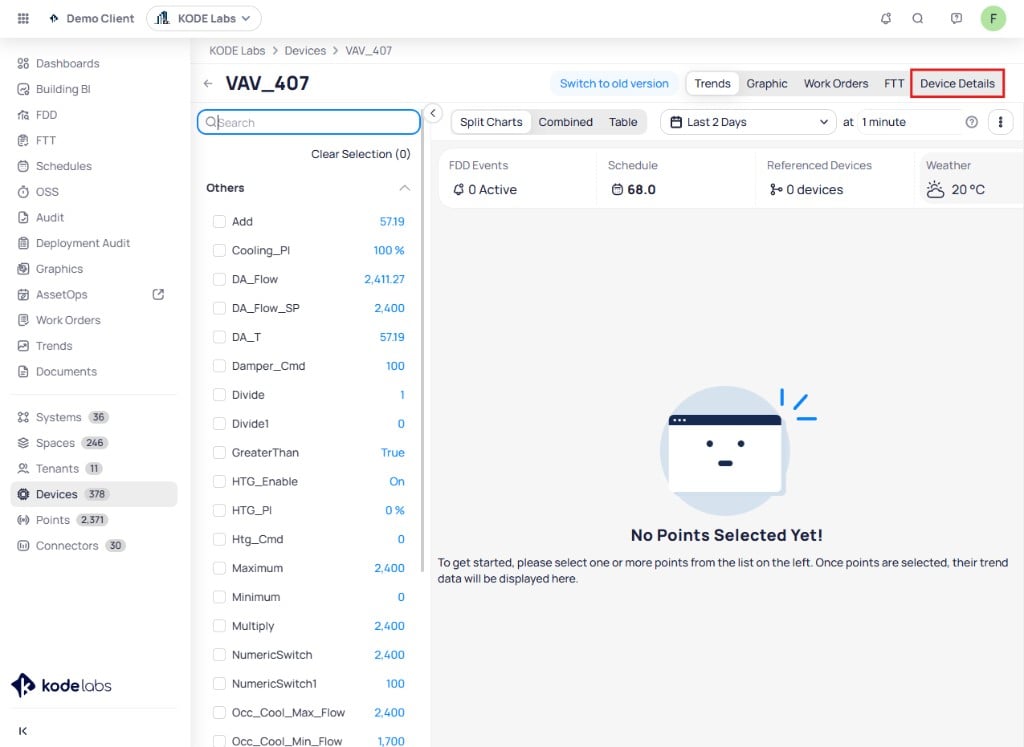 On the **Device Details** panel, click **`Edit Points`** next to the points count.
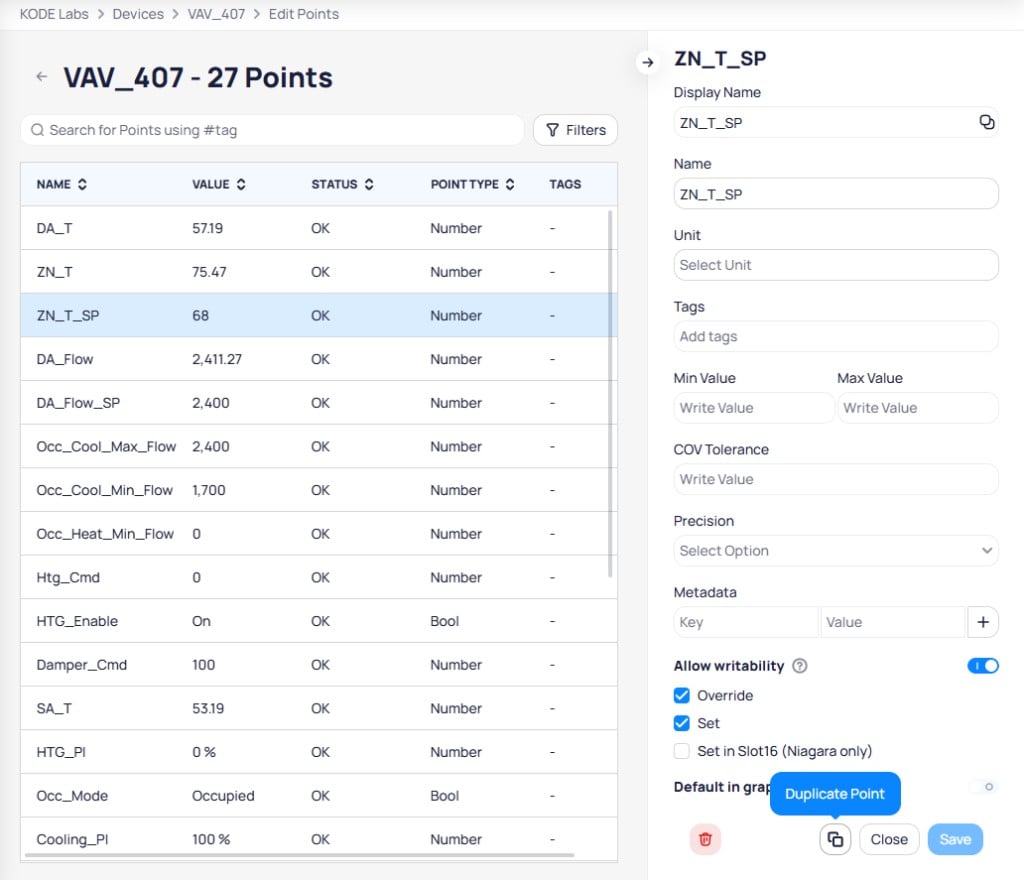
 On **Edit Points**, select the point in the list. In the right panel, click **`Duplicate Point`** (two overlapping squares).
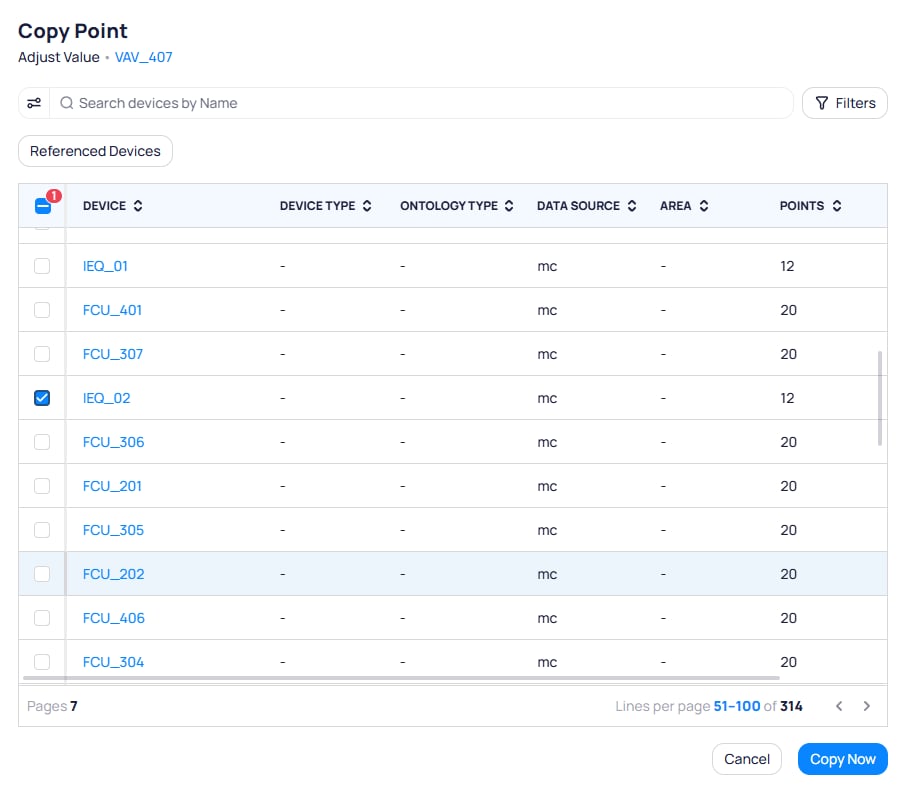
 In the **Copy Point** dialog, use **Search devices by Name**, **Filters**, and tabs such as **Referenced Devices** when shown. Select **one or more** targets, then click **`Copy Now`**.
 ## Point behavior after duplication
| Scenario | What happens |
| --------------------------- | ------------------------------------------------------------------------------------------------------- |
| Source point value changes | Copies on all targets update in real time |
| Source point is deleted | The copy is removed from every target |
| Source device is deleted | All copies of its points are removed from every target |
| Copy is deleted on a target | Only that target loses the copy; the source and other targets are unchanged |
| Source point was templated | The copy on the target is **not** templated; the duplication relationship is what ties it to the source |
## Remove copied points
Go to **`Devices`** → **`Batch Update Devices`** → **`Copied Points`**. Select **one or more** rows with the checkboxes. The toolbar shows **`Delete Duplicated Points`** with a count of selected rows—click it to remove those copies from their targets.
## Point behavior after duplication
| Scenario | What happens |
| --------------------------- | ------------------------------------------------------------------------------------------------------- |
| Source point value changes | Copies on all targets update in real time |
| Source point is deleted | The copy is removed from every target |
| Source device is deleted | All copies of its points are removed from every target |
| Copy is deleted on a target | Only that target loses the copy; the source and other targets are unchanged |
| Source point was templated | The copy on the target is **not** templated; the duplication relationship is what ties it to the source |
## Remove copied points
Go to **`Devices`** → **`Batch Update Devices`** → **`Copied Points`**. Select **one or more** rows with the checkboxes. The toolbar shows **`Delete Duplicated Points`** with a count of selected rows—click it to remove those copies from their targets.
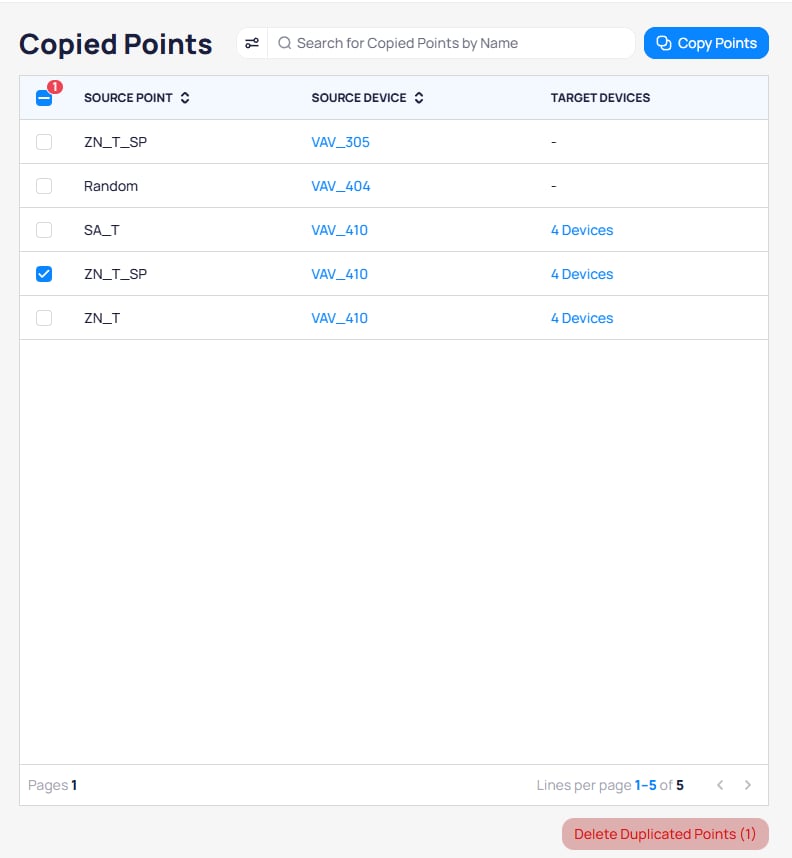 You can also open the row **three-dot** menu and choose **`Delete Duplicated Points`** for that row only.
 ## View or manage target devices
From the **Copied Points** list:
* Click the link in **TARGET DEVICES** when copies exist (for example **`4 Devices`**), or
* Open the row **three-dot** menu and choose **`View Target Devices`**.
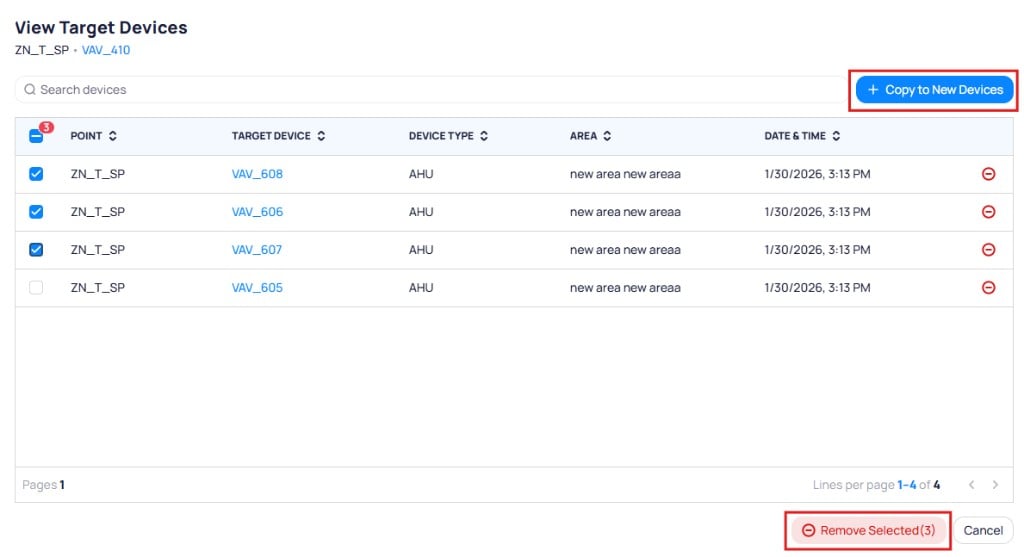
The **View Target Devices** page lists every target that receives the copy for that source point and device. From there you can:
* Click **`+ Copy to New Devices`** to copy the same point to additional devices.
* Select targets and click **`Remove Selected`** to drop those copies, or use the **minus** control on a row to remove one target.
## View or manage target devices
From the **Copied Points** list:
* Click the link in **TARGET DEVICES** when copies exist (for example **`4 Devices`**), or
* Open the row **three-dot** menu and choose **`View Target Devices`**.
The **View Target Devices** page lists every target that receives the copy for that source point and device. From there you can:
* Click **`+ Copy to New Devices`** to copy the same point to additional devices.
* Select targets and click **`Remove Selected`** to drop those copies, or use the **minus** control on a row to remove one target.
 ## Copy history on the Copied Points page
The **Copied Points** page lists copy activity for the building. Each entry shows the source point, source device, target device or devices, and when the copy ran. Use it to audit shared points and ongoing duplication.
## Next steps
Filter devices and run bulk updates from the batch update workspace.
Understand point types, normalization, and how copied points fit in.
## Copy history on the Copied Points page
The **Copied Points** page lists copy activity for the building. Each entry shows the source point, source device, target device or devices, and when the copy ran. Use it to audit shared points and ongoing duplication.
## Next steps
Filter devices and run bulk updates from the batch update workspace.
Understand point types, normalization, and how copied points fit in.