> ## Documentation Index
> Fetch the complete documentation index at: https://documentation.kodelabs.com/llms.txt
> Use this file to discover all available pages before exploring further.
# What is Functional Testing?
> Automate equipment testing and continuous commissioning with the Cloud BMS Functional Testing Tool (FTT).
The Functional Testing Tool (FTT) automates the testing and validation of building equipment directly from Cloud BMS. FTT replaces manual commissioning checks with digital workflows that command equipment, monitor sensor responses, and score results automatically.
Open FTT from the Cloud BMS portfolio or building sidebar.
## Example: how FTT decides if a heater works
An FCU heating workflow answers one question: can this unit deliver heat when commanded?
The workflow runs a fixed sequence:
1. **Check readiness** — confirm the unit is occupied and the fan is running. If not, the test stops and archives. This gate is not part of the scored sequence total.
2. **Stop cooling** — close the chilled water valve. Pass when discharge air temperature rises out of a cooled range.
3. **Stop heating** — close the hot water valve. Pass when discharge air temperature falls out of a heated range.
4. **Start heating** — open the hot water valve. Pass when discharge air temperature rises past the configured threshold within the time limit.
5. **Score the run** — divide passed sequences by total scored sequences. Two of three passed is **66.67%**. In KODE Library workflows, sequences are weighted equally. Custom workflows can change sequence weight when the logic exposes a weight parameter.
FTT does not rely on a visual check or a one-time site visit. It writes the commands, reads the sensors, and records pass or fail for each step.
## Why functional testing matters
Traditional commissioning requires a technician to inspect each piece of equipment and verify its operation. That process is time-consuming, expensive, and usually happens once during construction.
FTT shifts this to continuous, automated testing. You schedule recurring tests across your building, catch failing equipment before occupant complaints, and keep a digital record of every result.
## How the pieces fit together
FTT work follows this path:
1. **Workflow** — the test logic for one equipment type and component (commands, sensors, thresholds, report text)
2. **Project** — assigns devices to a workflow, groups them (by floor or count), and sets the schedule
3. **Task** — one scheduled batch inside a project (for example, Floor 03 on Monday at 16:00)
4. **Test result** — the step-by-step report and score for one device run
You can also run a single on-demand test from a device without creating a project. See [What is Functional Testing?](/products/ftt/overview).
### Workflows
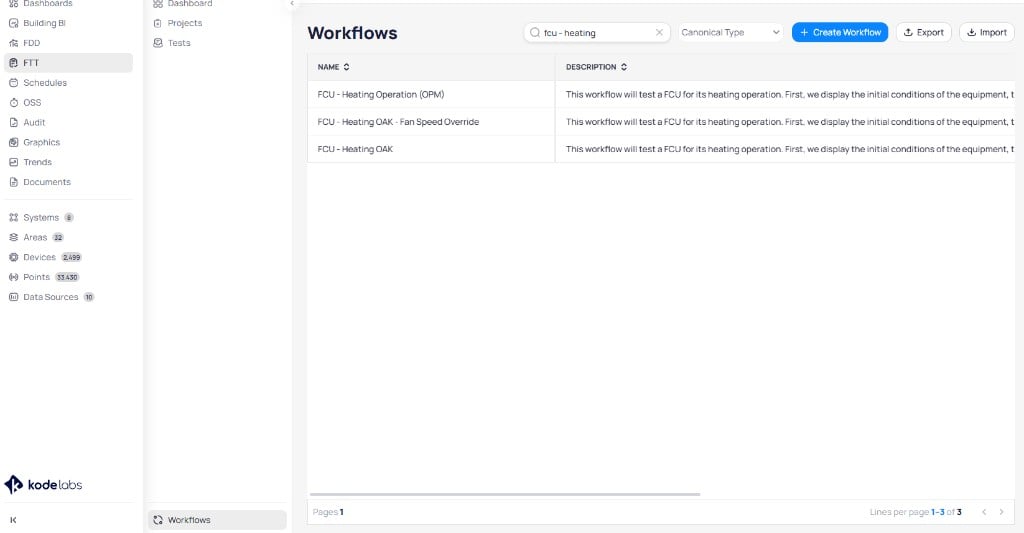
A workflow defines the end-to-end test sequence for a specific equipment type and component. Each workflow specifies the points to read, the commands to write, the success criteria, and the text output for the report.
Cloud BMS provides a pre-configured library covering common HVAC equipment:
* **VAV** (Variable Air Volume): damper operation, heating, airflow setpoint tracking, min/max damper
* **FCU** (Fan Coil Unit): heating operation, cooling operation, fan operation
* **AHU** (Air Handling Unit): heating, cooling, damper operation, VFD operation
* **Heat Pump**: heating and cooling operation
You can also create custom workflows with the drag-and-drop logic builder.
 ### Projects
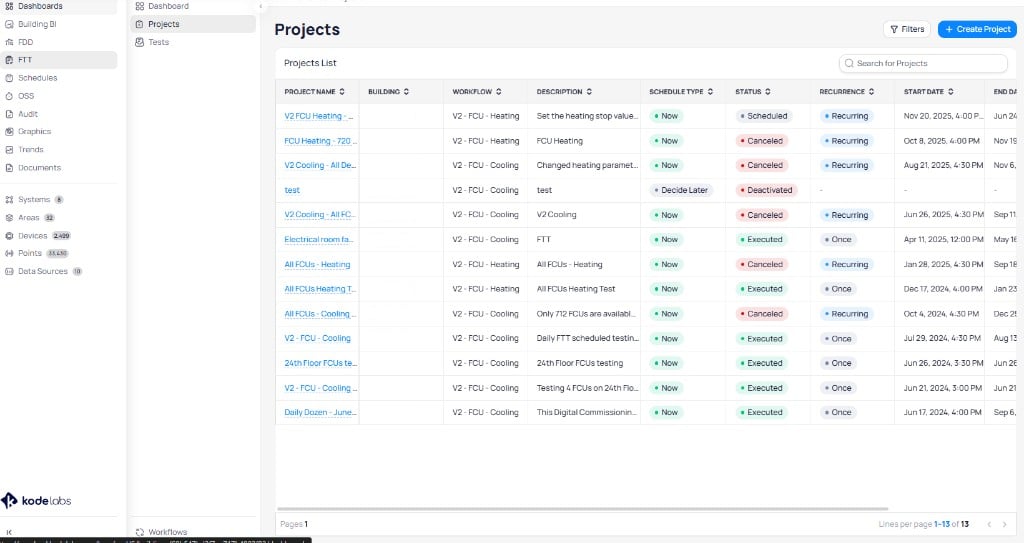
A project assigns one or more devices to a workflow along with a schedule. Projects can span an entire building or selected floors and run over days, weeks, or months. You configure cadence, grouping, and notification recipients when you create a project.
### Projects
A project assigns one or more devices to a workflow along with a schedule. Projects can span an entire building or selected floors and run over days, weeks, or months. You configure cadence, grouping, and notification recipients when you create a project.
 ### Test results
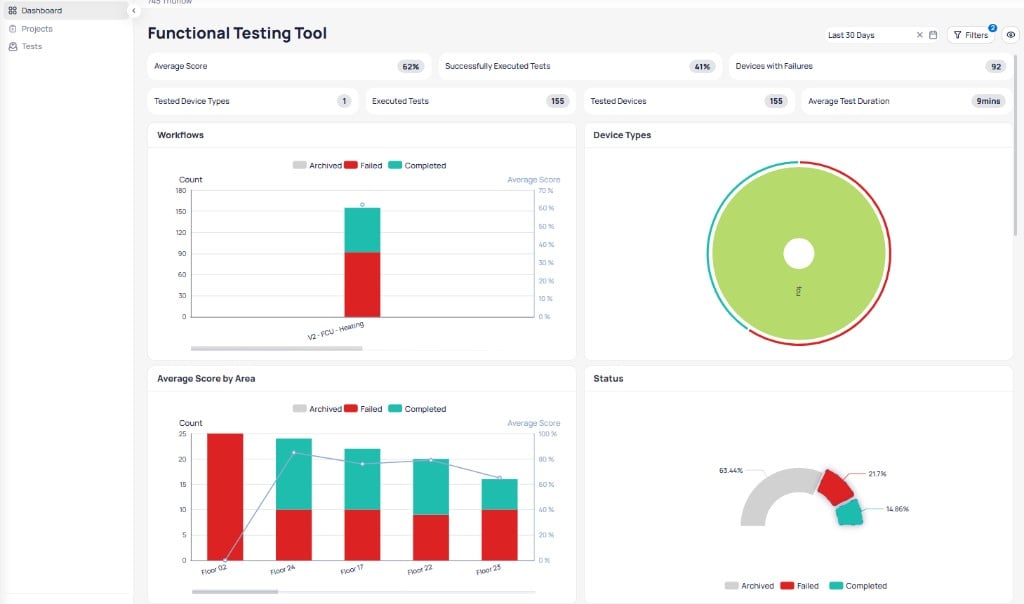
Each completed test produces a report. The report shows the step-by-step sequence, sensor feedback at each stage, and a pass or fail score for each component tested.
### Test results
Each completed test produces a report. The report shows the step-by-step sequence, sensor feedback at each stage, and a pass or fail score for each component tested.
 ## Prerequisites
FTT requires the following to produce valid results:
* **Correct device templating**: all points required by the workflow must be available on the device
* **Writable points**: the test engine must be able to write commands and receive feedback
* **Active equipment**: the device and any parent equipment (such as an upstream AHU) must be in an appropriate operating state
## Navigate to FTT
Log in to Cloud BMS and select a site from the sites list.
Select `FTT` from the left sidebar. The module opens to the test results dashboard.
## Next steps
Run an on-demand FCU heating test and read the score.
Review test scores, detailed reports, and device test history.
Create and manage automated testing projects across your building.
Browse, create, and customize testing workflows.
## Prerequisites
FTT requires the following to produce valid results:
* **Correct device templating**: all points required by the workflow must be available on the device
* **Writable points**: the test engine must be able to write commands and receive feedback
* **Active equipment**: the device and any parent equipment (such as an upstream AHU) must be in an appropriate operating state
## Navigate to FTT
Log in to Cloud BMS and select a site from the sites list.
Select `FTT` from the left sidebar. The module opens to the test results dashboard.
## Next steps
Run an on-demand FCU heating test and read the score.
Review test scores, detailed reports, and device test history.
Create and manage automated testing projects across your building.
Browse, create, and customize testing workflows.