> ## Documentation Index
> Fetch the complete documentation index at: https://documentation.kodelabs.com/llms.txt
> Use this file to discover all available pages before exploring further.
# Deployment guide
> Roll out FTT across a building: draft projects, calibrate parameters, and set production schedules in Cloud BMS.
Use this guide when you roll out FTT for operators and commissioning teams. It covers draft projects, small-scale calibration, client review, and production schedules.
If you have not run a single test yet, complete [What is Functional Testing?](/products/ftt/overview) first. Confirm how scores are produced before you schedule building-wide work.
## Who this guide is for
* Building engineers and operators who will review weekly results
* Commissioning agents who calibrate thresholds and seasonal cadence
* Implementation teams who set the first recurring projects
Custom workflow authoring is separate. See the [Workflow creator guide](/products/ftt/workflow-creator-guide) only when the library does not cover the sequence you need.
## Standard workflows
The following workflows are the standard set for buildings with compatible equipment:
| Workflow | Device type |
| -------------------------- | ----------- |
| VAV Induced Heating | VAV |
| VAV Damper Min/Max | VAV |
| FCU Heating | FCU |
| FCU Cooling | FCU |
| AHU Heating Operation | AHU |
| AHU Mixed Damper Operation | AHU |
### Additional workflows
Deploy these workflows as needed based on site requirements:
| Workflow | When to use |
| ----------------------------- | ---------------------------------------------------------------------------- |
| VAV Stuck Damper Testing | When Min/Max flow is not compatible, or the site needs a simpler damper test |
| VAV Airflow Setpoint Tracking | When the airflow setpoint is writable but the damper is not |
## Choose workflows by season
| Season | Recommended workflows |
| --------------------- | --------------------------------- |
| Spring through summer | VAV Damper Operation, FCU Cooling |
| Fall through winter | VAV Induced Heating, FCU Heating |
Match the library page to the component you need to score. See [VAV workflows](/products/ftt/vav-workflows), [FCU workflows](/products/ftt/fcu-workflows), [AHU workflows](/products/ftt/ahu-workflows), and [Heat pump workflows](/products/ftt/hp-workflows).
## Phase 1: create projects and check compatibility
Create projects for each applicable workflow and save them as drafts. Select a workflow from the library and review its parameters before assigning devices.
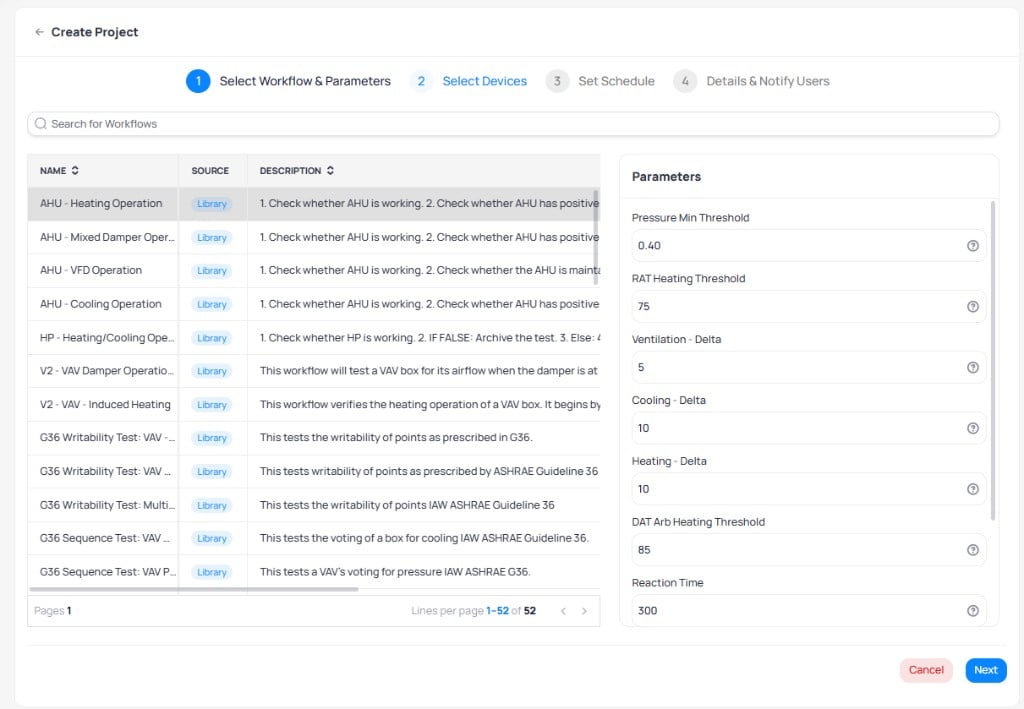 Review the compatibility results for each project. Devices that lack required points or writable points appear as incompatible. Address templating or write-access issues before proceeding.
## Phase 2: calibrate and validate
For each workflow, test five devices or one floor. The goal is to validate the following:
* Points are writable
* Equipment responds to commands
* Parameters are adequately adjusted
* At least 80% of tests pass or produce valid results
Adjust workflow parameters based on initial results. Common adjustments include increasing max sequence duration for slower equipment or modifying threshold multipliers for different equipment generations.
Review the compatibility results for each project. Devices that lack required points or writable points appear as incompatible. Address templating or write-access issues before proceeding.
## Phase 2: calibrate and validate
For each workflow, test five devices or one floor. The goal is to validate the following:
* Points are writable
* Equipment responds to commands
* Parameters are adequately adjusted
* At least 80% of tests pass or produce valid results
Adjust workflow parameters based on initial results. Common adjustments include increasing max sequence duration for slower equipment or modifying threshold multipliers for different equipment generations.
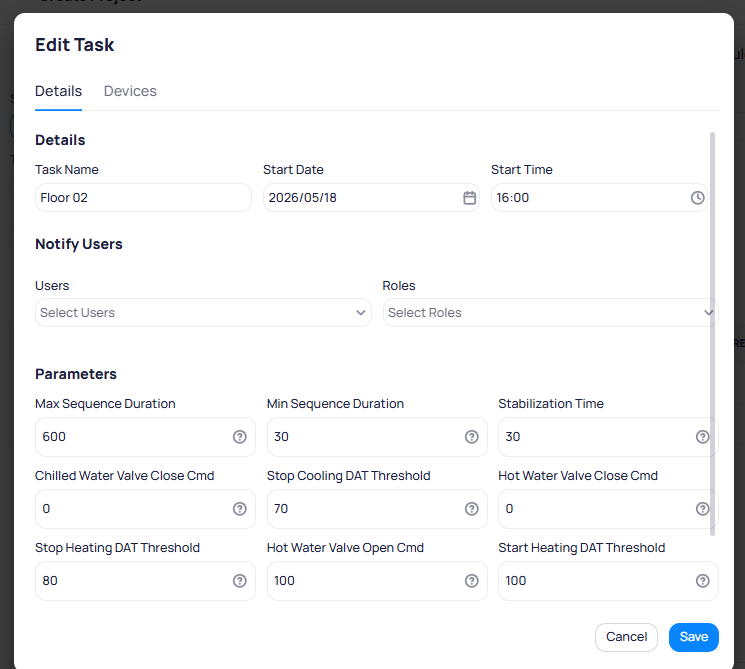 When a sequence fails, open the test report and compare the sensor reading to the threshold. See [How to read a score](/products/ftt/test-results#how-to-read-a-score). Retune only after you confirm the command wrote successfully.
Present initial test results and discuss findings. The test detail report shows the step-by-step sequence with pass/fail indicators for each stage.
When a sequence fails, open the test report and compare the sensor reading to the threshold. See [How to read a score](/products/ftt/test-results#how-to-read-a-score). Retune only after you confirm the command wrote successfully.
Present initial test results and discuss findings. The test detail report shows the step-by-step sequence with pass/fail indicators for each stage.
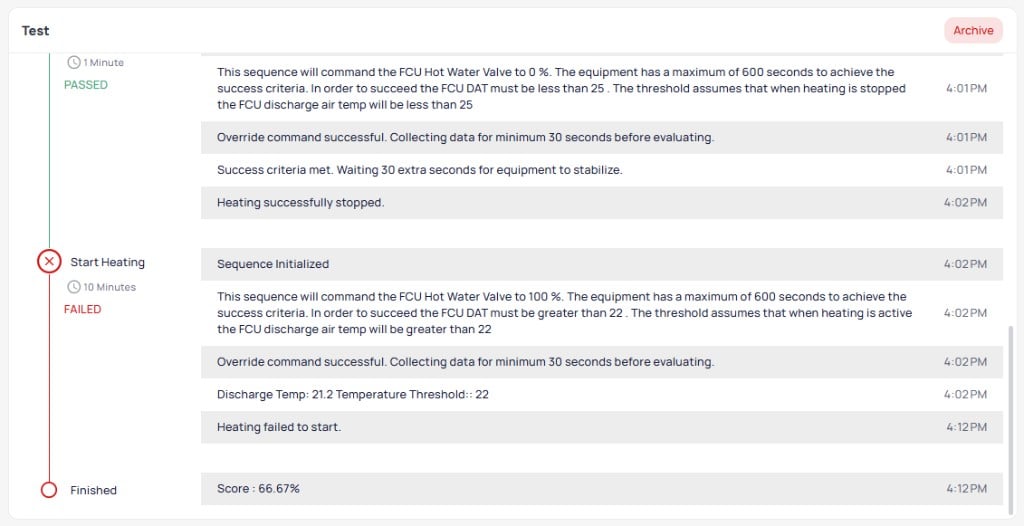 Use this opportunity to confirm the testing schedule and set expectations.
## Phase 3: set the testing schedule
After calibration, work with the building team to establish a production testing schedule.
### Scheduling recommendations
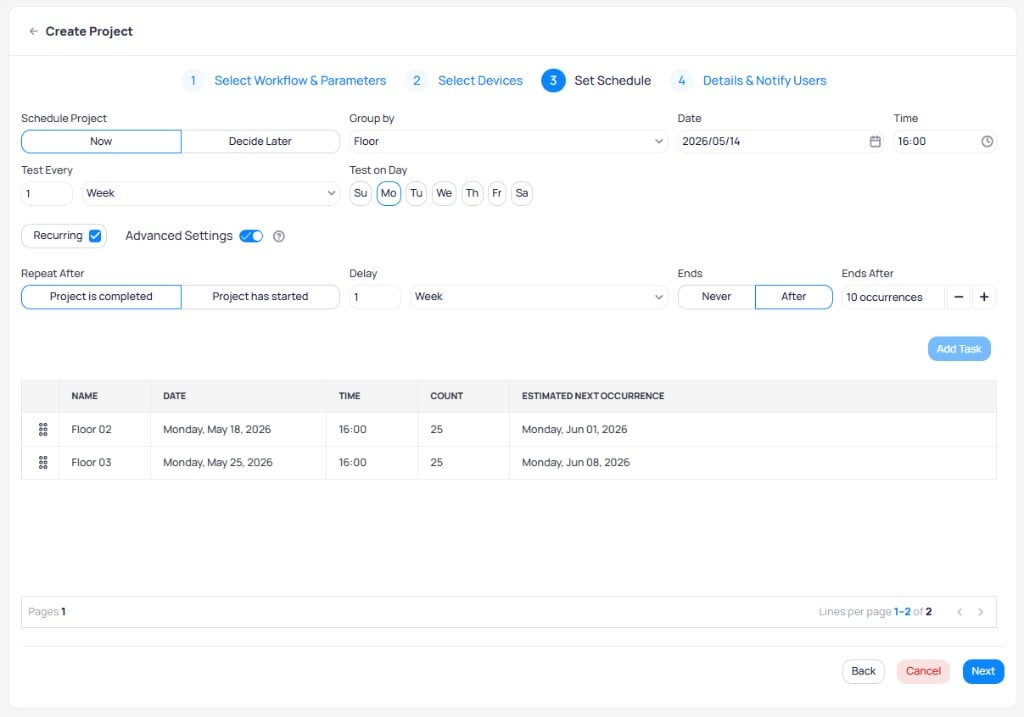
* **Weekly testing on low-occupancy days**: creates a manageable workload and cadence for operators to review results
* **Late afternoon timing**: equipment runs at steady state compared to startup hours, and late afternoon minimizes occupant impact
* **Daily batches of 10 devices**: takes less than 30 minutes and systematically covers the entire building over time
* **Recurring projects**: set up annual or continuous testing cycles for ongoing commissioning
Choose floor, device-count, or single-group scheduling in the project wizard. See [FTT projects](/products/ftt/projects) for grouping guidance.
Use this opportunity to confirm the testing schedule and set expectations.
## Phase 3: set the testing schedule
After calibration, work with the building team to establish a production testing schedule.
### Scheduling recommendations
* **Weekly testing on low-occupancy days**: creates a manageable workload and cadence for operators to review results
* **Late afternoon timing**: equipment runs at steady state compared to startup hours, and late afternoon minimizes occupant impact
* **Daily batches of 10 devices**: takes less than 30 minutes and systematically covers the entire building over time
* **Recurring projects**: set up annual or continuous testing cycles for ongoing commissioning
Choose floor, device-count, or single-group scheduling in the project wizard. See [FTT projects](/products/ftt/projects) for grouping guidance.
 ## Product support
The KODE Labs product team maintains and supports the FTT workflow library:
* New workflow variations are added within seven days of receiving clear requirements
* Product support is available for consulting on workflow needs
* Review and validate workflows at the project level before escalating to product support
## Next steps
Create and manage automated testing projects.
Read scores and investigate failed sequences after calibration runs.
Build custom workflows when the library does not cover your sequence.
Explore the VAV workflow library with parameters and success criteria.
## Product support
The KODE Labs product team maintains and supports the FTT workflow library:
* New workflow variations are added within seven days of receiving clear requirements
* Product support is available for consulting on workflow needs
* Review and validate workflows at the project level before escalating to product support
## Next steps
Create and manage automated testing projects.
Read scores and investigate failed sequences after calibration runs.
Build custom workflows when the library does not cover your sequence.
Explore the VAV workflow library with parameters and success criteria.