> ## Documentation Index
> Fetch the complete documentation index at: https://documentation.kodelabs.com/llms.txt
> Use this file to discover all available pages before exploring further.
# Budgets and capital planning
> How EnerG models energy budgets, accruals, and variance, and how capital measures and scenarios project savings
EnerG connects two financial workflows: annual energy budgets and capital investment planning. Budgets track plan against actual spend. Capital planning models the savings that reshape future budgets. This page explains the shared concepts.
To build these, see [Budget planning](/products/energ/finance/budget-planning) and [Capital planning](/products/energ/sustainability/capital-planning).
## Predicted, actual, and variance
A budget sets a planned cost for each month. As bills arrive, EnerG compares plan against reality.
| Term | Meaning |
| --------- | ---------------------------------------------------------- |
| Predicted | Estimated year-end spend based on current trends |
| Actual | Billed cost to date for the selected year |
| Variance | Difference between budget and actual, in value and percent |
Variance shows a dash until an active budget exists for the period.
## Accruals
Accruals estimate cost for periods without final utility bills. They borrow prior-year shapes, apply calendarization, and close month-end gaps.
Treat accruals as placeholders. EnerG trues them up when utilities post final reads. Turn accruals on for month-end reporting and off for a billed-only view during audits.
## Budget models
A budget model trains on a reference period to predict future consumption and cost. Three planning methods drive the values.
| Method | How it builds values |
| ---------------- | ------------------------------------------ |
| Smart Generation | Projects from historical usage and weather |
| Reference Year | Copies a chosen baseline period |
| Manual Entry | Direct monthly input |
Smart Generation and Reference Year draw on a trained model from [Model configuration](/products/energ/finance/budgets). Only one budget should be active per period.
## Measures, curves, and scenarios
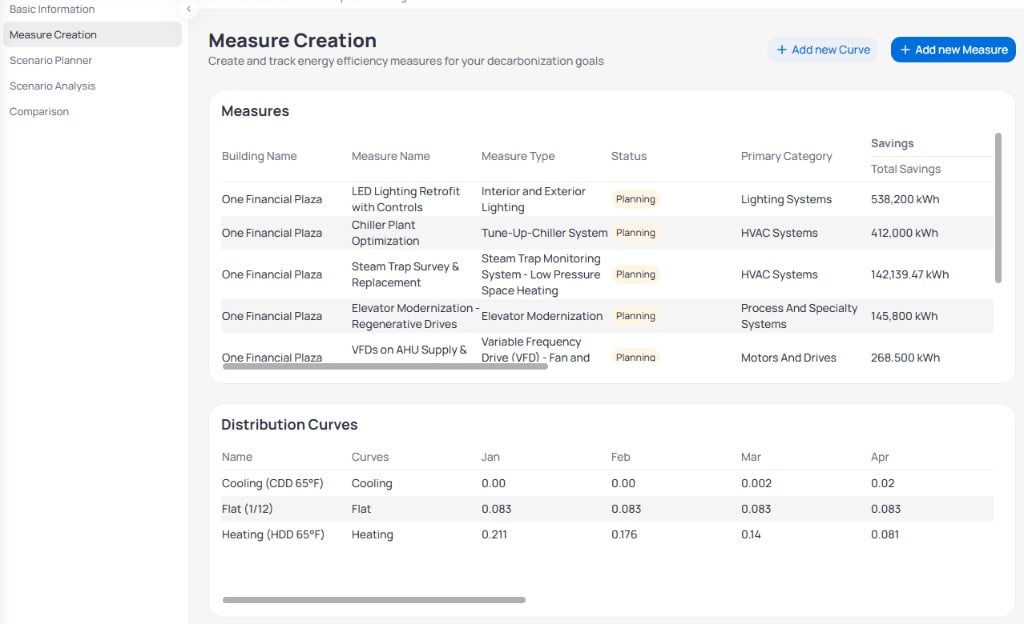
Capital planning models conservation investments before you fund them.
* A **conservation measure** is one project with savings, capital cost, and incentives.
* A **distribution curve** spreads annual savings across months, weighted by cooling, heating, or a flat profile.
* A **scenario** bundles measures into a funding package with priority and dates.
 ## How savings reach the budget
Measures move through a lifecycle: **Planning**, **Implementation**, then **Operations**. The **operation date** marks when savings first count.
Scenarios project savings on the capital planning roadmap toward a target year. When a measure reaches operations, you connect it to an [M\&V model](/products/energ/energy-modeling/mv-models) so verified savings match the plan. You also pull measures into a budget's capital planning step so the plan reflects expected reductions.
Treat simple payback as a planning signal. Confirm capital cost, incentives, and savings against your funding rules before you activate a budget.
## Next steps
Build, review, and activate an annual building budget.
Create measures, curves, and scenarios for one building.
See how M\&V verifies the savings you plan.
Look up distribution curves and accrual behavior.
## How savings reach the budget
Measures move through a lifecycle: **Planning**, **Implementation**, then **Operations**. The **operation date** marks when savings first count.
Scenarios project savings on the capital planning roadmap toward a target year. When a measure reaches operations, you connect it to an [M\&V model](/products/energ/energy-modeling/mv-models) so verified savings match the plan. You also pull measures into a budget's capital planning step so the plan reflects expected reductions.
Treat simple payback as a planning signal. Confirm capital cost, incentives, and savings against your funding rules before you activate a budget.
## Next steps
Build, review, and activate an annual building budget.
Create measures, curves, and scenarios for one building.
See how M\&V verifies the savings you plan.
Look up distribution curves and accrual behavior.