> ## Documentation Index
> Fetch the complete documentation index at: https://documentation.kodelabs.com/llms.txt
> Use this file to discover all available pages before exploring further.
# Fleet emissions
> Register vehicles and log mileage for Scope 1 mobile combustion in EnerG
Register company vehicles and log mileage for Scope 1 mobile combustion reporting in the [portfolio view](/products/energ/get-started/navigation#portfolio-view). Expand `Emissions` in the left sidebar and open `Fleet Emissions`. Fleet data rolls into portfolio Scope 1 totals on [Emissions overview](/products/energ/analytics/portfolio-emissions-overview) and [Benchmarking](/products/energ/analytics/portfolio-emissions-benchmarking). For the accounting model, see [GHG scopes](/products/energ/concepts/emissions-accounting#ghg-scopes).
## Navigate to Fleet Emissions
Click `Emissions` > `Fleet Emissions` in the portfolio left sidebar.
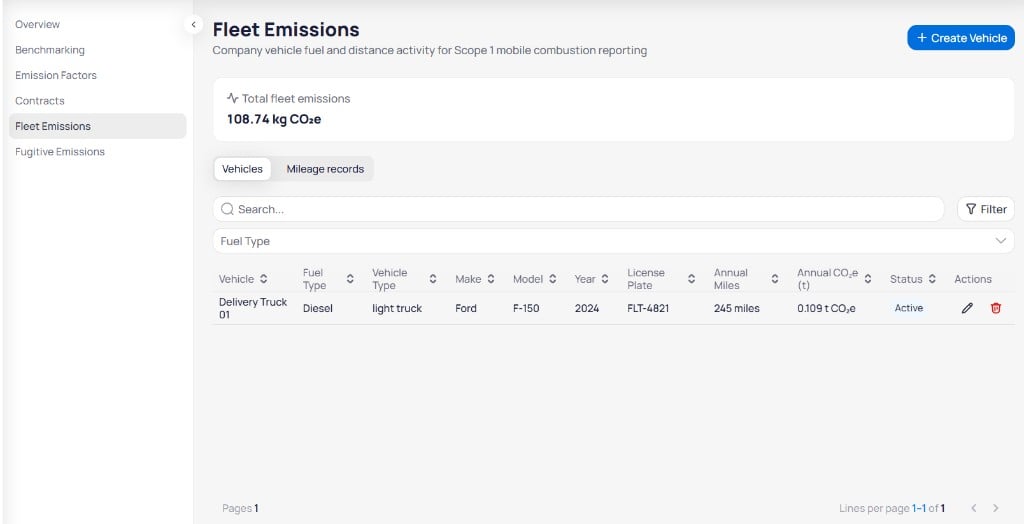 The **Total fleet emissions** card shows portfolio-wide mobile combustion in **kg CO₂e** for the active filters. Two tabs organize fleet data:
| Tab | Purpose |
| ------------------- | ------------------------------------------------------------------ |
| **Vehicles** | Register fleet assets, fuel type, and annual distance or emissions |
| **Mileage records** | Record mileage and fuel activity that drives Scope 1 calculations |
Define each asset on **Vehicles** first, then log activity on **Mileage records**. For the vehicle and mileage record fields, see [fleet fields](/products/energ/reference/emissions-reference#fleet-fields).
## Create a vehicle
On the **Vehicles** tab, click `+ Create Vehicle` to open the **Create Vehicle** panel on the right. The panel subtitle reads *Add a vehicle to your fleet.*
The **Total fleet emissions** card shows portfolio-wide mobile combustion in **kg CO₂e** for the active filters. Two tabs organize fleet data:
| Tab | Purpose |
| ------------------- | ------------------------------------------------------------------ |
| **Vehicles** | Register fleet assets, fuel type, and annual distance or emissions |
| **Mileage records** | Record mileage and fuel activity that drives Scope 1 calculations |
Define each asset on **Vehicles** first, then log activity on **Mileage records**. For the vehicle and mileage record fields, see [fleet fields](/products/energ/reference/emissions-reference#fleet-fields).
## Create a vehicle
On the **Vehicles** tab, click `+ Create Vehicle` to open the **Create Vehicle** panel on the right. The panel subtitle reads *Add a vehicle to your fleet.*
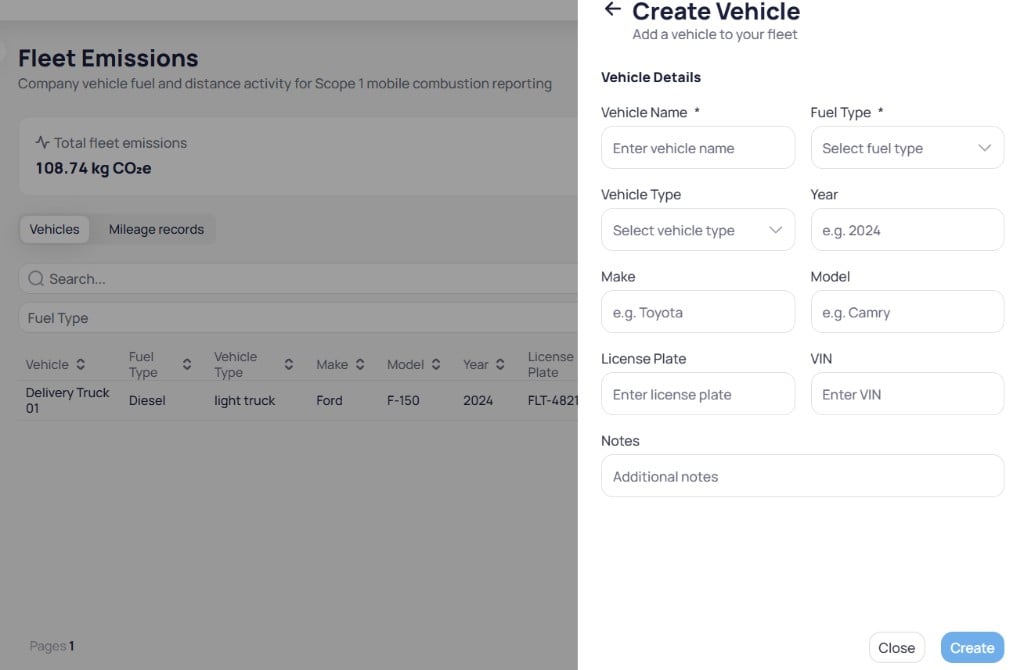 Fill in **Vehicle Name** and **Fuel Type**. Add **Vehicle Type**, **Year**, **Make**, **Model**, **License Plate**, and **VIN** when you have them.
Enter optional **Notes** for fleet managers or auditors.
Click `Create` to save the vehicle. Click `Close` to exit without saving.
To find vehicles on the tab, use **Search** by name or plate, and use the **Fuel Type** dropdown to limit the table to one fuel category. Use the **Edit** and **Delete** actions in the **Actions** column to update or remove a vehicle. After you create a vehicle, add mileage records on the **Mileage records** tab. See [Add a fleet mileage record](#add-a-fleet-mileage-record).
## Mileage records tab
Open the **Mileage records** tab to review logged trips and fuel use.
Fill in **Vehicle Name** and **Fuel Type**. Add **Vehicle Type**, **Year**, **Make**, **Model**, **License Plate**, and **VIN** when you have them.
Enter optional **Notes** for fleet managers or auditors.
Click `Create` to save the vehicle. Click `Close` to exit without saving.
To find vehicles on the tab, use **Search** by name or plate, and use the **Fuel Type** dropdown to limit the table to one fuel category. Use the **Edit** and **Delete** actions in the **Actions** column to update or remove a vehicle. After you create a vehicle, add mileage records on the **Mileage records** tab. See [Add a fleet mileage record](#add-a-fleet-mileage-record).
## Mileage records tab
Open the **Mileage records** tab to review logged trips and fuel use.
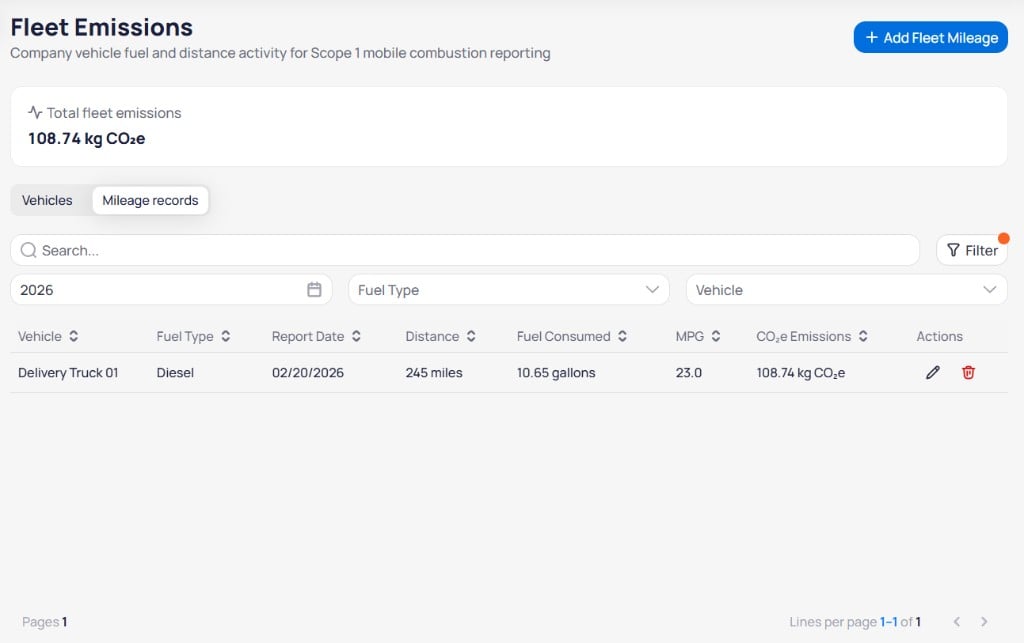 Use **Search** to find records by vehicle or date, and use the dropdown filters below the search bar to narrow the table.
| Filter | Purpose |
| ------------- | -------------------------------------------------------- |
| **Year** | Reporting year for mileage entries (for example, `2026`) |
| **Fuel Type** | Limit records to one fuel category |
| **Vehicle** | Show mileage for one fleet asset |
## Add a fleet mileage record
Click `+ Add Fleet Mileage` to open the **Add Fleet Mileage Record** panel on the right. The panel subtitle reads *Record mileage and fuel for Scope 1 fleet emissions.*
Use **Search** to find records by vehicle or date, and use the dropdown filters below the search bar to narrow the table.
| Filter | Purpose |
| ------------- | -------------------------------------------------------- |
| **Year** | Reporting year for mileage entries (for example, `2026`) |
| **Fuel Type** | Limit records to one fuel category |
| **Vehicle** | Show mileage for one fleet asset |
## Add a fleet mileage record
Click `+ Add Fleet Mileage` to open the **Add Fleet Mileage Record** panel on the right. The panel subtitle reads *Record mileage and fuel for Scope 1 fleet emissions.*
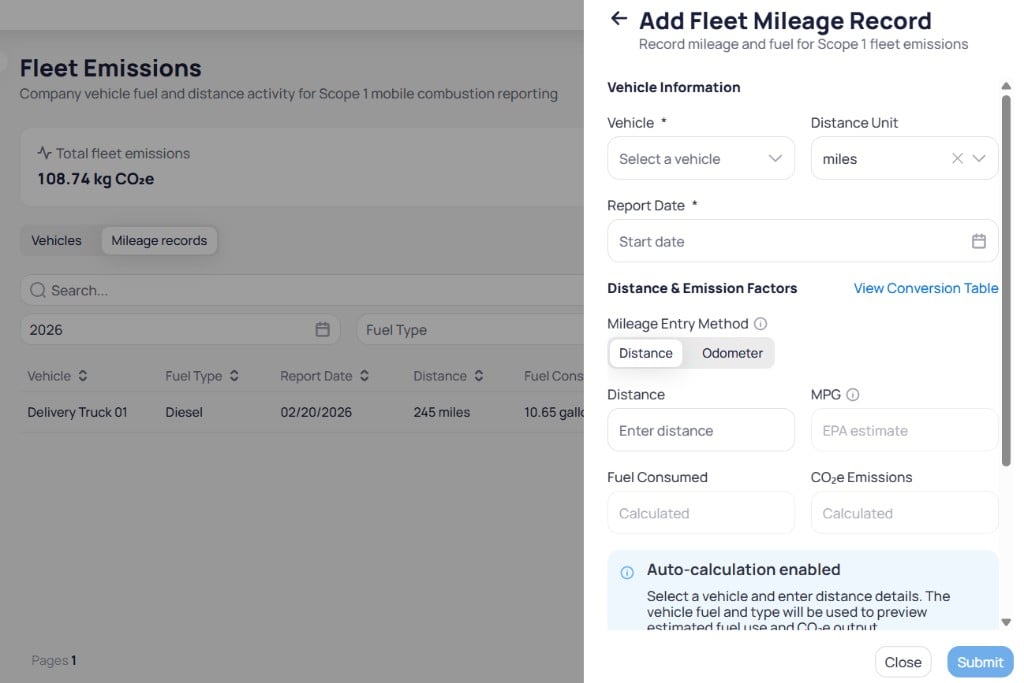 **Auto-calculation enabled.** Select a vehicle and enter distance details. EnerG uses the vehicle **Fuel Type** and **Vehicle Type** to preview estimated fuel use and CO₂e output before you submit.
Choose **Vehicle** and **Report Date**. Set **Distance Unit** when you report in a unit other than the default.
Select **Distance** or **Odometer** under **Mileage Entry Method**. Enter **Distance** and adjust **MPG** when you have a measured or EPA value. Click **View Conversion Table** for unit or factor references.
Confirm **Fuel Consumed** and **CO₂e Emissions** match your expectations before you submit.
Enter **Data Source**, **Document URL**, and **Notes** when you have audit evidence. Click `Submit` to save the record. Click `Close` to exit without saving.
After you submit, the record appears on the **Mileage records** tab and updates **Total fleet emissions** on the summary card. Vehicle **Annual Miles** and **Annual CO₂e (t)** on the **Vehicles** tab reflect aggregated mileage for the reporting period. For the mileage record field list, see [fleet fields](/products/energ/reference/emissions-reference#fleet-fields).
Keep **Fuel Type** and **Vehicle Type** accurate on each vehicle. Mobile combustion factors depend on both fields when EnerG calculates Scope 1 fleet emissions from mileage records.
## Next steps
Understand how fleet activity maps to Scope 1.
Look up the full vehicle and mileage fields.
Review Scope 1 rollups that include fleet emissions.
Compare building emissions alongside fleet totals.
Track refrigerant loss for Scope 1 fugitive reporting.
Export fleet and emissions data for compliance reporting.
**Auto-calculation enabled.** Select a vehicle and enter distance details. EnerG uses the vehicle **Fuel Type** and **Vehicle Type** to preview estimated fuel use and CO₂e output before you submit.
Choose **Vehicle** and **Report Date**. Set **Distance Unit** when you report in a unit other than the default.
Select **Distance** or **Odometer** under **Mileage Entry Method**. Enter **Distance** and adjust **MPG** when you have a measured or EPA value. Click **View Conversion Table** for unit or factor references.
Confirm **Fuel Consumed** and **CO₂e Emissions** match your expectations before you submit.
Enter **Data Source**, **Document URL**, and **Notes** when you have audit evidence. Click `Submit` to save the record. Click `Close` to exit without saving.
After you submit, the record appears on the **Mileage records** tab and updates **Total fleet emissions** on the summary card. Vehicle **Annual Miles** and **Annual CO₂e (t)** on the **Vehicles** tab reflect aggregated mileage for the reporting period. For the mileage record field list, see [fleet fields](/products/energ/reference/emissions-reference#fleet-fields).
Keep **Fuel Type** and **Vehicle Type** accurate on each vehicle. Mobile combustion factors depend on both fields when EnerG calculates Scope 1 fleet emissions from mileage records.
## Next steps
Understand how fleet activity maps to Scope 1.
Look up the full vehicle and mileage fields.
Review Scope 1 rollups that include fleet emissions.
Compare building emissions alongside fleet totals.
Track refrigerant loss for Scope 1 fugitive reporting.
Export fleet and emissions data for compliance reporting.