> ## Documentation Index
> Fetch the complete documentation index at: https://documentation.kodelabs.com/llms.txt
> Use this file to discover all available pages before exploring further.
# Volume contracts
> Create, allocate, and retire renewable energy contracts and RECs in EnerG
Create, allocate, and retire volume-based emission contracts in EnerG. Expand **Emissions** in the left sidebar and open **Contracts** to record renewable energy certificates (RECs), offsets, and other instruments that reduce or attribute emissions. Reach this page from the [portfolio view](/products/energ/get-started/navigation#portfolio-view) or the [building view](/products/energ/get-started/navigation#building-view) after you select a site. For how instruments affect emissions, see [RECs and offsets](/products/energ/concepts/emissions-accounting#recs-and-offsets).
## Navigate to Volume Contracts
Click `Emissions` > `Contracts` in the portfolio left sidebar.
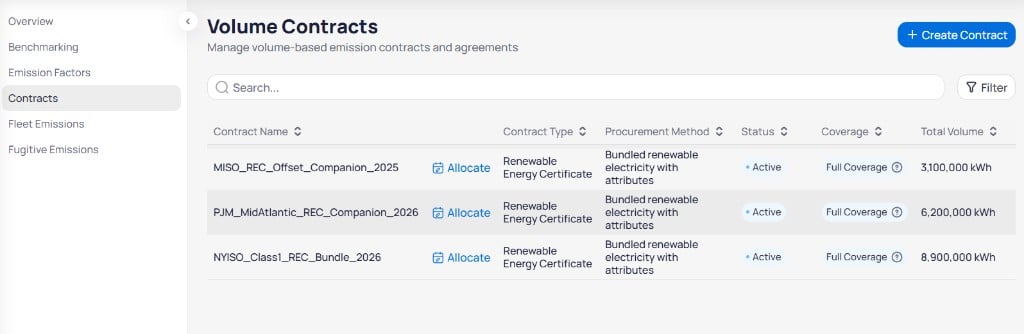 Click `+ Create Contract` in the top right to add a new agreement. Use **Search** to find contracts by name and click `Filter` to narrow the list by status, type, or reporting year. For the columns in the contracts table, see [volume contract fields](/products/energ/reference/emissions-reference#contract-fields).
## Allocate contract volume
Click **Allocate** on a contract row to distribute **Total Volume** across buildings or time periods. When **Allocated** equals **Total Volume** and **Remaining** is `0 kWh`, the contract is fully assigned.
## Retire a contract
Each contract row includes actions on the right side of the table, after **Document URL**.
| Action | Purpose |
| ---------- | --------------------------------------------------------------------------------------- |
| **Retire** | Retire environmental attributes so they count toward offsets and market-based reporting |
| **Delete** | Remove the contract from the library |
Click `+ Create Contract` in the top right to add a new agreement. Use **Search** to find contracts by name and click `Filter` to narrow the list by status, type, or reporting year. For the columns in the contracts table, see [volume contract fields](/products/energ/reference/emissions-reference#contract-fields).
## Allocate contract volume
Click **Allocate** on a contract row to distribute **Total Volume** across buildings or time periods. When **Allocated** equals **Total Volume** and **Remaining** is `0 kWh`, the contract is fully assigned.
## Retire a contract
Each contract row includes actions on the right side of the table, after **Document URL**.
| Action | Purpose |
| ---------- | --------------------------------------------------------------------------------------- |
| **Retire** | Retire environmental attributes so they count toward offsets and market-based reporting |
| **Delete** | Remove the contract from the library |
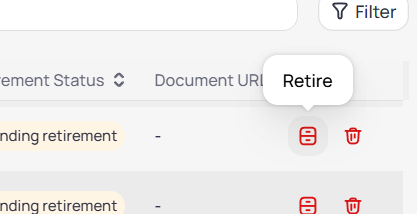 Contracts with **Pending retirement** in the **Retirement Status** column are not yet retired. Click **Retire** to complete retirement. After retirement, **Retirement Status** updates and REC volume appears in offset charts on [Emissions overview](/products/energ/analytics/portfolio-emissions-overview).
Confirm **Retirement Status** before you report market-based Scope 2 emissions. Retired REC volume rolls into offset and renewable charts on [Emissions overview](/products/energ/analytics/portfolio-emissions-overview).
## Create a contract
Click `+ Create Contract` to open the **Create Contract** panel on the right. The panel subtitle reads *Add a renewable energy instrument.*
Contracts with **Pending retirement** in the **Retirement Status** column are not yet retired. Click **Retire** to complete retirement. After retirement, **Retirement Status** updates and REC volume appears in offset charts on [Emissions overview](/products/energ/analytics/portfolio-emissions-overview).
Confirm **Retirement Status** before you report market-based Scope 2 emissions. Retired REC volume rolls into offset and renewable charts on [Emissions overview](/products/energ/analytics/portfolio-emissions-overview).
## Create a contract
Click `+ Create Contract` to open the **Create Contract** panel on the right. The panel subtitle reads *Add a renewable energy instrument.*
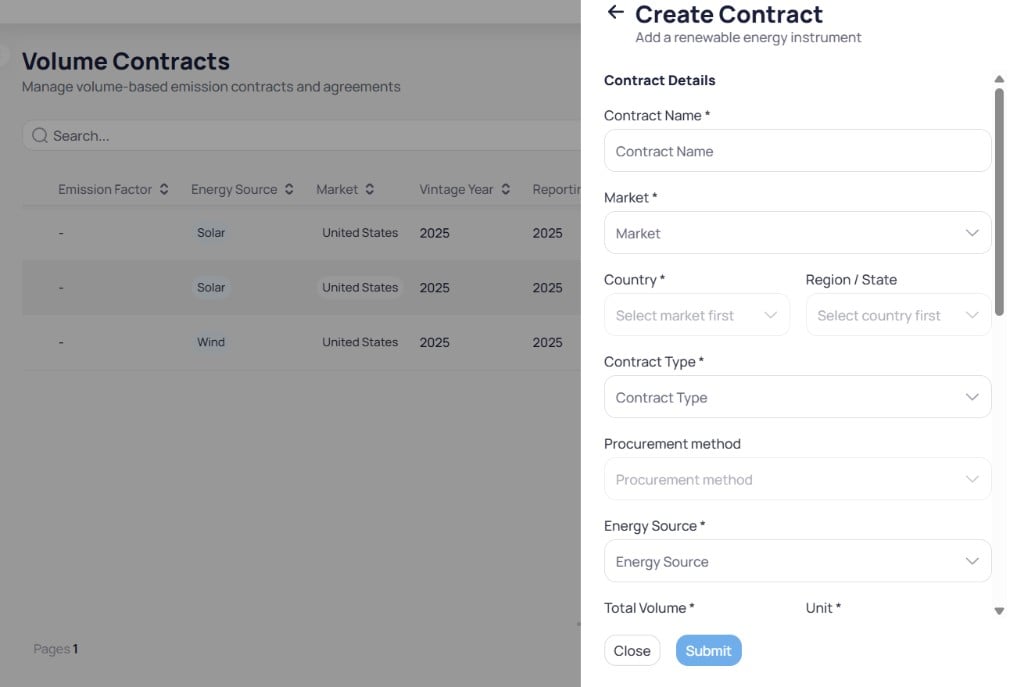 Fill in **Contract Name**, **Market**, **Country**, **Contract Type**, **Energy Source**, **Total Volume**, and **Unit**. Add **Region / State** and **Procurement method** when they apply. **Country** activates after you choose **Market**, and **Region / State** activates after you choose **Country**.
Enter **Vintage Year** and **Applicable Reporting Year**. Adjust **Emission Factor** and **Emission Factor Unit** when the contract includes a linked factor.
Set **Contract Start** and **Contract End** for the agreement window. Enter **Registry / Counterparty**, **Serial Numbers**, **Document URL**, and **Notes** when you have audit evidence.
Click `Submit` to save the contract. Click `Close` to exit without saving.
For the full list of contract fields, see [volume contract fields](/products/energ/reference/emissions-reference#contract-fields).
After you create the contract, click **Allocate** on the row to assign volume to buildings. Use **Retire** when **Retirement Status** is `Pending retirement` and you are ready to count attributes in offset reporting.
Fully allocate active REC contracts so **Remaining** reaches zero before period close. Unallocated volume does not attribute renewable energy to buildings in benchmarking or overview rollups.
## Next steps
Understand RECs, offsets, and market-based Scope 2.
Look up the full volume contract field list.
Review GHG charts and scope tables for one building.
Review offset breakdown and renewable contract rollups.
Manage factors used alongside contract attributes.
Compare building emissions after contracts are allocated.
Fill in **Contract Name**, **Market**, **Country**, **Contract Type**, **Energy Source**, **Total Volume**, and **Unit**. Add **Region / State** and **Procurement method** when they apply. **Country** activates after you choose **Market**, and **Region / State** activates after you choose **Country**.
Enter **Vintage Year** and **Applicable Reporting Year**. Adjust **Emission Factor** and **Emission Factor Unit** when the contract includes a linked factor.
Set **Contract Start** and **Contract End** for the agreement window. Enter **Registry / Counterparty**, **Serial Numbers**, **Document URL**, and **Notes** when you have audit evidence.
Click `Submit` to save the contract. Click `Close` to exit without saving.
For the full list of contract fields, see [volume contract fields](/products/energ/reference/emissions-reference#contract-fields).
After you create the contract, click **Allocate** on the row to assign volume to buildings. Use **Retire** when **Retirement Status** is `Pending retirement` and you are ready to count attributes in offset reporting.
Fully allocate active REC contracts so **Remaining** reaches zero before period close. Unallocated volume does not attribute renewable energy to buildings in benchmarking or overview rollups.
## Next steps
Understand RECs, offsets, and market-based Scope 2.
Look up the full volume contract field list.
Review GHG charts and scope tables for one building.
Review offset breakdown and renewable contract rollups.
Manage factors used alongside contract attributes.
Compare building emissions after contracts are allocated.