> ## Documentation Index
> Fetch the complete documentation index at: https://documentation.kodelabs.com/llms.txt
> Use this file to discover all available pages before exploring further.
# Portfolio certifications
> Manage and track building certifications, fees, and compliance across your portfolio in EnerG
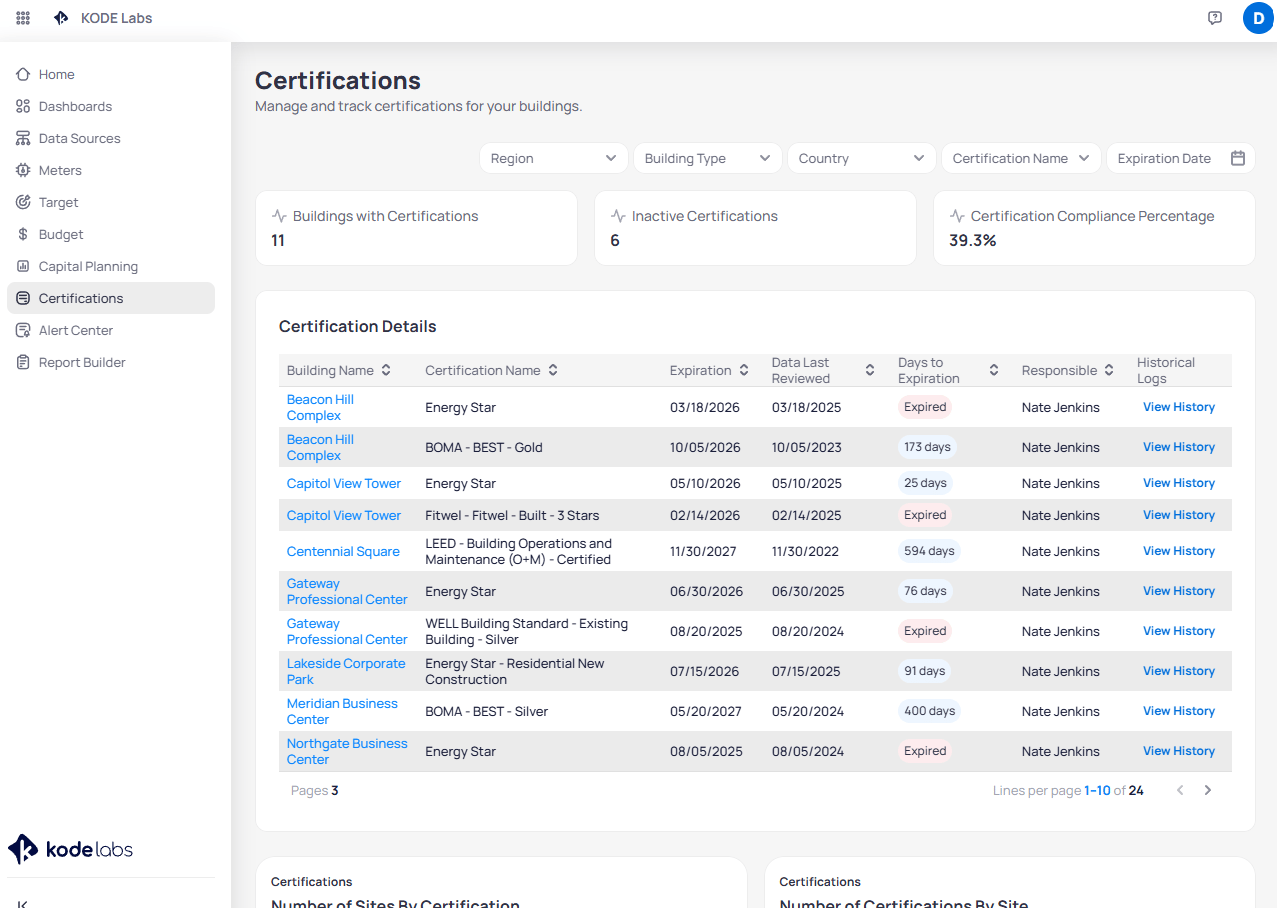
Monitor certification status, fees, and expiration across your portfolio in the [portfolio view](/products/energ/get-started/navigation#portfolio-view). Click `Certifications` in the left sidebar to open the dashboard. The page title reads **Certifications** with the subtitle *Manage and track certifications for your buildings.*
To add or edit a certification for one building, open the [building view](/products/energ/get-started/navigation#building-view) and use [Building certifications](/products/energ/sustainability/certifications).
EnerG tracks certification status, fees, expiration dates, and historical records. It does not submit or manage certification applications on your behalf.
## Navigate to portfolio certifications
Click `Certifications` in the portfolio left sidebar.
 ## Summary cards
Three cards summarize portfolio certification health.
| Card | What it shows |
| --------------------------------------- | --------------------------------------------------------------------- |
| **Buildings with Certifications** | Count of buildings that have at least one active certification record |
| **Inactive Certifications** | Certifications marked inactive or no longer in force |
| **Certification Compliance Percentage** | Share of certifications that meet your compliance rules |
## Filter the portfolio
Use the filter row above the summary cards to narrow the table and charts.
| Filter | Purpose |
| ---------------------- | --------------------------------------------------------------------- |
| **Region** | Limit results to a geographic region |
| **Building Type** | Filter by property type such as Office or Retail |
| **Country** | Filter by country |
| **Certification Name** | Show one program such as LEED, Energy Star, or WELL Building Standard |
| **Expiration Date** | Focus on certifications expiring in a date range |
## Certification Details table
The **Certification Details** table lists every certification record in the portfolio. Click a **Building Name** to open that site in the building view. Use the download control to export the filtered certification list to a spreadsheet.
## Summary cards
Three cards summarize portfolio certification health.
| Card | What it shows |
| --------------------------------------- | --------------------------------------------------------------------- |
| **Buildings with Certifications** | Count of buildings that have at least one active certification record |
| **Inactive Certifications** | Certifications marked inactive or no longer in force |
| **Certification Compliance Percentage** | Share of certifications that meet your compliance rules |
## Filter the portfolio
Use the filter row above the summary cards to narrow the table and charts.
| Filter | Purpose |
| ---------------------- | --------------------------------------------------------------------- |
| **Region** | Limit results to a geographic region |
| **Building Type** | Filter by property type such as Office or Retail |
| **Country** | Filter by country |
| **Certification Name** | Show one program such as LEED, Energy Star, or WELL Building Standard |
| **Expiration Date** | Focus on certifications expiring in a date range |
## Certification Details table
The **Certification Details** table lists every certification record in the portfolio. Click a **Building Name** to open that site in the building view. Use the download control to export the filtered certification list to a spreadsheet.
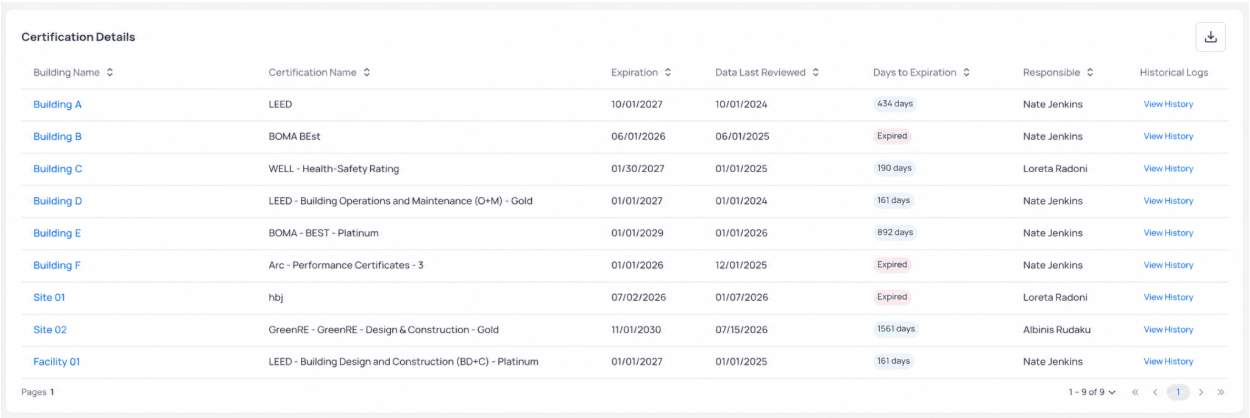 | Column | Description |
| ---------------------- | ------------------------------------------------------------------------------------------------------------ |
| **Building Name** | Site that holds the certification |
| **Certification Name** | Program and rating (for example, `LEED - Building Operations and Maintenance (O+M)` or `BOMA - BEST - Gold`) |
| **Score** | Program score when tracked (ENERGY STAR, LEED, and other scored programs) |
| **Expiration** | Renewal deadline |
| **Data Last Reviewed** | Date someone last verified the record in EnerG |
| **Days to Expiration** | Countdown to renewal, or an **Expired** badge when the date has passed |
| **Responsible** | Person assigned to track renewal |
| **Historical Logs** | Click **View History** to see prior entries and changes for that certification |
Sort or filter by **Days to Expiration** when you plan renewal work. Address **Expired** rows before you publish compliance or ESG reports.
## Overview charts
The **Overview** section includes charts that summarize certification coverage across the portfolio.
| Column | Description |
| ---------------------- | ------------------------------------------------------------------------------------------------------------ |
| **Building Name** | Site that holds the certification |
| **Certification Name** | Program and rating (for example, `LEED - Building Operations and Maintenance (O+M)` or `BOMA - BEST - Gold`) |
| **Score** | Program score when tracked (ENERGY STAR, LEED, and other scored programs) |
| **Expiration** | Renewal deadline |
| **Data Last Reviewed** | Date someone last verified the record in EnerG |
| **Days to Expiration** | Countdown to renewal, or an **Expired** badge when the date has passed |
| **Responsible** | Person assigned to track renewal |
| **Historical Logs** | Click **View History** to see prior entries and changes for that certification |
Sort or filter by **Days to Expiration** when you plan renewal work. Address **Expired** rows before you publish compliance or ESG reports.
## Overview charts
The **Overview** section includes charts that summarize certification coverage across the portfolio.
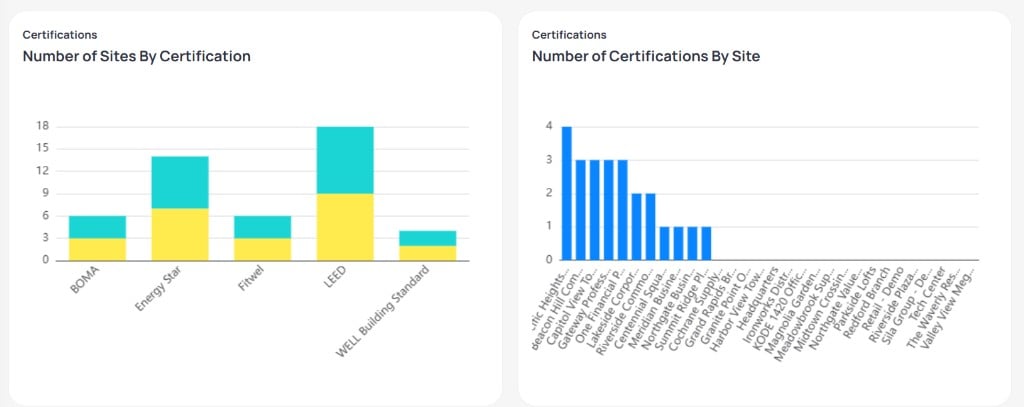 | Chart | What it shows |
| ------------------------------------ | ---------------------------------------------------------------------------------------------------------------------------------- |
| **Number of Sites By Certification** | How many buildings hold each certification program. Stacked segments distinguish certification status or tier within each program. |
| **Number of Certifications By Site** | How many certifications each building holds. Use this chart to spot sites with heavy certification portfolios. |
## Fee overview
The **Fee Overview** charts break down certification-related fees by building and by year.
| Chart | What it shows |
| ------------------------------------ | ---------------------------------------------------------------------------------------------------------------------------------- |
| **Number of Sites By Certification** | How many buildings hold each certification program. Stacked segments distinguish certification status or tier within each program. |
| **Number of Certifications By Site** | How many certifications each building holds. Use this chart to spot sites with heavy certification portfolios. |
## Fee overview
The **Fee Overview** charts break down certification-related fees by building and by year.
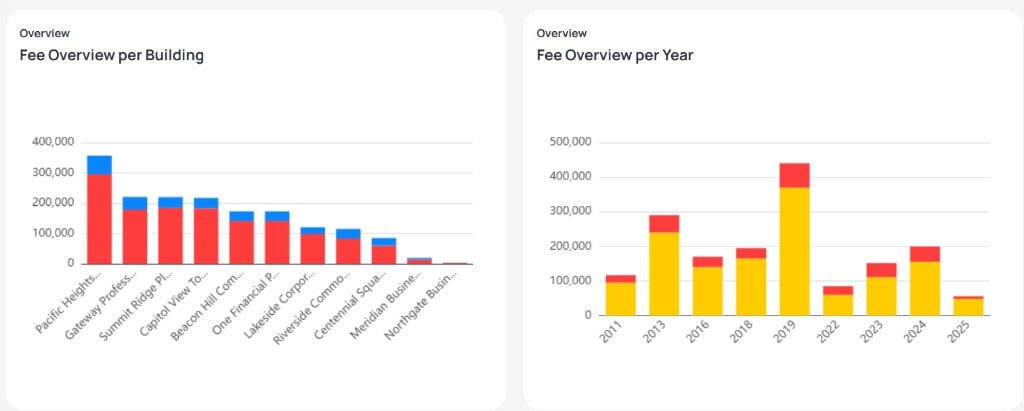 | Chart | What it shows |
| ----------------------------- | ------------------------------------------------------- |
| **Fee Overview per Building** | Total certification fees allocated to each building |
| **Fee Overview per Year** | How certification fees accumulate across calendar years |
Stacked colors represent fee categories configured in your workspace (for example, consulting versus certification fees).
## Cost analysis
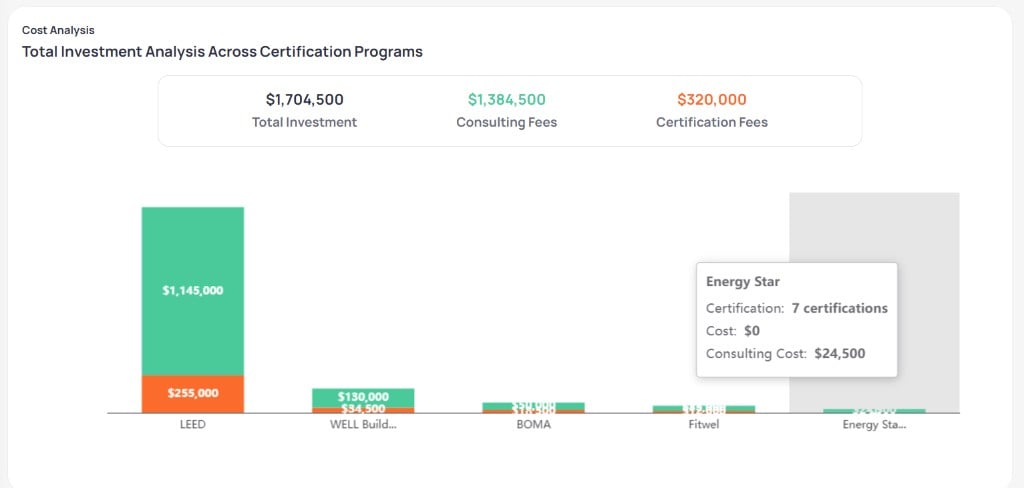
The **Cost Analysis** section shows total investment across certification programs.
| Chart | What it shows |
| ----------------------------- | ------------------------------------------------------- |
| **Fee Overview per Building** | Total certification fees allocated to each building |
| **Fee Overview per Year** | How certification fees accumulate across calendar years |
Stacked colors represent fee categories configured in your workspace (for example, consulting versus certification fees).
## Cost analysis
The **Cost Analysis** section shows total investment across certification programs.
 ### Summary metrics
| Metric | Description |
| ---------------------- | ---------------------------------------------------------- |
| **Total Investment** | Combined consulting and certification fees across programs |
| **Consulting Fees** | Professional services tied to certification work |
| **Certification Fees** | Direct program or body fees |
### Fees by program
The stacked bar chart lists each certification program on the horizontal axis. **Consulting Fees** and **Certification Fees** stack within each bar so you can compare total cost by program (for example, LEED versus WELL Building Standard versus Energy Star).
Hover a bar to see program name, certification count, and fee breakdown when your deployment supports tooltips.
Certification data supports environmental, social, and governance reporting when finance and sustainability teams share the same system of record.
## Next steps
Add or update certification records for one building.
Align reduction targets with certified performance goals.
Select a building to manage site-level certifications.
Connect capital programs to certification narratives.
### Summary metrics
| Metric | Description |
| ---------------------- | ---------------------------------------------------------- |
| **Total Investment** | Combined consulting and certification fees across programs |
| **Consulting Fees** | Professional services tied to certification work |
| **Certification Fees** | Direct program or body fees |
### Fees by program
The stacked bar chart lists each certification program on the horizontal axis. **Consulting Fees** and **Certification Fees** stack within each bar so you can compare total cost by program (for example, LEED versus WELL Building Standard versus Energy Star).
Hover a bar to see program name, certification count, and fee breakdown when your deployment supports tooltips.
Certification data supports environmental, social, and governance reporting when finance and sustainability teams share the same system of record.
## Next steps
Add or update certification records for one building.
Align reduction targets with certified performance goals.
Select a building to manage site-level certifications.
Connect capital programs to certification narratives.