> ## Documentation Index
> Fetch the complete documentation index at: https://documentation.kodelabs.com/llms.txt
> Use this file to discover all available pages before exploring further.
# Templating vs deployment
> Choose Building BI templating for independent starting points, or deployment when copies must stay synchronized across sites.
Both copy a dashboard from one place to another, but they answer different needs. **Templating** gives you a starting point you expect to modify. **Deployment** gives you parity; the copies stay governed and in sync.
Choose by asking whether the sites should stay identical after the copy is made.
## Independent copy vs live sync
The deciding question is the relationship *after* the copy is made:
* **Templating** produces an independent copy. You template a chart, page, dashboard, or whole collection, then use that template wherever you need a head start. Edit freely — there is no ongoing link to the original. See [Template types](/products/building-bi/reference/template-types).
* **Deployment** produces a governed copy. The Deployment Manager pushes one dashboard to many buildings and keeps them synced: publish a new version at the source and every predefined copy updates. See [Deployment manager](/products/building-bi/deployment-manager).
A template is a photocopy you are free to mark up. A deployment is a live mirror that keeps reflecting the source.
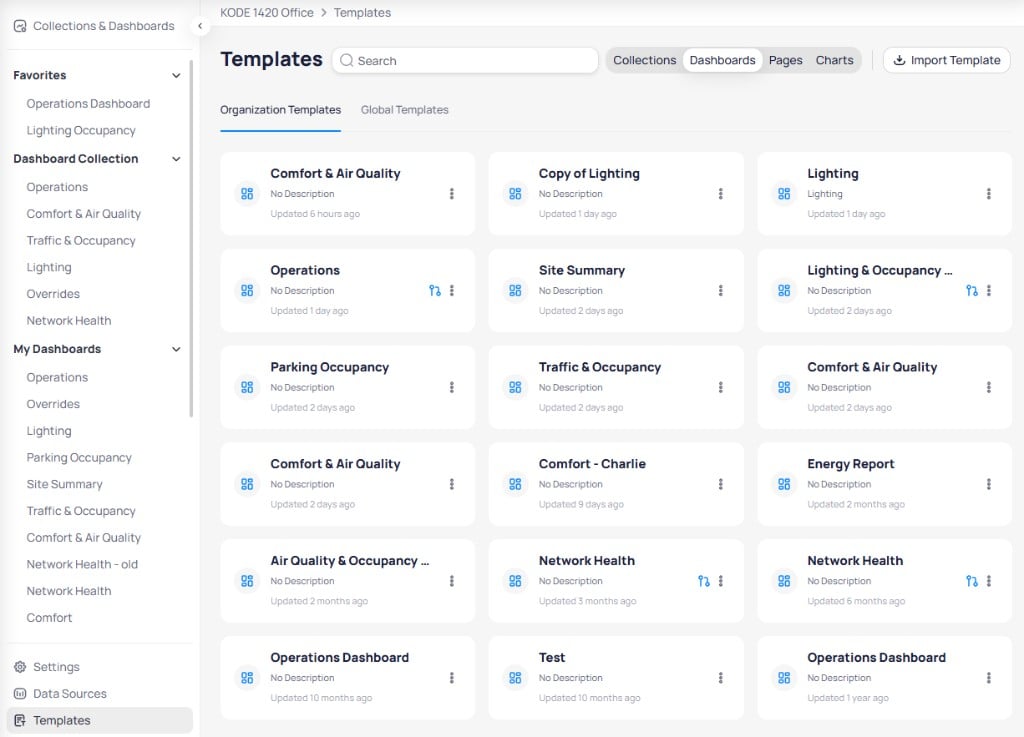
Organization templates live in the Templates gallery as independent starters you apply and then edit.
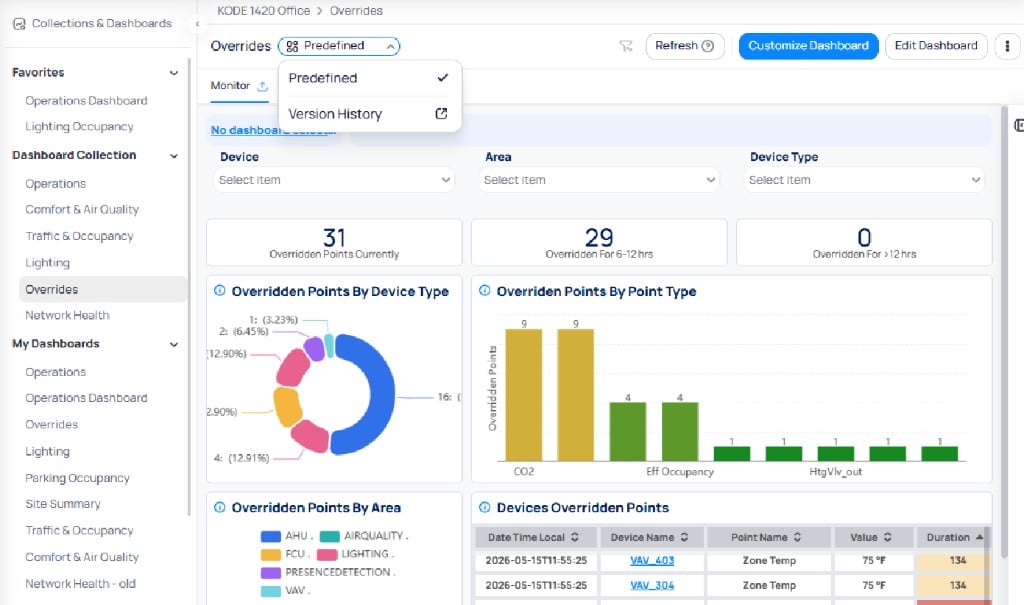
 A deployed dashboard shows a `Predefined` chip while it stays synced to the source. Customize it and that site leaves the sync track.
 ## Template or deploy
| Choose templating when… | Choose deployment when… |
| -------------------------------------------- | --------------------------------------------------------- |
| Copies should diverge and be edited freely | Sites must stay identical |
| You need a starting point, not ongoing sync | Central publish should update every linked site |
| You are sharing layouts across organizations | You are standardizing one dashboard across many buildings |
These are not mutually exclusive. A common pattern is to template a variant for sites that genuinely differ, and deploy the standard version everywhere else — escaping parity deliberately rather than accumulating ad-hoc custom views.
| | Templating | Deployment |
| ---------------------- | ------------------------------------------- | ------------------------------------------- |
| Relationship to source | Independent copy | Synced (predefined) until customized |
| Best for | Starting point; heavy local change expected | Identical dashboards across many sites |
| Maintenance | Each copy maintained separately | Maintained centrally; propagates on publish |
| Risk | Drift — copies diverge over time | Rigidity; a bad publish hits everyone |
Templates can also be exported and imported across organizations (24-hour secure URL) and exist at organization or global scope. They can carry Building Data Hub pipeline dependencies so the data plumbing recreates with the layout. See [Template types](/products/building-bi/reference/template-types).
* Templating is independent, so no copy benefits from later improvements to the original.
* Deployment maintains parity, so a flaw published once reaches every linked site. Test before deploying.
* Do not use templating to solve a visibility problem. Making a dashboard visible to roles is what collections are for.
## Next steps
Create and apply templates.
Deploy dashboards and keep sites in sync.
## Template or deploy
| Choose templating when… | Choose deployment when… |
| -------------------------------------------- | --------------------------------------------------------- |
| Copies should diverge and be edited freely | Sites must stay identical |
| You need a starting point, not ongoing sync | Central publish should update every linked site |
| You are sharing layouts across organizations | You are standardizing one dashboard across many buildings |
These are not mutually exclusive. A common pattern is to template a variant for sites that genuinely differ, and deploy the standard version everywhere else — escaping parity deliberately rather than accumulating ad-hoc custom views.
| | Templating | Deployment |
| ---------------------- | ------------------------------------------- | ------------------------------------------- |
| Relationship to source | Independent copy | Synced (predefined) until customized |
| Best for | Starting point; heavy local change expected | Identical dashboards across many sites |
| Maintenance | Each copy maintained separately | Maintained centrally; propagates on publish |
| Risk | Drift — copies diverge over time | Rigidity; a bad publish hits everyone |
Templates can also be exported and imported across organizations (24-hour secure URL) and exist at organization or global scope. They can carry Building Data Hub pipeline dependencies so the data plumbing recreates with the layout. See [Template types](/products/building-bi/reference/template-types).
* Templating is independent, so no copy benefits from later improvements to the original.
* Deployment maintains parity, so a flaw published once reaches every linked site. Test before deploying.
* Do not use templating to solve a visibility problem. Making a dashboard visible to roles is what collections are for.
## Next steps
Create and apply templates.
Deploy dashboards and keep sites in sync.