> ## Documentation Index
> Fetch the complete documentation index at: https://documentation.kodelabs.com/llms.txt
> Use this file to discover all available pages before exploring further.
# Status transitions settings
> Configure which roles can perform work order status transitions in AssetOps
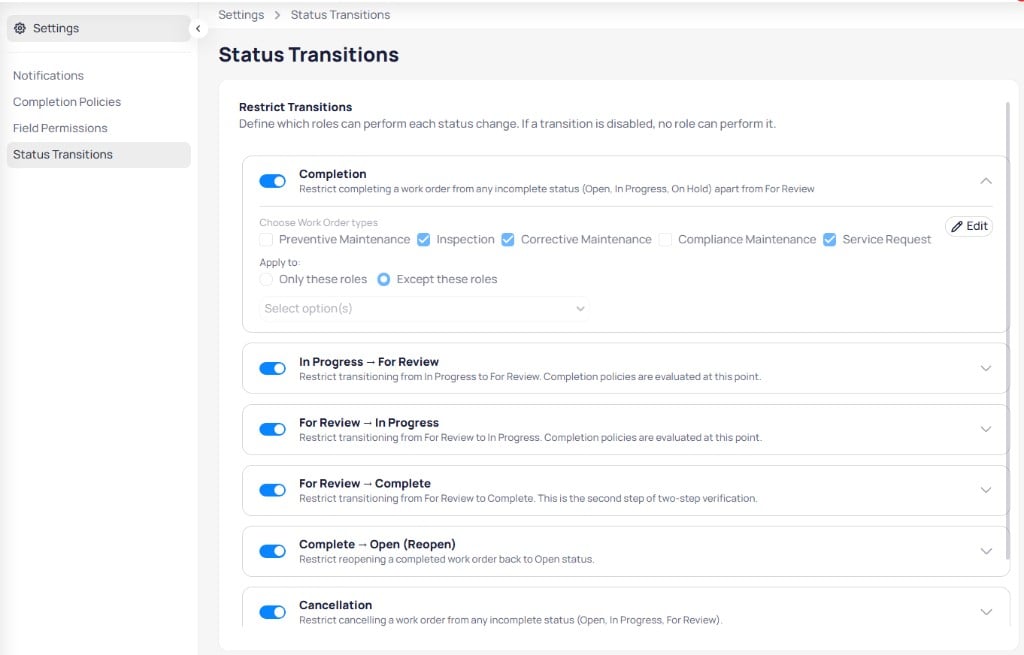
**Status transitions** define which roles can move work orders between statuses. Configure rules under **Settings** at the portfolio level. When a transition is disabled, no role can perform that change.
 ## Restrict transitions
Each rule includes a toggle, description, and expandable configuration. Select **Edit** to choose work order types and roles.
### Transition rules
| Rule | Description |
| ---------------------------- | ----------------------------------------------------------------------------------------------------------------- |
| **Completion** | Restrict completing a work order from incomplete statuses (open, in progress, on hold) except from **For review** |
| **In progress → For review** | Restrict moving from **In progress** to **For review**; completion policies are evaluated at this step |
| **For review → In progress** | Restrict sending a work order back from **For review** to **In progress** |
| **For review → Complete** | Restrict **For review** to **Complete**; second step of two-step verification |
| **Complete → Open (reopen)** | Restrict reopening a completed work order to **Open** |
| **Cancellation** | Restrict cancelling from incomplete statuses (open, in progress, for review) |
### Configure a rule
When you expand a rule:
1. Enable the toggle to activate the restriction.
2. Under **Choose work order types**, select programs such as inspection, corrective maintenance, or service request.
3. Under **Apply to**, choose **Only these roles** or **Except these roles**.
4. Select roles in the dropdown.
5. Select **Edit** to save.
Completion policies run when work orders move to **For review** or **Complete**. Align [completion policies](/products/assetops/quickstart/settings-completion-policies) with status transition rules.
## Restrict transitions
Each rule includes a toggle, description, and expandable configuration. Select **Edit** to choose work order types and roles.
### Transition rules
| Rule | Description |
| ---------------------------- | ----------------------------------------------------------------------------------------------------------------- |
| **Completion** | Restrict completing a work order from incomplete statuses (open, in progress, on hold) except from **For review** |
| **In progress → For review** | Restrict moving from **In progress** to **For review**; completion policies are evaluated at this step |
| **For review → In progress** | Restrict sending a work order back from **For review** to **In progress** |
| **For review → Complete** | Restrict **For review** to **Complete**; second step of two-step verification |
| **Complete → Open (reopen)** | Restrict reopening a completed work order to **Open** |
| **Cancellation** | Restrict cancelling from incomplete statuses (open, in progress, for review) |
### Configure a rule
When you expand a rule:
1. Enable the toggle to activate the restriction.
2. Under **Choose work order types**, select programs such as inspection, corrective maintenance, or service request.
3. Under **Apply to**, choose **Only these roles** or **Except these roles**.
4. Select roles in the dropdown.
5. Select **Edit** to save.
Completion policies run when work orders move to **For review** or **Complete**. Align [completion policies](/products/assetops/quickstart/settings-completion-policies) with status transition rules.