> ## Documentation Index
> Fetch the complete documentation index at: https://documentation.kodelabs.com/llms.txt
> Use this file to discover all available pages before exploring further.
# Field permissions settings
> Configure field permissions by work order type, status, and time in AssetOps
**Field permissions** control which work order fields users can edit under specific conditions. Configure restrictions under **Settings** at the portfolio level using three tabs: **Restrict by type**, **Restrict by status**, and **Restrict by time**.
## Restrict by type
Restrict specific fields to read-only for selected work order types and roles.
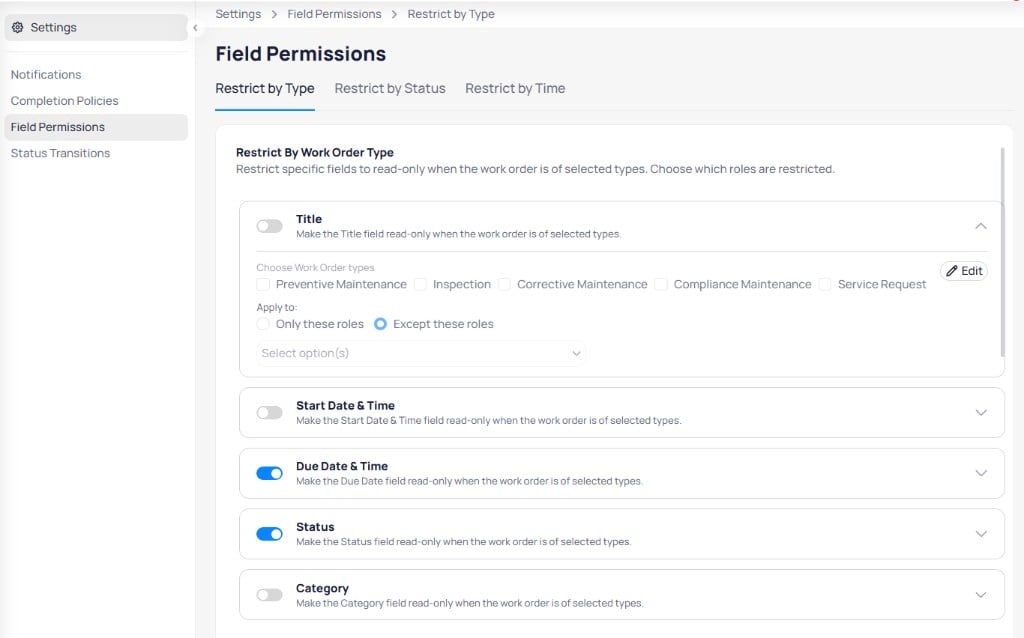 For each field, such as **Title**, **Start date & time**, **Due date & time**, **Status**, or **Category**:
1. Enable the toggle to activate the restriction.
2. Expand the rule and select **Choose work order types**.
3. Choose **Only these roles** or **Except these roles**, then select roles in the dropdown.
4. Select **Edit** to save.
## Restrict by status
Lock fields when a work order reaches specific statuses.
For each field, such as **Title**, **Start date & time**, **Due date & time**, **Status**, or **Category**:
1. Enable the toggle to activate the restriction.
2. Expand the rule and select **Choose work order types**.
3. Choose **Only these roles** or **Except these roles**, then select roles in the dropdown.
4. Select **Edit** to save.
## Restrict by status
Lock fields when a work order reaches specific statuses.
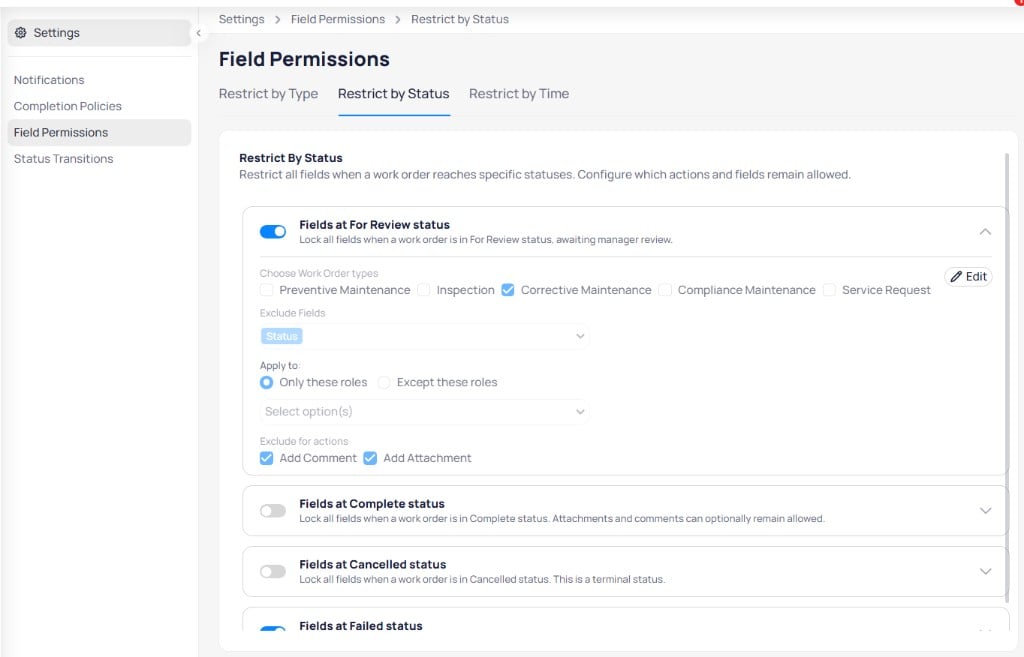 Status-based rules include:
| Rule | Description |
| ------------------------ | --------------------------------------------------------------------------- |
| **Fields at For review** | Lock fields while the work order awaits manager review |
| **Fields at Complete** | Lock fields in complete status; attachments and comments can remain allowed |
| **Fields at Cancelled** | Lock fields in cancelled status (terminal) |
| **Fields at Failed** | Lock fields in failed status |
Expanded configuration options:
* **Choose work order types** — Scope the rule by program
* **Exclude fields** — Keep specific fields editable (for example, **Status**)
* **Apply to** — **Only these roles** or **Except these roles**
* **Exclude for actions** — Allow **Add comment** or **Add attachment** while fields are locked
## Restrict by time
Lock the entire work order record when a date condition is met.
Status-based rules include:
| Rule | Description |
| ------------------------ | --------------------------------------------------------------------------- |
| **Fields at For review** | Lock fields while the work order awaits manager review |
| **Fields at Complete** | Lock fields in complete status; attachments and comments can remain allowed |
| **Fields at Cancelled** | Lock fields in cancelled status (terminal) |
| **Fields at Failed** | Lock fields in failed status |
Expanded configuration options:
* **Choose work order types** — Scope the rule by program
* **Exclude fields** — Keep specific fields editable (for example, **Status**)
* **Apply to** — **Only these roles** or **Except these roles**
* **Exclude for actions** — Allow **Add comment** or **Add attachment** while fields are locked
## Restrict by time
Lock the entire work order record when a date condition is met.
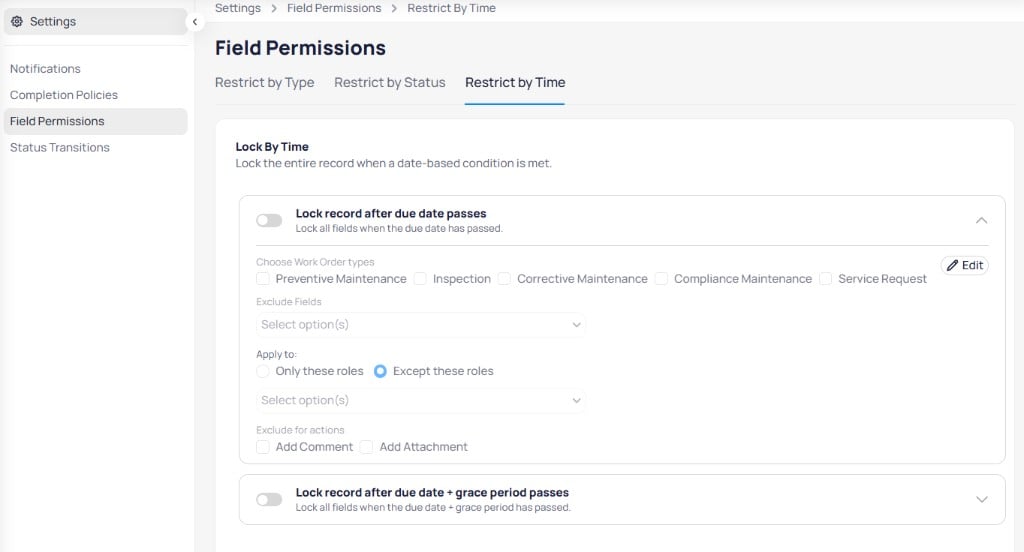 Time-based rules include:
| Rule | Description |
| ---------------------------------------------------- | ---------------------------------------------------- |
| **Lock record after due date passes** | Lock all fields when the due date has passed |
| **Lock record after due date + grace period passes** | Lock all fields after the due date plus grace period |
Each rule supports **Choose work order types**, **Exclude fields**, role scope, and **Exclude for actions** options similar to status-based rules.
Time-based rules include:
| Rule | Description |
| ---------------------------------------------------- | ---------------------------------------------------- |
| **Lock record after due date passes** | Lock all fields when the due date has passed |
| **Lock record after due date + grace period passes** | Lock all fields after the due date plus grace period |
Each rule supports **Choose work order types**, **Exclude fields**, role scope, and **Exclude for actions** options similar to status-based rules.