> ## Documentation Index
> Fetch the complete documentation index at: https://documentation.kodelabs.com/llms.txt
> Use this file to discover all available pages before exploring further.
# Completion policies settings
> Configure portfolio completion policies for work orders in AssetOps
**Completion policies** define requirements that must be met before a work order can move to **For review** or **Complete**. Configure them under **Settings** at the portfolio level so rules apply consistently across buildings.
 ## Require actions
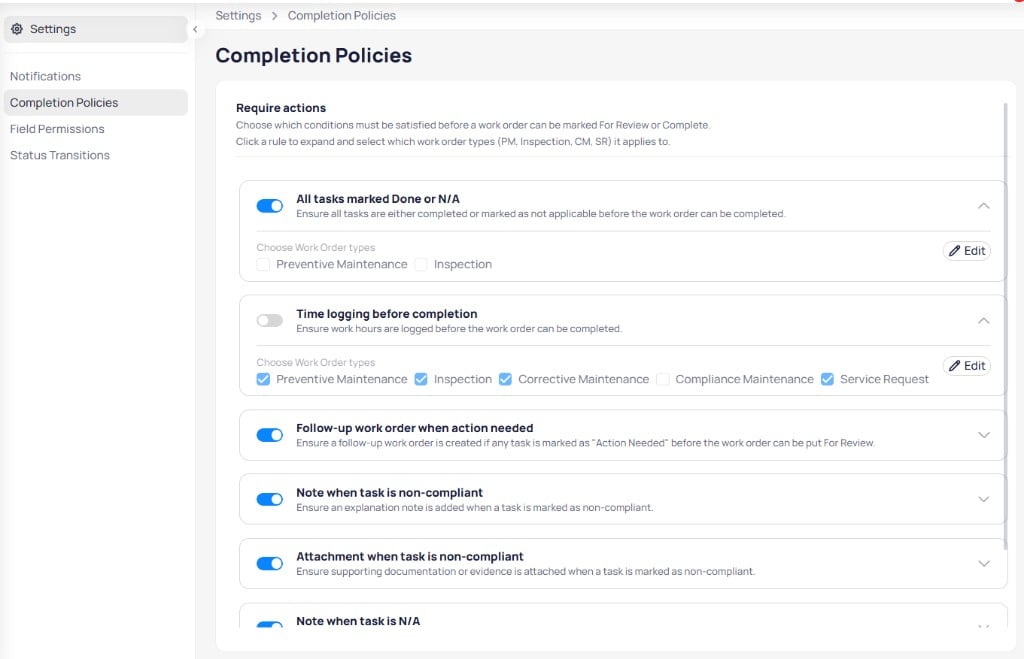
The **Require actions** section lists conditions you can enable for closing work orders. Select a rule to expand it, choose which work order types it applies to, and select **Edit** to save changes.
### Available policies
Ensure all tasks are completed or marked not applicable before the work order can complete. Apply to preventive maintenance and inspection work orders.
Require logged work hours before completion. Can apply to preventive maintenance, inspection, corrective maintenance, and service request types.
Require a follow-up work order when any task is marked **Action needed** before the work order moves to **For review**.
Require an explanation note when a task is marked non-compliant.
Require supporting documentation when a task is marked non-compliant.
Require an explanation note when a task is marked not applicable.
## Choose work order types
Each policy includes **Choose work order types** checkboxes:
* **Preventive maintenance**
* **Inspection**
* **Corrective maintenance**
* **Compliance maintenance**
* **Service request**
Enable only the types that should follow the rule.
## Building-level overrides
Sites can override portfolio policies on the building [completion policies](/products/assetops/quickstart/completion-policies) page when local rules differ. For a consolidated view of every policy and its scope, see [Completion policy options](/products/assetops/reference/completion-policy-options).
## Require actions
The **Require actions** section lists conditions you can enable for closing work orders. Select a rule to expand it, choose which work order types it applies to, and select **Edit** to save changes.
### Available policies
Ensure all tasks are completed or marked not applicable before the work order can complete. Apply to preventive maintenance and inspection work orders.
Require logged work hours before completion. Can apply to preventive maintenance, inspection, corrective maintenance, and service request types.
Require a follow-up work order when any task is marked **Action needed** before the work order moves to **For review**.
Require an explanation note when a task is marked non-compliant.
Require supporting documentation when a task is marked non-compliant.
Require an explanation note when a task is marked not applicable.
## Choose work order types
Each policy includes **Choose work order types** checkboxes:
* **Preventive maintenance**
* **Inspection**
* **Corrective maintenance**
* **Compliance maintenance**
* **Service request**
Enable only the types that should follow the rule.
## Building-level overrides
Sites can override portfolio policies on the building [completion policies](/products/assetops/quickstart/completion-policies) page when local rules differ. For a consolidated view of every policy and its scope, see [Completion policy options](/products/assetops/reference/completion-policy-options).